The docs say to use my own Google Drive Client ID, but I am unable to publish my app:
Valid app name, support email, homepage url, and privacy policy url are required for switching the app to external production mode. You must enter the missing information to proceed. Please visit the Branding page to finish configuring your app.
This is a problem because without this, I have read my access token expires every 7 hours, refresh is not allowed.
This means my headless backup orchestrater server cant do backups on a cron schedule nightly.
Run the command 'rclone version' and share the full output of the command.
rclone v1.75.0
os/version: ubuntu 26.04 (64 bit)
os/kernel: 7.0.0-30-generic (x86_64)
os/type: linux
os/arch: amd64
go/version: go1.26.5
go/linking: static
go/tags: none
Which cloud storage system are you using? (eg Google Drive)
Google Drive
The command you were trying to run (eg rclone copy /tmp remote:tmp)
sync command for Google Drive to Backblaze B2
Paste command here
Please run 'rclone config redacted' and share the full output. If you get command not found, please make sure to update rclone.
I dont think I need this for this issue since thisis not a config issuer per say
Paste config here
A log from the command that you were trying to run with the -vv flag
This is not really a command issues, its an issue with Google Drive Client ID
Looks like most people are SOL. They make you use a domain you own, they make you upload a video of your app and stuff. I have a domain ill try going through it but this is hilariously shitty to do to people that want to do backups of their personal data.
yeah googles oauth branding wall is rough for personal backup setups. in my experience you dont actually need production/publish for rclone cron if you keep the consent screen on External + Testing and add your own google account as a test user. tokens last longer that way and refresh works for the test users without the full verification circus.
production publish is the path if you want unrelated accounts, but for one headless box backing up your own drive the testing mode + test user has been enough for me. the docs kinda undersell how annoying the publish checklist got.
I have been testing this week and a gist in github still provides support for the branding as per today, allowing publishing - that is ok up to 100 users, not requiring validation. Tokens for drive accounts will be valid for six months.
Testing ... you will discover that tokens expire in 7 days... no way to use that unless you are using it very frequently...
And yes, conditions might change any moment and github trick might be stopping working...
Documentation got a slight change to reflect the need to complete the branding element, but continues to be terse, unless you already now what needs to be done.
I am working in producing an alternative guidance for getting the clientID AOuth, target is it be almost usable by uncles and aunties and grannies and gramps. Will use gists at github for the working drafts so you can have a peek to them.
Besides, I have a working semi-manual implementation of a cmd script for windows that will be also sharing.
I am currently working on an automation script based on the Google Drive instructions on the rclone website.
Its using a scripting launguage for an automation program called autohotkey.
My first test was successful. I have a brand new client ID and Secret in an account where I had none before.
First you log into the account you want to use to create your client ID.
Then when you run the script it goes to the website that it needs to and fills in all of the information giving you an opportunity to change that information page by Page.
For example it gives you an opportunity to use your own name for a project otherwise it fills in a random name. Then you press f8 to go to the next step.
Each step in the process goes from page to page via pressing f8 after you confirm that all the information on the current page is correct.
Each time it fills in a page it pops up a box that shows what it did and ask you to press okay and then go on and press f8.
When script gets to the end you are at the page where you can copy your client ID and secret and download the JSON file.
Unfortunately this is a solution that only works on Windows.
I'm also writing a python script that should work on any platform that will do essentially the same thing.
I'm going to run this through a few more tests make sure that it's solid and I already have one volunteer from The Forum that will give it a try and see if it's okay for someone to follow and complete other than myself.
The script is a Simple Text file and the program comes from an official website and is free to use.
This makes the documentation "improvement" almost unnecessary and certainly outdates my semi-manual trials... Nevertheless I still believe the documentation refactoring be a need for future reference and changes.
Hi, how do I download your script?
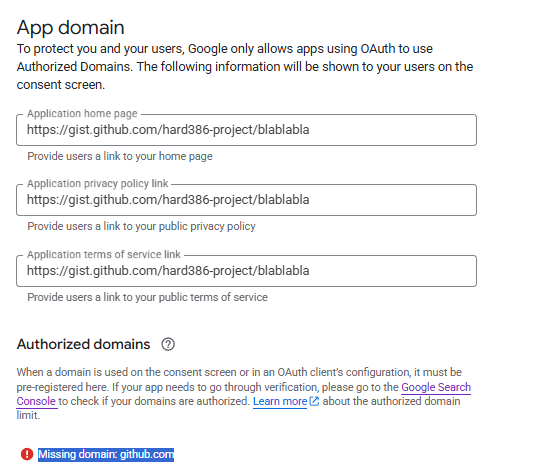
I can't approve the branding page; I don't have my own website. If I enter a GitHub link, the "Save" button stays greyed out and a red message appears: "Missing domain: github.com".
I have no clue what you're doing with GitHub. My script does not involve GitHub only Google console.
The application that you are registering is a desktop app called rclone.
I don't have a website either and it doesn't ask for one.
As far as my script goes I need another couple of days of testing to make sure that it works and then I can let you try it. I'll make it available via download link. You should have a copy of the rclone google drive instruction to follow along with.
I followed the instructions, but I can't get the "Publishing status" to "In production" because it says I need to fill out the Branding page; when I enter the homepage and privacy policy URLs using the github domain, it displays an error in red: "Missing domain: github.com".
Your instructions say, "You may inspire yourself on this example: https://gist.github.com/rclonelittlehelper-vondin-2609/a024a60a65814575231d4c2c7eaca4e2," but as you can see, it won't accept GitHub links.
If you can wait a couple of days I'll give you a link to download the script so you can try it out.
You run the script and then fill in the first page press f8 fill in the second page press f8 fill in the third page press f8 until you get your client ID and secret on the screen. A little box pops up also that you need to click on and close every time you press f8 to go to the next page.
In my case, no branding, no publishing. Might be it depends on the country ...
If you have created your github page, share here the URL so I can check it.
Might be they closed the workaround. On the other hand, the guide is still in work in progress status ... and I am updating it frequently and some steps missing.
Here is what I have done recently.
I publish the project but I don't validate.
When you create a remote the Authentication process will say that it hasn't been validated yet don't go any further but you can say I want to continue anyway.
Then you will get a success message and your remote will be configured.
I'm having an interesting time creating a script to automate the whole process. Every time I think I'm done I find something that's missing.
 but if you have a suggestion for the docs I can put them in.