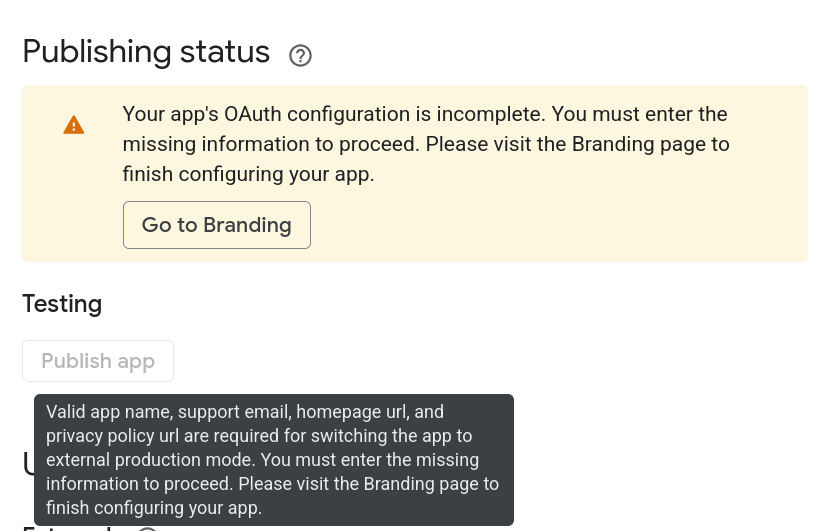
All starred fields in the Branding page are filled as a result of following the guide (App name, User support email, and Developer contact information). However, the tooltip which appears over the "Publish app" button shown above suggests that now "homepage URL" and "privacy policy URL" might also be mandatory. Very recent discussions on Google Developer forums seem to suggest the same: link.
I understand that changes in Google products are not rclone's responsibility (outside from the rclone guide for GDrive being potentially outdated because of said changes), but perhaps someone had recent experience with setting it up and knows how to handle it? Is now keeping it in "Testing" and refreshing every week the only option? I don't happen to have a domain that I own, and that requirement would be absurd for personal use of rclone.
I confirm behavior. Same here. I was able to register previously a ClientID but publishing, starting two (one?) days ago, following guidance, is not a possibility any more, at least for a just a recently created google account - might be that is relevant as could be just a cool off period.
If that change sticks, and it is not a cool off of period, it looks as a killer event for rclone for G. Drive use; AFAIK, as tokes for non-published ClientID tokens have a 7day validity, meaning that in order to avoid re-registration that ClientID has to be used in those 7days ...
its not a cool off period, google just made app homepage + privacy policy url required to publish, even for a personal one user app. thats why the button is greyed out until branding is filled in.
testing mode still works but the refresh token dies after 7 days so you end up reauthing constantly, annoying as hell.
cheapest way around it if you dont wanna buy a domain is a github pages page with a dummy privacy policy and point homepage + privacy policy at it. thats enough for google to let you publish. otherwise stay in testing and eat the weekly reauth.
Have some questions/doubts. Would you/anyone know/believe/estimate if ...
how/if Google does further checks to just checking that a policy URL works?
that privacy disclosure solution would be working for some time?
Google will react introducing stronger requirements for publishing?
it would work if rclone.org would have a privacy policy page so that those ClientIDs would share it? Whaever is the case, the client is unmodified rclone 100%, so privacy policy would match real. Note, I am NOT meaning the website privacy policy Privacy Policy
a policy posted in a permanent pastebin such here https://nullpaste.org/ would suffice and be ok?
@ncw Perhaps could you check with google in your open ticket about the approach for a common rclone client policy page?
tried this, there was no way i could pass the "prove homepage verification" step, so went ahead with creating a github page site at myusername.github.io and added a "rcloneeet" page, added a privacy policy href to this page, all verification steps passed except the homepage verification, the linked article suggested multiple ways to verify homepage through google search console, i verified using the html file method, the state was soon updated on the search console property
tried verification again on the branding page but got the same error, someone mentioned in a google discussion thread that branding section only accepts verification if they are done using domain txt records but that obviously isn't an option when using github pages
Just followed the latest iteration of instructions and I was able to successfully create a client ID and secret and load into a new remote and it works so thanks.
For the test that I just ran I did not use GitHub I simply created a Google Drive client ID and Secret.
I am in the process of writing a script that helps create the client ID and Secret by selecting each required page to be filled in and then goes to the next page until you receive your client ID and Secret.
What specifically are you trying to do with GitHub that I can attempt to duplicate? I have never mixed rclone and github before.
My experience is that I cannot publish the app if not branded, i.e., having url for home page, privacy policy and terms of service, so I tried the workaround presented at the top of this thread, building the home, privacy and tos in github (not fullfiling TOS as a verified own domain is required) but, publish button is unlocked). If you stay in testing, your config for remote get a seven days valid token. If not refreshed in 7 days, you need to readuthorize for the remote.
So, can you confirm that you are in testing and not needing to reauthorize if you not open the remote at least once in 7 days since last access?
I am still testing and editing the script.
You are welcome to try it if you like?
I don't have my experience is that I can't publish the app if not branded anything related to GitHub to show you.
All I ever do is create a Google Drive client ID and Secret and GitHub is not required anywhere in that process. There might be a step that you are doing that's getting you in this place where you're stuck.
I think for my rclone configs Google reminds me every 6 months that I haven't used it.
I think I need to continue working with chat gpt for another day or two. I have some feedback to give it regarding editing the script file because it's a little bit confusing.
I think that I am getting the client ID done correctly in part because I've done it so many times that even following the script I might be doing something that is not in the script I'm not sure.
Wow the amount of hoops required to get this working is getting ridiculous. I really hope OAuth makes a proper comeback because this is really killing usability.