Rclone Copy/Sync with backup dir - Setup Question

Hello guys,

I want to backup one of my folders with all my work documents etc. to gdrive.

My question now is should I use rclone copy or rclone sync for that? (Every file/folder change should be “catched”/uploaded to gdrive)

Everytime a file is updated or changed I want to make a backup of the file which was on gdrive before using--backup-dir command.

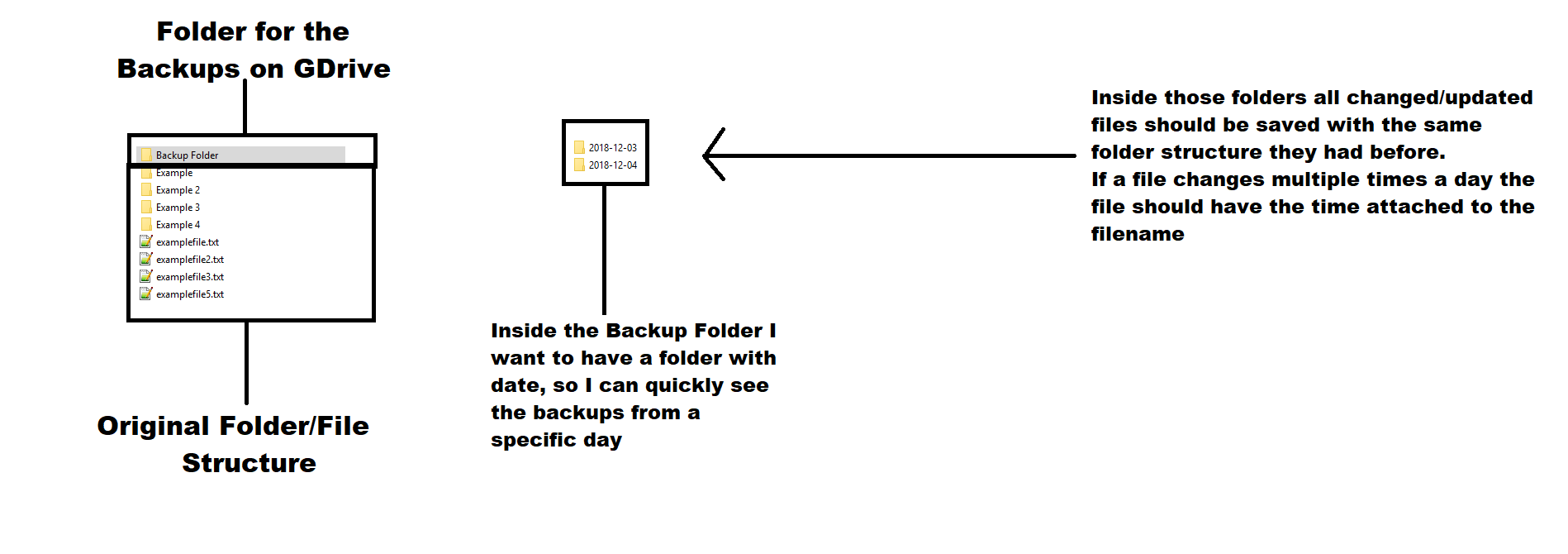
Now I want to ask if it is possible to create a command which handles the backup process like in the picture below (I hope its understandable, if not I try my best to clarify):

The Backup Folder should only exist on the gdrive.

Setupquestion

This is what --backup-dir does.

So you want something like

rclone sync /path/to/source remote:backups/current --backup-dir remote:current/`date -I`

This will copy your full backup to backups/current and leave dated directories in current/2018-12-03 etc.

Note the date -I only works on unix based systems, I expect there is something similar for Windows but I don’t know it off the top of my head!

Thank you I will try that command. Is it possible that the sync only is oneway, I mean I do not want to loose a file on Source because I accidently delete a file on the remote. (I want to prevent to loose anything because of my own stupidity.)

After reading more I see that that is exactly how the sync command works. (Sorry for the stupid question)

'sok - data is important and best to be safe :smile:

When I try this command:

rclone sync /share/CACHEDEV1_DATA/User Name/ gcrypt:shared/User Name --backup-dir gcrypt:shared/User Name/Backups/date -I --checkers 3 --fast-list --log-file /share/CACHEDEV1_DATA/rclone/sync.log -v --tpslimit 3 --transfers 3 --config /share/CACHEDEV1_DATA/rclone/rclonegdrivebackup.conf

it shows me this:

Usage:
rclone sync source:path dest:path [flags]

Flags:
-h, --help help for sync

Use "rclone [command] --help" for more information about a command.
Use "rclone help flags" for to see the global flags.
Use "rclone help backends" for a list of supported services.
Command sync needs 2 arguments maximum

Where did I do a mistake ?

You need to put "quotes" around paths whch have spaces in, so something like this

rclone sync "/share/CACHEDEV1_DATA/User Name/" "gcrypt:shared/User Name" --backup-dir "gcrypt:shared/User Name/Backups/"`date -I` --checkers 3 --fast-list --log-file /share/CACHEDEV1_DATA/rclone/sync.log -v --tpslimit 3 --transfers 3 --config /share/CACHEDEV1_DATA/rclone/rclonegdrivebackup.conf

Thank you for the response but I get this error:
2018/12/06 01:58:43 INFO : Starting HTTP transaction limiter: max 3 transactions/s with burst 1
2018/12/06 01:58:52 ERROR : Fatal error received - not attempting retries
2018/12/06 01:58:52 Failed to sync: destination and parameter to --backup-dir mustn’t overlap

You need to move the backup-dir up a level probably so it is not inside the destination.

But then the Backups would not be in a seperate folder right? Then that directory would fill up with folders?

You could make a folder underneath it like this

rclone sync “/share/CACHEDEV1_DATA/User Name/” “gcrypt:shared/User Name” --backup-dir “gcrypt:shared/Backups/User Name/”`date -I` --checkers 3 --fast-list --log-file 

The layout I prefer is this

rclone sync “/share/CACHEDEV1_DATA/User Name/” “gcrypt:shared/User Name/current” --backup-dir “gcrypt:shared/User Name/”`date -I` --checkers 3 --fast-list --log-file 

Which puts the current backup into a directory called current which is on the same level as the dated backup directories.

But you can use either.

Working perfect! Thanks alot, is it normal that is continues like this?

2018/12/08 14:46:06 INFO  : folder/structure/folder/stuff/file.extension: Moved (server side)
2018/12/08 14:46:06 INFO  : folder/structure/folder/stuff/file.extension: Moved into backup dir
2018/12/08 14:46:25 INFO  : 
Transferred:   	  143.180G / 143.180 GBytes, 100%, 953.208 kBytes/s, ETA 0s
Errors:                 0
Checks:           1471257 / 1471257, 100%
Transferred:       133522 / 133522, 100%
Elapsed time:  43h45m4.6s

// […] (25 Minutes later it is still producing the same output)

2018/12/08 15:11:25 INFO  : 
Transferred:   	  143.180G / 143.180 GBytes, 100%, 944.216 kBytes/s, ETA 0s
Errors:                 0
Checks:           1471257 / 1471257, 100%
Transferred:       133522 / 133522, 100%
Elapsed time:  44h10m4.6s

2018/12/08 15:12:25 INFO  : 
Transferred:   	  143.180G / 143.180 GBytes, 100%, 943.859 kBytes/s, ETA 0s
Errors:                 0
Checks:           1471257 / 1471257, 100%
Transferred:       133522 / 133522, 100%
Elapsed time:  44h11m4.6s

2018/12/08 15:13:25 INFO  : 
Transferred:   	  143.180G / 143.180 GBytes, 100%, 943.504 kBytes/s, ETA 0s
Errors:                 0
Checks:           1471257 / 1471257, 100%
Transferred:       133522 / 133522, 100%
Elapsed time:  44h12m4.6s

2018/12/08 15:14:25 INFO  : 
Transferred:   	  143.180G / 143.180 GBytes, 100%, 943.148 kBytes/s, ETA 0s
Errors:                 0
Checks:           1471257 / 1471257, 100%
Transferred:       133522 / 133522, 100%
Elapsed time:  44h13m4.6s

2018/12/08 15:15:25 INFO  : 
Transferred:   	  143.180G / 143.180 GBytes, 100%, 942.793 kBytes/s, ETA 0s
Errors:                 0
Checks:           1471257 / 1471257, 100%
Transferred:       133522 / 133522, 100%
Elapsed time:  44h14m4.6s

It is producing the same output again and again is that normal ?

EDIT:
Now it stoped with this. It says ERROR, what exactly did not work ?

2018/12/08 15:37:25 INFO  : 
Transferred:   	  143.180G / 143.180 GBytes, 100%, 935.042 kBytes/s, ETA 0s
Errors:                 0
Checks:           1471257 / 1471257, 100%
Transferred:       133522 / 133522, 100%
Elapsed time:  44h36m4.6s

2018/12/08 15:37:51 ERROR : Attempt 2/3 succeeded
2018/12/08 15:37:51 INFO  : 
Transferred:   	  143.180G / 143.180 GBytes, 100%, 934.891 kBytes/s, ETA 0s
Errors:                 0
Checks:           1471257 / 1471257, 100%
Transferred:       133522 / 133522, 100%
Elapsed time:  44h36m30.6s
Not sure why that would be happening since rclone doesn't appear to be checking or transferring anything...

rclone should have printed an "ERROR" log learlier.

I suspect it was something timeing out. Looks like it all worked in the retry though.

Every time I start the sync now I get this as output for 35 minutes.

2018/12/09 02:36:13 INFO  : Starting HTTP transaction limiter: max 3 transactions/s with burst 1
2018/12/09 02:37:16 INFO  : 
Transferred:   	         0 / 0 Bytes, -, 0 Bytes/s, ETA -
Errors:                 0
Checks:                 0 / 0, -
Transferred:            0 / 0, -
Elapsed time:      1m2.8s

//It continues like this:

2018/12/09 03:11:16 INFO  : 
Transferred:   	         0 / 0 Bytes, -, 0 Bytes/s, ETA -
Errors:                 0
Checks:                 0 / 0, -
Transferred:            0 / 0, -
Elapsed time:     35m2.8s

2018/12/09 03:12:16 INFO  : 
Transferred:   	         0 / 0 Bytes, -, 0 Bytes/s, ETA -
Errors:                 0
Checks:                 0 / 0, -
Transferred:            0 / 0, -
Elapsed time:     36m2.8s

And only then after approx 36 min it is starting to do stuff:
2018/12/09 03:12:46 INFO : folder/structure/folder/stuff.fileextension: Copied (new)

//

2018/12/09 03:13:16 INFO  : 
Transferred:   	   30.792M / 146.494 MBytes, 21%, 14.185 kBytes/s, ETA 2h19m12s
Errors:                 0
Checks:            781622 / 781622, 100%
Transferred:           19 / 140, 14%
Elapsed time:     37m2.8s
Transferring:

Why does that happen, I was hoping to be able to run the sync command every 5 or 10 minutes, so it also catches files that get changed and saved more often (so I have a copy on gdrive of every single one)

And one more question:

BTW: how will it handle a file which changes more than once during a day, will it have the time appended to its file name ? or will it be deleted ?

That is because you used --fast-list it builds the in memory tree of all the files first.

It is expensive looking up files on gdrive.

What you should probably do is run a command like this more often which will only copy files that have been recently modified. The --no-traverse stops it looking at all the files in the destination. Tweak the 24h accordingly.

rclone copy --max-age 24h --no-traverse “/share/CACHEDEV1_DATA/User Name/” “gcrypt:shared/User Name” --backup-dir “gcrypt:shared/Backups/User Name/”`date -I` --checkers 3 --log-file

You'll still need the sync command but you can run that less often (once a day say).

Note that you'll need the latest beta for --no-traverse.

You'll get the most recent one.

If you want more granularity, you can use date -Is instead which will make a new backup-dir every time rclone runs.

Thanks a lot for all the deatiled answers. There is only one left

When using

the output is this: 2018-12-10T17:46:01+0100

How do I remove the +0100 part ?

EDIT:
Would this be possible?

rclone sync “/share/CACHEDEV1_DATA/User Name/” “gcrypt:shared/User Name” --backup-dir 
 gcrypt:shared/Backups/User Name/”'date -I'/'date +%H' --checkers 3 --fast-list --log-file

gcrypt:shared/Backups/User Name/”'date -I'/'date +%H'

you should be able to use whatever you want for the structure.

rclone \
    --transfers=25 \
    --checkers=50 \
    -v \
    --checksum \
  sync $FROM_REMOTE $TO_REMOTE --backup-dir ${TO_REMOTE}-bkup/`date +%Y%m%d_%H%M%S`/

If that is the structure you prefer then that will work fine - it is up to you!

Or something like this if you prefer

$ date '+%Y-%m-%d-%H%M%S'
2018-12-11-095657

Is it normal that the command above is running 4 hours long? Each time I start it?

Why does it take so long?

You can use the following code

VNC_RCLONE="$(rclone config file | grep rclone.conf | sed 's/rclone.conf//')"
VNC_RCLONE_REMOTE="$(cat $VNC_RCLONE/rclone.conf | grep "\[" | sed 's/\[//' | sed 's/\]//')"
TIMESTAMP=$(date +"%F")
BACKUP_DIR="/root/backup/$TIMESTAMP"
for i in $VNC_RCLONE_REMOTE
	do
		rclone copy $BACKUP_DIR "$i:$SERVER_NAME/$TIMESTAMP" >> /var/log/rclone.log 2>&1
	echo "done upload $i"
done

Or you can refer to my project
https://github.com/vncloudsco/rclonebackup

after using my code on google drive

Listing directories is really slow in google drive alas. Try using --fast-list - it will use a lot more memory but should be a lot quicker.