If you are using crypt try the latest beta
http://beta.rclone.org/v1.35-36-ga4bf22e/

If you are using crypt try the latest beta
http://beta.rclone.org/v1.35-36-ga4bf22e/
How’d you go about re-encoding from encfs => crypt?
By checking: HOW TO: Switch from encfs to rclone crypt
Ahhhh… Nice! Can’t wait for your tests to see if it’s worth the switch. Btw, that test that you did, did you have Direct Play enabled in the web player?
Hi @Ajki,
Managing a headless server from hetzner. Ubuntu 16.04
Around 25 TB in Google Drive so far uploaded with rclone crypt.
My mount settings:
rclone mount
–config “/root/.rclone.conf”
–read-only
–allow-other
–acd-templink-threshold 0
–allow-non-empty
–dir-cache-time 1m
–max-read-ahead 14G
–checkers 32
–contimeout 15s
–low-level-retries 1
–no-check-certificate
–quiet
–retries 3
–stats 0
–timeout 30s
secret:FOLDER /mnt/FOLDER/ &
Installed Plex on Ubuntu…
Ok, so Plex see correctly the folders.
I have made 2 test with 2 sections:
1 Folder with 100 movies
1 Folder with 300 movies
Scanning has been amazingly quick, recognize all the movies, get poster and actors and so on… but none of them are playable.
When i click on a movie, it shows the poster, info and so on, but show the file as not available, if i click on info it seems to come back available but when i try to play it…“there was a problem playing this item” and again show it as unavailable…
Any help would be more than welcome…
I think you have got 24hr ban.
All will be available the day after 'till next ban 
No iam still waiting for server that I ordered since i plan to run 2 server for few weeks concurrently so the "old/current" one will stay on encfs and new one will be on crypt.
Just came back from vacation and I should get server next week ( waiting for PCIe SSD )
Lol, how much ‘friends’ do you have leeching your content? I’m quite happy with my server bidding dedicated i7-3770 hetzner @ 31 euro =) Haven’t seen it bottleneck yet anyway. I hope you’re not going to run this from your own home, having that vacuum cleaner run all day doesn’t play nice with your ears / power bill =)
I will have server at my company datacenter so free electricity and internet.
But yea i was thinking about is as atm iam paying 39€ ( no tax ) for:
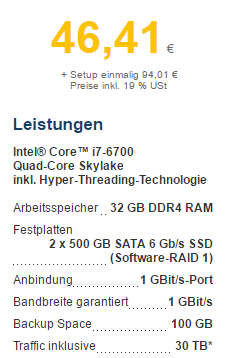
Thats basically 2 years (without NVMe SSD that would be around 250€ as well) of hosting to break even assuming nothing dies in server that need to be replaced.
I have an agreement with friends that they unsub netflix and give half that for server rent, with the system iam running you basically do plex request and get whatever you requested within 30 minutes or so.
But with E5 2670 being so cheap for awesome performance i just could not stay away lol.
I just share all costs with every friend who wants xs.
But I get it =) why not, right? As long as datatransfer isn’t going to be an issue over @ work.
Still - way over the top. But hey, go big or go home, right? I’d start using the local storage as a buffer though, since you’d have enough.
Yea basically i do the same iam not “earning” anything from it but dont want anyone to pay more then 5€ monthly and once i cover that server it will dropped to like 1, 2€ , still need to pay for usenet providers.
As for buffer its no go as I have different server that is handeling all downloading/uploading to cloud, this server will be strictly for Plex and Plexpy.
I will put nginx reverse proxy on it and as well cloudflare to improve peering from other countries.
@Ajki is 30tb traffic really enough for a plex server?
For Plex definitely for your main download/upload machine not so much.
The good thing about Hetzner is they limit only upload.
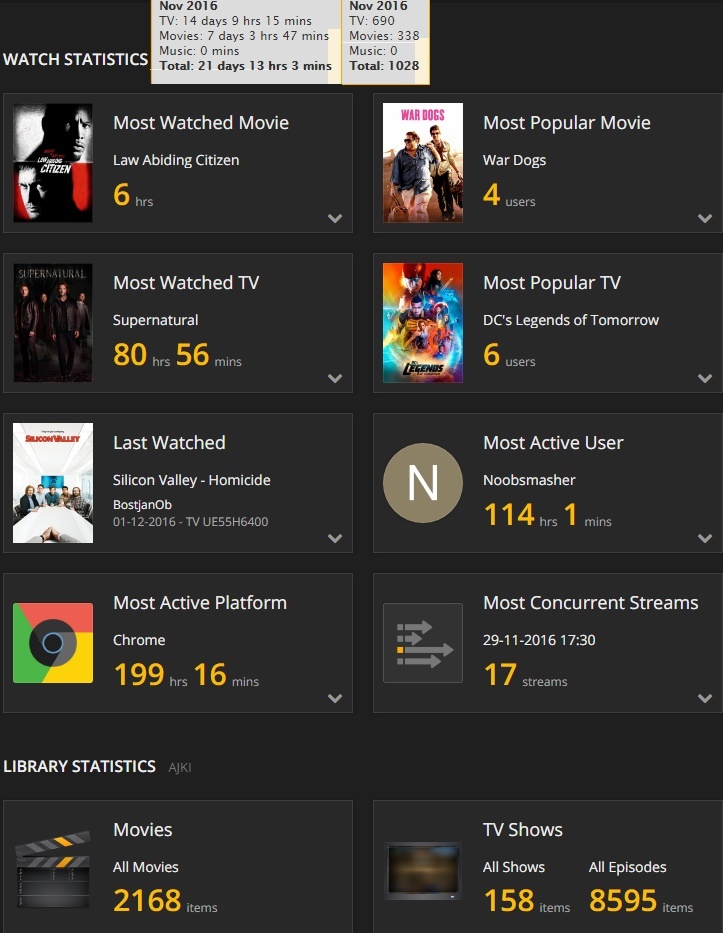
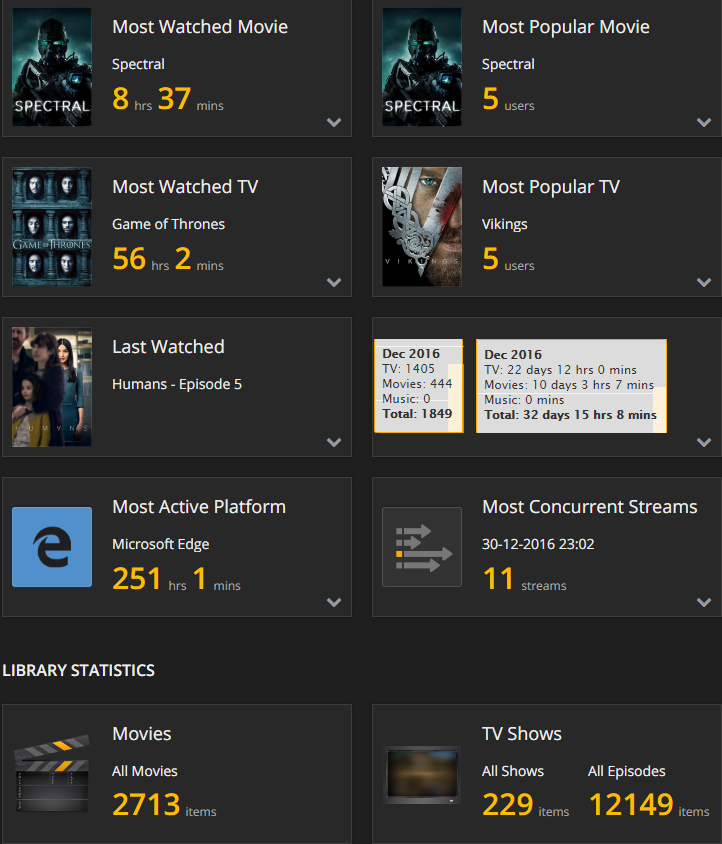
Here are the stats of my Plex server
As you can see you dont need some amazing speeds or transfer as In december there was 1405 shows watched and 444 movies and that was only 5TB was uploaded. ( so 25TB to spare )
Now when it come to download ( Sonarr, CouchPotato, NZB's, Torrents ) and upload the content to amazon cloud thats another story.
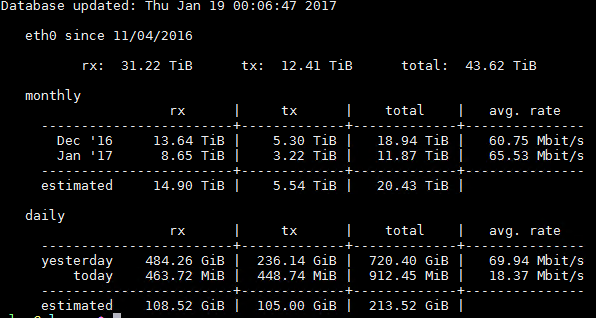
Stats of my download/upload server:
Hopefully @ncw will figure out whats with EOF errors and crypt ( latest beta fixed retries bug, but not solved the problem yet )
@Ajki Are you also using Hetzner for your download/upload server also? I’m thinking of separating my Plex server from my download/upload server as well. Looking for some recommendations for low specs server but with unlimited/high BW limit.
Nice discussion, really helpful! I am also looking for recommendations for a vps specifically for hosting my Plex server. I already have a seedbox up and running which copies the files to my drive.
I’ve done exactly this.
I’ve recently rented a Hetzner E-41S-SSD to build my new Plex/PlexPy server.
Backend will be in encrypted in google and mounted with rclone.
Currently fighting with setup and google rate limit.
For downloads/uploads with unlimited transfers i would recommend Scaleway.
@4everfun
I tried a whole range of different VPS providers, but performance is a big issue, it’s just not consistent enough with the shared hardware. That or the bandwidth offered is too low. I’d take a look at hetzner if I were you. Especially their server bidding options are a pretty good deal: https://robot.your-server.de/order/market/
I've really given up on Google Drive for now. Maybe in the future once rclone is able to cache directory data it can be used reliably for Plex. But at the moment you get banned so often that it's really not reliable enough for Plex. I would use ACD with a U.K. Amazon account if you're planning to use Hetzner.
Thanks for the advice.
I’m really open to both solutions as i have unlimited accounts for Drive and ACD.
But for the final production i would prefer google for other reasons…
In any case, i’m just testing for now and not in a hurry, i hope “rclone mount” gets improved and with new cache functionalities avoid banning from google.
amazon.de would be even better.