Rclone as a client closes the connection after the PBSZ command.
Server side logs
2025/11/06 08:56:00 DEBUG : rclone: Version "v1.71.2" starting with parameters ["./rclone" "serve" "ftp" "--cert" "../cert.pem" "--public-ip" "REDACTED" "--key" "../cert.key" "--addr" "0.0.0.0:2121" "-vv" "b2:REDACTED-build/Official"]
2025/11/06 08:56:00 DEBUG : Creating backend with remote "b2:REDACTED-build/Official"
2025/11/06 08:56:00 DEBUG : Using config file from "/home/ubuntu/.config/rclone/rclone.conf"
2025/11/06 08:56:01 INFO  : B2 bucket REDACTED-build path Official: poll-interval is not supported by this remote
2025/11/06 08:56:01 NOTICE: B2 bucket REDACTED-build path Official: Serving FTP on 0.0.0.0:2121
2025/11/06 08:56:01 INFO  : Rclone FTP Server listening on 2121
2025/11/06 08:56:05 INFO  : 59d5145b4c0436e5b92e: Connection Established
2025/11/06 08:56:05 INFO  : 59d5145b4c0436e5b92e: < 220 Welcome to Rclone v1.71.2 FTP Server
2025/11/06 08:56:05 INFO  : 59d5145b4c0436e5b92e: > USER anonymous
2025/11/06 08:56:05 INFO  : 59d5145b4c0436e5b92e: < 331 User name ok, password required
2025/11/06 08:56:05 INFO  : 59d5145b4c0436e5b92e: > PASS ****
2025/11/06 08:56:05 INFO  : 59d5145b4c0436e5b92e: < 230 Password ok, continue
2025/11/06 08:56:05 INFO  : 59d5145b4c0436e5b92e: > FEAT
2025/11/06 08:56:05 INFO  : 59d5145b4c0436e5b92e: < 211 Extensions supported:
 UTF8
 MLSD
 CLNT
 EPRT
 EPSV
 LPRT
 AUTH TLS
 PBSZ
 PROT
2025/11/06 08:56:05 INFO  : 59d5145b4c0436e5b92e: > TYPE I
2025/11/06 08:56:05 INFO  : 59d5145b4c0436e5b92e: < 200 Type set to binary
2025/11/06 08:56:05 INFO  : 59d5145b4c0436e5b92e: > OPTS UTF8 ON
2025/11/06 08:56:05 INFO  : 59d5145b4c0436e5b92e: < 200 UTF8 mode enabled
2025/11/06 08:56:05 INFO  : 59d5145b4c0436e5b92e: > PBSZ 0
2025/11/06 08:56:05 INFO  : 59d5145b4c0436e5b92e: < 550 Action not taken
2025/11/06 08:56:05 INFO  : 59d5145b4c0436e5b92e: > QUIT
2025/11/06 08:56:05 INFO  : 59d5145b4c0436e5b92e: < 221 Goodbye
2025/11/06 08:56:05 INFO  : 59d5145b4c0436e5b92e: Connection Terminated
Client side logs
2025/11/06 11:02:34 DEBUG : rclone: Version "v1.71.2" starting with parameters ["C:\\Users\\REDACTED\\Downloads\\rclone-v1.71.2-windows-amd64\\rclone.exe" "ls" "-vv" "ftp:/"]
2025/11/06 11:02:34 DEBUG : Creating backend with remote "ftp:/"
2025/11/06 11:02:34 DEBUG : Using config file from "C:\\Users\\REDACTED\\AppData\\Roaming\\rclone\\rclone.conf"
2025/11/06 11:02:34 DEBUG : ftps://ftp.REDACTED.REDACTED:2121: Connecting to FTP server
2025/11/06 11:02:34 DEBUG : ftps://ftp.REDACTED.REDACTED:2121: dial("tcp","ftp.REDACTED.REDACTED:2121")
2025/11/06 11:02:34 DEBUG : ftps://ftp.REDACTED.REDACTED:2121: > dial: conn=REDACTED:52680->REDACTED:2121, err=<nil>
2025/11/06 11:02:34 CRITICAL: Failed to create file system for "ftp:/": NewFs: failed to make FTP connection to "ftp.REDACTED.REDACTED:2121": 550 Action not taken
rclone client config
[ftp]
type = ftp
host = ftp.REDACTED.REDACTED
user = anonymous
port = 2121
pass = REDACTED
tls = true
This happens regardless of the rclone version I use, either as a server or as a client. I have tried with the ones I mentioned in the original post as a server, while I used the following ones as a client.
rclone v1.71.2
- os/version: Microsoft Windows Server 2016 Standard 1607 (64 bit)
- os/kernel: 10.0.14393.8524 (x86_64)
- os/type: windows
- os/arch: amd64
- go/version: go1.25.3
- go/linking: static
- go/tags: cmount
rclone v1.72.0-beta.9276.ec5ddb68a
- os/version: Microsoft Windows Server 2016 Standard 1607 (64 bit)
- os/kernel: 10.0.14393.8524 (x86_64)
- os/type: windows
- os/arch: amd64
- go/version: go1.25.3
- go/linking: static
- go/tags: cmount
rclone v1.63.1
- os/version: Microsoft Windows Server 2016 Standard 1607 (64 bit)
- os/kernel: 10.0.14393.8524 (x86_64)
- os/type: windows
- os/arch: amd64
- go/version: go1.20.6
- go/linking: static
- go/tags: cmount
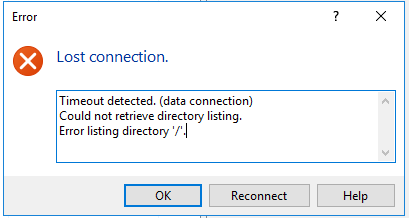
I was able to replicate the same behaviour I got with WinSCP using FileZilla as a client.
Server side logs
2025/11/06 10:24:48 DEBUG : rclone: Version "v1.71.2" starting with parameters ["./rclone" "serve" "ftp" "--cert" "../cert.pem" "--public-ip" "REDACTED" "--key" "../cert.key" "--addr" "0.0.0.0:2121" "-vv" "b2:REDACTED-build/Official"]
2025/11/06 10:24:48 DEBUG : Creating backend with remote "b2:REDACTED-build/Official"
2025/11/06 10:24:48 DEBUG : Using config file from "/home/ubuntu/.config/rclone/rclone.conf"
2025/11/06 10:24:49 INFO  : B2 bucket REDACTED-build path Official: poll-interval is not supported by this remote
2025/11/06 10:24:49 NOTICE: B2 bucket REDACTED-build path Official: Serving FTP on 0.0.0.0:2121
2025/11/06 10:24:49 INFO  : Rclone FTP Server listening on 2121
2025/11/06 10:25:03 INFO  : e0e3be3534466ca3b0a5: Connection Established
2025/11/06 10:25:03 INFO  : e0e3be3534466ca3b0a5: < 220 Welcome to Rclone v1.71.2 FTP Server
2025/11/06 10:25:03 INFO  : e0e3be3534466ca3b0a5: > USER anonymous
2025/11/06 10:25:03 INFO  : e0e3be3534466ca3b0a5: < 331 User name ok, password required
2025/11/06 10:25:03 INFO  : e0e3be3534466ca3b0a5: > PASS ****
2025/11/06 10:25:03 INFO  : e0e3be3534466ca3b0a5: < 230 Password ok, continue
2025/11/06 10:25:03 INFO  : e0e3be3534466ca3b0a5: > OPTS UTF8 ON
2025/11/06 10:25:03 INFO  : e0e3be3534466ca3b0a5: < 200 UTF8 mode enabled
2025/11/06 10:25:03 INFO  : e0e3be3534466ca3b0a5: > PBSZ 0
2025/11/06 10:25:03 INFO  : e0e3be3534466ca3b0a5: < 550 Action not taken
2025/11/06 10:25:03 INFO  : e0e3be3534466ca3b0a5: > PROT P
2025/11/06 10:25:03 INFO  : e0e3be3534466ca3b0a5: < 550 Action not taken
2025/11/06 10:25:03 INFO  : e0e3be3534466ca3b0a5: > PWD
2025/11/06 10:25:03 INFO  : e0e3be3534466ca3b0a5: < 257 "/" is the current directory
2025/11/06 10:25:06 INFO  : e0e3be3534466ca3b0a5: > CWD REDACTED
2025/11/06 10:25:06 DEBUG : /REDACTED: Stat:
2025/11/06 10:25:07 ERROR : Entry doesn't belong in directory "" (same as directory) - ignoring
2025/11/06 10:25:07 DEBUG : /REDACTED: >Stat: fi=&{FileInfo:REDACTED/ mode:2147484157 owner:1000 group:1001}, err = <nil>
2025/11/06 10:25:07 INFO  : e0e3be3534466ca3b0a5: < 250 Directory changed to /REDACTED
2025/11/06 10:25:07 INFO  : e0e3be3534466ca3b0a5: > PWD
2025/11/06 10:25:07 INFO  : e0e3be3534466ca3b0a5: < 257 "/REDACTED" is the current directory
2025/11/06 10:25:07 INFO  : e0e3be3534466ca3b0a5: > TYPE I
2025/11/06 10:25:07 INFO  : e0e3be3534466ca3b0a5: < 200 Type set to binary
2025/11/06 10:25:07 INFO  : e0e3be3534466ca3b0a5: > PASV
2025/11/06 10:25:07 INFO  : e0e3be3534466ca3b0a5: < 227 Entering Passive Mode (REDACTED,REDACTED,REDACTED,REDACTED,122,163)
2025/11/06 10:25:07 INFO  : e0e3be3534466ca3b0a5: > LIST
2025/11/06 10:25:07 DEBUG : /REDACTED: Stat:
2025/11/06 10:25:07 DEBUG : /REDACTED: >Stat: fi=&{FileInfo:REDACTED/ mode:2147484157 owner:1000 group:1001}, err = <nil>
2025/11/06 10:25:07 DEBUG : /REDACTED: ListDir:
2025/11/06 10:25:07 DEBUG : /REDACTED: >ListDir: err = <nil>
2025/11/06 10:25:07 INFO  : e0e3be3534466ca3b0a5: < 150 Opening ASCII mode data connection for file list
2025/11/06 10:25:27 INFO  : e0e3be3534466ca3b0a5: < 226 Closing data connection, sent 14698 bytes
2025/11/06 10:25:27 INFO  : e0e3be3534466ca3b0a5: Connection Terminated
Client side logs
Command:	CWD REDACTED
Response:	250 Directory changed to /REDACTED
Command:	PWD
Response:	257 "/REDACTED" is the current directory
Command:	TYPE I
Response:	200 Type set to binary
Command:	PASV
Response:	227 Entering Passive Mode (REDACTED,REDACTED,REDACTED,REDACTED,122,163)
Command:	LIST
Response:	150 Opening ASCII mode data connection for file list
Error:	Connection timed out after 20 seconds of inactivity
Error:	Failed to retrieve directory listing