gotcha, thank you for the explanation.
1.2 PB on Dropbox? How about the speed upload compared with Google? Any issues until now?
That's not me as someone told me that.
I've noticed no speed issues.
I've had no issues since migrating.
But gsuite have a bandwith limit when uploading does Dropbox have it also?
Dropbox has no download or upload quotas.
Sorry... Not also about quotas... But the speed of upload... If i am not mistaken gsuite have a max bandwith of 500mbits per upload. Even you have for example 10gbits uplink the speed Willbe that One. And Dropbox?
This is pretty far off topic for this post as I don't have a 10Gbs links so I have no idea.
it was just one example.... indeed i did saw you saying on rclone git "I had 3 gigabit machines going concurrently for days" so at least for that you should have seen the upload speed of each machine, right?
Again, very off topic for this thread.
I had no performance issues with Google or Dropbox.
thanks... can you share a rclone.conf example for dropbox? is it still possible to use encryption?
It is the same as for Google Drive as I don’t do anything special other than following the directions for creating your own client ID and secret like Google Drive.
An example conf is on my GitHub.
hello there,
I have changed now my TV library to the new scanner: Plex TV Series
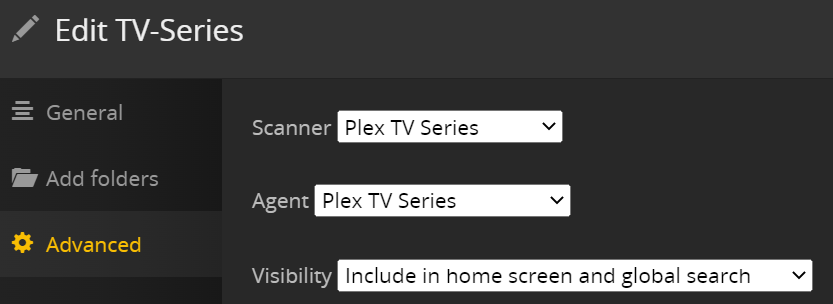
and I have this script to check if there is any new folder and manually trigger the Plex Media Scanner to scan only that season folder.
#UPDATE MOVIES
find "$MOVIELIBRARY" -mindepth 1 -type d -cmin -"$MAXTIME" -exec
/usr/lib/plexmediaserver/Plex\ Media\ Scanner --scan --refresh --section "$MOVIESECTION" --directory {} ;
#UPDATE TV SHOWS
find "$TVLIBRARY" -mindepth 2 -type d -cmin -"$MAXTIME" -exec
/usr/lib/plexmediaserver/Plex\ Media\ Scanner --scan --refresh --section "$TVSECTION" --directory {} ;
Will this still work with the new scanner settings?
Do you have any experience?
thanks!
Not sure what that has to go with my Google Drive mount settings.
If you have a Plex question, the plex forums would be a much better spot.
the relation is not to "hurt" the google drive "hidden" restrictions 
I have no idea what that means but it has nothing to do with my drive settings or a question relating to them so it's just hijacking a post so please don't do that.
Thanks.
Hey @Animosity022,
First of all - thank you for your amazing tips and for the rclone mount settings that strive to maximize the perfomance (especially in the context of Plex which is resource intensive).
I would like to suggest changing this thread's subject to "Recommended Dropbox and Plex Mount Settings" since you moved away from using Google Drive.
I noticed that you wanted to simplify the whole workflow as far as possible and avoided using external tools (e.g. for uploading etc.), so it's all boiled down to doing all operations within the mount.
Because all files are uploaded by moving them to the VFS cache and it's offloaded to the cloud after an hour, I think it would make sense to take advantage of those few things:
--dropbox-batch-mode sync(we want full integrity, we don't care about speeds), leave the size at default as rclone will take care of calculating it by itself (based on transfers)
--dropbox-chunk-size 150M(it's not too much and it's the maximum we can set anyway)
--transfers 16(we don't want this value to be too high)
It means: Plex had an hour to take care of scanning files, it generated thumbnails and everything else, we can now trash it away off to the cloud. We commit everything together in one batch and upload it to Dropbox.
On top of that, I observed that we need to consider 2 types of API calls: read and write.
You can indeed separate out your API keys + registered tokens with them to increase your overall limit of requests, but that's only for read operations (list/polling/download/ etc.).
You can't do that with writes, because it's limited in a different way. If you trigger a large move operation (moving a folder with lots of subfolders to another location), you'll run into a so called namespace lock. That means, you won't be able to do any more write operations; however reading (listing/downloading/etc.) will still work fine.
The only way to "bypass" that is by having multiple namespaces.
Each user’s private Dropbox folder maps to a root namespace. Shared folders are also mapped to their own namespaces, as are team folders in Dropbox Business and Dropbox Enterprise. Namespaces are also where we set ownership and access permissions. A user has the same access type for all of the files and folders in a namespace.
So if you want to be able to do multiple write (rename/move/upload/delete/etc.) operations parallely, you're gonna need to separate out your media folder into multiple shared folders.
Example:
- Team Folder for Movies
- Team Folder for TV
- Team Folder for Movies 4K
etc. etc.
Each shared folder will be an unique namespace. When there's an ongoing large write operation inside the namespace for Movies, you will be able to rename/move/upload/delete/etc. folders/files in another namespace for TV.
The reason I brought this to your attention is because I figured you might wanna add it in your README for those who want to scale it up.
It's especially useful for running multiple Radarr/Sonarr instances so that they can trigger write operations without competing with each other.
That's the default so that's already there.
I've noticed not much difference in changing this in my experience.
I don't want this at 16 as my goal here is to make sure my cache disk does not fill up and having 4 at a time is plenty to make sure it's cleaned out. 16 at a time would create some bottlenecks in uploading.
I use 1 shared folder for Movies and 1 shared folder to TV.
With the right TPS limits, I've never had a problem. 12 seems to be the sweet spot.
Good to know!
Makes sense.
--tpslimit indeed works for read operations but not for write ones. That's where another namespace-bound limit kicks in. If you attempt to move a large folder to elsewhere, it'll get your namespace locked out. But you're already seperating it out into shared folders, so that's probably why you never ran into an issue!
Thanks for your response 
Not sure I've ever hit that issue.
The easiest way to reproduce this issue is by moving a large folder (with thousands of subfolders and files) to elsewhere. You won't be able to rename/move/remove anything in the very same namespace (personal/shared folder).
I guess it's not a big deal for most of people, but if Radarr + Sonarr happen to upgrade stuff at the very exact same time, they end up competing with each other locking out each other.
Nevertherless, I appreciate your response and changing the thread's subject!