Ok, transferring a single 12 GiB mkv video file.
Non-multithreaded copy:
rclone copy --no-check-certificate --progress --multi-thread-streams=0 copyparty-local-shrimp:/protected/test.mkv /home/gremious/Test
Speed: 250 MiB/s
CPU: Irix 70% (Real 1.8%)
(I tried out of curiosity, --multi-thread-streams=6 does put that to ~1 GiB/s)
Mount2 with max speed settings:
rclone mount2 --no-check-certificate --vfs-cache-mode off --vfs-read-chunk-streams 4 --vfs-read-chunk-size 8M gremy-copyparty-local: /mnt/user/copyparty
Speed: ~700 MiB/s
CPU: Irix 230% (Real 5%)
Moun2 with default settings:
(wasn’t sure if you wanted this to be more barebones too)
rclone mount2 --no-check-certificate --vfs-cache-mode off gremy-copyparty-local: /mnt/user/copyparty
Speed: 300 MiB/s
CPU: same as rclone copy, Irix ~70% (Real 1.8%)
I’m trying, but am failing to run the copy command over core/command. Do you happen to know what’s wrong with the following:
rclone rc core/command command=copy -o no-check-certificate -o multi-thread-streams=0 -a "copyparty-local-shrimp:/protected/test.mkv" -a "/home/gremious/Test/test.mkv"
output:
== snip big usage dump ==
Command copy needs 2 arguments maximum: you provided 3 non flag arguments: [\"copyparty-local-shrimp:/protected/test.mkv\" \"/home/gremious/Test/test.mkv\" \"\"]\n"
So I tried providing it as 1 flag:
rclone rc core/command command=copy -o no-check-certificate -o multi-thread-streams=0 -a "copyparty-local-shrimp:/protected/test.mkv /home/gremious/Test/test.mkv"
No bueno:
{
        "error": true,
        "result": "2025/12/07 18:13:17 CRITICAL: Failed to create file system for \"\": can't use empty string as a path\n"
}
It really thinks I gave it an empty string somewhere.
I assume operations/copyfile is going to be multi-threaded by default?
Here you go, these are the ones that seem relevant.
This is copying the same one single ~12 GiB file as above.
Enable nullrw mode with nullrw=true. This will effectively make reads and writes no-ops. Removing the underlying device / filesystem from the equation. This will give us the top theoretical speeds.
sudo mergerfs -o cache.files=off,category.create=pfrd,func.getattr=newest,dropcacheonclose=false,nullrw=true /home/gremious/Test /mnt/user/copyparty/
Copying a file out: 1.3 GiB/s
Configure mergerfs to use a tmpfs branch. tmpfs is a RAM disk. Extremely high speed and very low latency. This is a more realistic best case scenario. Example: mount -t tmpfs -o size=2G tmpfs /tmp/tmpfs
sudo mkdir /tmp/tmpfs
sudo mount -t tmpfs -o size=13G tmpfs /tmp/tmpfs
sudo mergerfs -o cache.files=off,category.create=pfrd,func.getattr=newest,dropcacheonclose=false /tmp/tmpfs/ /mnt/user/copyparty/
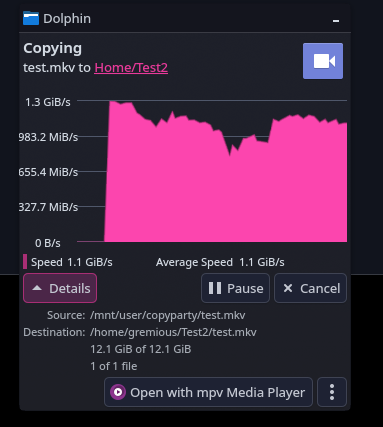
1.1 GiB/s, with some drops
Configure mergerfs to use a local device filesystem branch. NVMe, SSD, HDD, etc. Test them individually. If you have different interconnects / controllers use the same storage device when testing to ensure consistency.
This is what we tested above I believe.