What is the problem you are having with rclone?
I try to mount my encrypted remote using systemd service, so it executes on every boots
Here's the content in my /etc/systemd/system/rclone.service
[Unit]
Description=Rclone Mount Service
After=network-online.target

[Service]
Type=notify
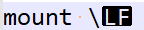
ExecStart=/usr/bin/rclone mount \
   --config=/root/.config/rclone/rclone.conf \
   --log-level=INFO \
   --log-file=/home/ubuntu/rclone/log/rclone-mount.log \
   --user-agent=root \
   --umask=022 \
   --gid=0 \
   --uid=0 \
   --allow-other \
   --timeout=1h \
   --poll-interval=15s \
   --dir-cache-time=1000h \
   --cache-dir=/home/ubuntu/rclone/cache \
   --vfs-cache-mode=full \
   --vfs-cache-max-size=4G \
   --vfs-cache-max-age=12h \
   test: /home/ubuntu/rclone/cloud
ExecStop=/bin/fusermount -uz /home/ubuntu/rclone/cloud
Restart=on-abort
RestartSec=5
StartLimitInterval=60s
StartLimitBurst=3

[Install]
WantedBy=multi-user.target
Running sudo systemctl start rclone.service returns the following errors :
Job for rclone.service failed because the control process exited with error code. See "systemctl status rclone.service" and "journalctl -xe" for details.
systemctl status rclone.service
● rclone.service - Rclone Mount Service
     Loaded: loaded (/etc/systemd/system/rclone.service; enabled; vendor preset>
     Active: failed (Result: exit-code) since Tue 2023-10-03 14:11:25 UTC; 59s >
    Process: 1575 ExecStart=/usr/bin/rclone mount \ (code=exited, status=1/FAIL>
   Main PID: 1575 (code=exited, status=1/FAILURE)

Oct 03 14:11:25 test4 rclone[1575]:       --min-age Duration                   >
Oct 03 14:11:25 test4 rclone[1575]:       --min-size SizeSuffix                >
Oct 03 14:11:25 test4 rclone[1575]: Additional help topics:
Oct 03 14:11:25 test4 rclone[1575]: Use "rclone [command] --help" for more info>
Oct 03 14:11:25 test4 rclone[1575]: Use "rclone help flags" for to see the glob>
Oct 03 14:11:25 test4 rclone[1575]: Use "rclone help backends" for a list of su>
Oct 03 14:11:25 test4 rclone[1575]: Command mount needs 2 arguments minimum: yo>
Oct 03 14:11:25 test4 systemd[1]: rclone.service: Main process exited, code=exi>
Oct 03 14:11:25 test4 systemd[1]: rclone.service: Failed with result 'exit-code>
Oct 03 14:11:25 test4 systemd[1]: Failed to start Rclone Mount Service.
journalctl -xe
Oct 03 14:20:01 test4 rclone[1693]:       --vfs-write-wait Duration                Time to wait for in-sequence write before giving error (default 1s)
Oct 03 14:20:01 test4 rclone[1693]:       --volname string                         Set the volume name (supported on Windows and OSX only)
Oct 03 14:20:01 test4 rclone[1693]:       --write-back-cache                       Makes kernel buffer writes before sending them to rclone (without this, writethrough caching is used) (no>
Oct 03 14:20:01 test4 rclone[1693]: # Filter Flags
Oct 03 14:20:01 test4 rclone[1693]: Flags for filtering directory listings.
Oct 03 14:20:01 test4 rclone[1693]:       --delete-excluded                     Delete files on dest excluded from sync
Oct 03 14:20:01 test4 rclone[1693]:       --exclude stringArray                 Exclude files matching pattern
Oct 03 14:20:01 test4 rclone[1693]:       --exclude-from stringArray            Read file exclude patterns from file (use - to read from stdin)
Oct 03 14:20:01 test4 rclone[1693]:       --exclude-if-present stringArray      Exclude directories if filename is present
Oct 03 14:20:01 test4 rclone[1693]:       --files-from stringArray              Read list of source-file names from file (use - to read from stdin)
Oct 03 14:20:01 test4 rclone[1693]:       --files-from-raw stringArray          Read list of source-file names from file without any processing of lines (use - to read from stdin)
Oct 03 14:20:01 test4 rclone[1693]:   -f, --filter stringArray                  Add a file filtering rule
Oct 03 14:20:01 test4 rclone[1693]:       --filter-from stringArray             Read file filtering patterns from a file (use - to read from stdin)
Oct 03 14:20:01 test4 rclone[1693]:       --ignore-case                         Ignore case in filters (case insensitive)
Oct 03 14:20:01 test4 rclone[1693]:       --include stringArray                 Include files matching pattern
Oct 03 14:20:01 test4 rclone[1693]:       --include-from stringArray            Read file include patterns from file (use - to read from stdin)
Oct 03 14:20:01 test4 rclone[1693]:       --max-age Duration                    Only transfer files younger than this in s or suffix ms|s|m|h|d|w|M|y (default off)
Oct 03 14:20:01 test4 rclone[1693]:       --max-depth int                       If set limits the recursion depth to this (default -1)
Oct 03 14:20:01 test4 rclone[1693]:       --max-size SizeSuffix                 Only transfer files smaller than this in KiB or suffix B|K|M|G|T|P (default off)
Oct 03 14:20:01 test4 rclone[1693]:       --metadata-exclude stringArray        Exclude metadatas matching pattern
Oct 03 14:20:01 test4 rclone[1693]:       --metadata-exclude-from stringArray   Read metadata exclude patterns from file (use - to read from stdin)
Oct 03 14:20:01 test4 rclone[1693]:       --metadata-filter stringArray         Add a metadata filtering rule
Oct 03 14:20:01 test4 rclone[1693]:       --metadata-filter-from stringArray    Read metadata filtering patterns from a file (use - to read from stdin)
Oct 03 14:20:01 test4 rclone[1693]:       --metadata-include stringArray        Include metadatas matching pattern
Oct 03 14:20:01 test4 rclone[1693]:       --metadata-include-from stringArray   Read metadata include patterns from file (use - to read from stdin)
Oct 03 14:20:01 test4 rclone[1693]:       --min-age Duration                    Only transfer files older than this in s or suffix ms|s|m|h|d|w|M|y (default off)
Oct 03 14:20:01 test4 rclone[1693]:       --min-size SizeSuffix                 Only transfer files bigger than this in KiB or suffix B|K|M|G|T|P (default off)
Oct 03 14:20:01 test4 rclone[1693]: Additional help topics:
Oct 03 14:20:01 test4 rclone[1693]: Use "rclone [command] --help" for more information about a command.
Oct 03 14:20:01 test4 rclone[1693]: Use "rclone help flags" for to see the global flags.
Oct 03 14:20:01 test4 rclone[1693]: Use "rclone help backends" for a list of supported services.
Oct 03 14:20:01 test4 rclone[1693]: Command mount needs 2 arguments minimum: you provided 1 non flag arguments: ["\\"]
Oct 03 14:20:01 test4 systemd[1]: rclone.service: Main process exited, code=exited, status=1/FAILURE
-- Subject: Unit process exited
-- Defined-By: systemd
-- Support: http://www.ubuntu.com/support
--
-- An ExecStart= process belonging to unit rclone.service has exited.
--
-- The process' exit code is 'exited' and its exit status is 1.
Oct 03 14:20:01 test4 systemd[1]: rclone.service: Failed with result 'exit-code'.
-- Subject: Unit failed
-- Defined-By: systemd
-- Support: http://www.ubuntu.com/support
--
-- The unit rclone.service has entered the 'failed' state with result 'exit-code'.
Oct 03 14:20:01 test4 systemd[1]: Failed to start Rclone Mount Service.
-- Subject: A start job for unit rclone.service has failed
-- Defined-By: systemd
-- Support: http://www.ubuntu.com/support
--
-- A start job for unit rclone.service has finished with a failure.
--
-- The job identifier is 1052 and the job result is failed.
Run the command 'rclone version' and share the full output of the command.
rclone v1.64.0
- os/version: ubuntu 20.04 (64 bit)
- os/kernel: 5.15.0-1042-oracle (aarch64)
- os/type: linux
- os/arch: arm64 (ARMv8 compatible)
- go/version: go1.21.1
- go/linking: static
- go/tags: none
Which cloud storage system are you using? (eg Google Drive)
Oracle cloud
The command you were trying to run (eg rclone copy /tmp remote:tmp)
See above
Please run 'rclone config redacted' and share the full output. If you get command not found, please make sure to update rclone.
[onedrive]
type = onedrive
token = XXX
drive_id = XXX
drive_type = personal

[test]
type = crypt
remote = onedrive:/test1
password = XXX
A log from the command that you were trying to run with the -vv flag
See Above