STOP and READUSE THIS TEMPLATENO EXCEPTIONS - By not using this, you waste your time, our time and really hate puppies. Please remove these two lines and that will confirm you have read them.
Whats the problem you are having with rclone?
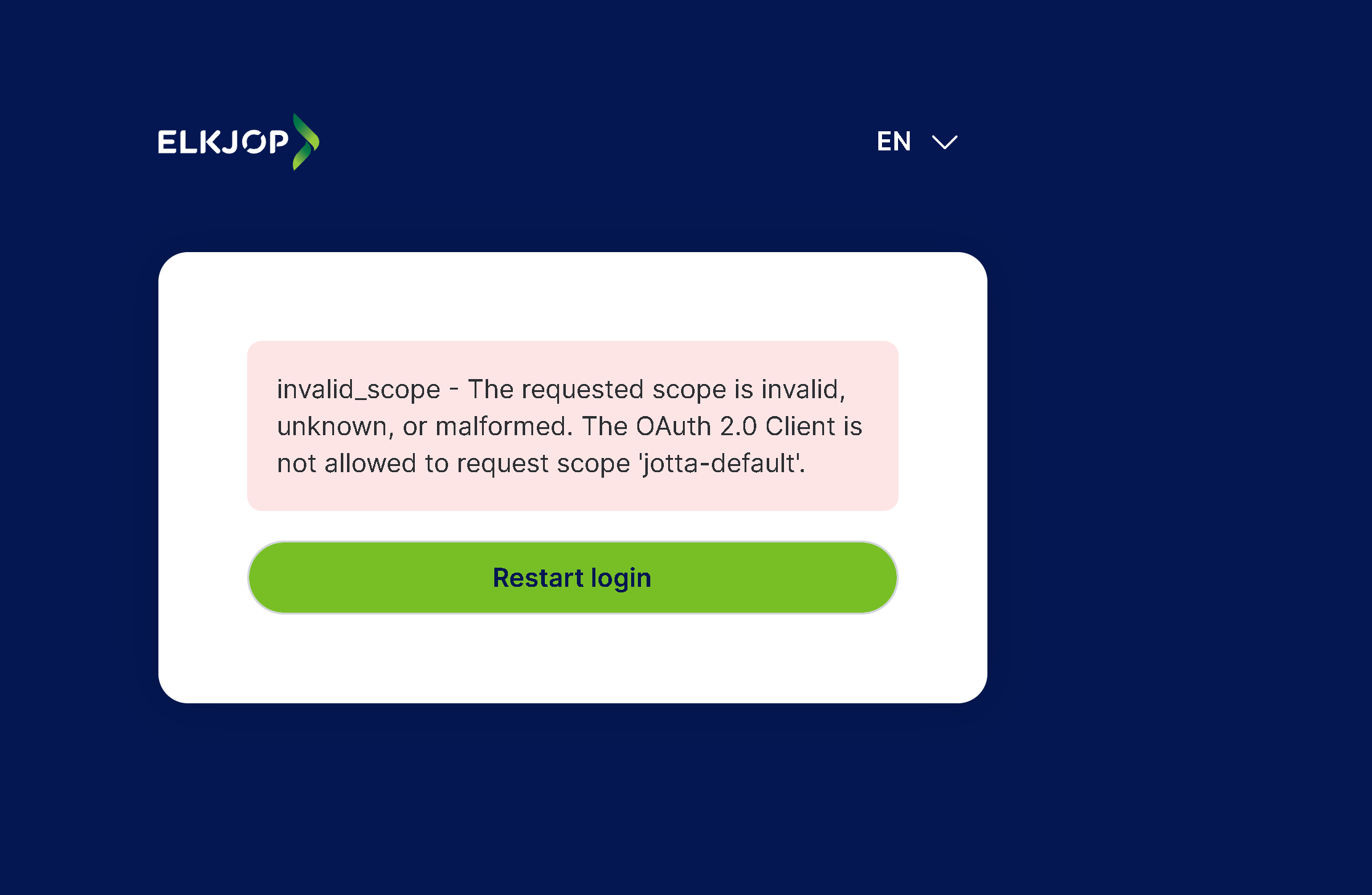
Get following error "invalid_scope - The requested scope is invalid, unknown, or malformed. The OAuth 2.0 Client is not allowed to request scope 'jotta-default'". In the browser.
Run the command 'rclone version' and share the full output of the command.
os/version: Microsoft Windows 11 Pro 26H2 26H2 (64 bit)
os/kernel: 10.0.26300.9711 (x86_64)
os/type: windows
os/arch: amd64
go/version: go1.25.1
go/linking: static
go/tags: cmount
Which cloud storage system are you using? (eg Google Drive)
Elkjop-cloud(jottacloud)
The command you were trying to run (eg rclone copy /tmp remote:tmp)
c:\rclone\rclone.exe config
Please run 'rclone config redacted' and share the full output. If you get command not found, please make sure to update rclone.
[elkjop]
type = jottacloud
configVersion = 1
client_id = XXX
tokenURL = https://cloud.elgiganten.dk/auth/realms/elgiganten/protocol/openid-connect/token
token = XXX
device =
mountpoint =

[elkjop-crypt]
type = crypt
remote = elkjop:\crypt
password = XXX
password2 = XXX

[gdrive]
type = drive
scope = drive
token = XXX
team_drive =
### Double check the config for sensitive info before posting publicly
A log from the command that you were trying to run with the -vv flag
2026/10/26 14:21:58 NOTICE: Make sure your Redirect URL is set to "http://localhost:53682/" in your custom config.
2026/10/26 14:21:58 NOTICE: If your browser doesn't open automatically go to the following link: http://127.0.0.1:53682/auth?state=HqV81W2VyQ62zuwzVTEq4A
2026/10/26 14:21:58 NOTICE: Log in and authorize rclone for access
2026/10/26 14:21:58 NOTICE: Waiting for code...
I get 2026/10/26 16:14:34 DEBUG : rclone: Version "v1.75.2" starting with parameters ["C:\rclone\rclone.exe" "lsd" "elkjop:" "-vv"]
2026/10/26 16:14:34 DEBUG : Creating backend with remote "elkjop:"
2026/10/26 16:14:34 DEBUG : Using config file from "C:\rclone\rclone.conf"
2026/10/26 16:14:34 DEBUG : elkjop: Token expired
2026/10/26 16:14:34 DEBUG : elkjop: No updated token found in the config file
2026/10/26 16:14:34 DEBUG : elkjop: got fatal oauth error: oauth2: "invalid_grant" "The provided authorization grant (e.g., authorization code, resource owner credentials) or refresh token is invalid, expired, revoked, does not match the redirection URI used in the authorization request, or was issued to another client."
2026/10/26 16:14:34 CRITICAL: Failed to create file system for "elkjop:": couldn't get customer info: Get "https://api.jottacloud.com/account/v1/customer": couldn't fetch token: invalid_grant: maybe token expired? - try refreshing with "rclone config reconnect elkjop:"
2026/10/26 16:19:43 DEBUG : elkjop: config: reading config parameter "config_is_local"
Use web browser to automatically authenticate rclone with remote?
Say Y if the machine running rclone has a web browser you can use
Say N if running rclone on a (remote) machine without web browser access
If not sure try Y. If Y failed, try N.
y) Yes (default)
n) No
y/n>
2026/10/26 16:19:43 DEBUG : elkjop: config in: state="*oauth-islocal,choose_device,traditional_type,elkjop", result=XXX
2026/10/26 16:19:43 DEBUG : elkjop: config out: out={State:"*oauth-do,choose_device,traditional_type,elkjop" Result:""}, err=
2026/10/26 16:19:43 DEBUG : elkjop: config in: state="*oauth-do,choose_device,traditional_type,elkjop", result=""
2026/10/26 16:19:43 DEBUG : Saving config "configVersion" in section "elkjop" of the config file
2026/10/26 16:19:43 DEBUG : Keeping previous permissions for config file: -rw-rw-rw-
2026/10/26 16:19:43 DEBUG : Saving config "client_id" in section "elkjop" of the config file
2026/10/26 16:19:43 DEBUG : Keeping previous permissions for config file: -rw-rw-rw-
2026/10/26 16:19:43 DEBUG : Saving config "tokenURL" in section "elkjop" of the config file
2026/10/26 16:19:43 DEBUG : Keeping previous permissions for config file: -rw-rw-rw-
2026/10/26 16:19:43 NOTICE: Make sure your Redirect URL is set to "http://localhost:53682/" in your custom config.
2026/10/26 16:19:43 DEBUG : Starting auth server on 127.0.0.1:53682
2026/10/26 16:19:43 NOTICE: If your browser doesn't open automatically go to the following link: http://127.0.0.1:53682/auth?state=Lvg4pi7k2EwVDHdT6TvmxQ
2026/10/26 16:19:43 NOTICE: Log in and authorize rclone for access
2026/10/26 16:19:43 NOTICE: Waiting for code...
2026/10/26 16:19:44 DEBUG : Redirecting browser to: Elkjøp Cloud
Still doesn't work trying to do anything with rclone:
026/10/26 19:18:44 DEBUG : Elkjop: config: reading config parameter "config_is_local"
Use web browser to automatically authenticate rclone with remote?

Say Y if the machine running rclone has a web browser you can use

Say N if running rclone on a (remote) machine without web browser access
If not sure try Y. If Y failed, try N.

y) Yes (default)
n) No
y/n> y

2026/10/26 19:18:45 DEBUG : Elkjop: config in: state="*oauth-islocal,choose_device,traditional_type,elkjop", result=XXX
2026/10/26 19:18:45 DEBUG : Elkjop: config out: out={State:"*oauth-do,choose_device,traditional_type,elkjop" Result:""}, err=
2026/10/26 19:18:45 DEBUG : Elkjop: config in: state="*oauth-do,choose_device,traditional_type,elkjop", result=""
2026/10/26 19:18:45 DEBUG : Saving config "configVersion" in section "Elkjop" of the config file
2026/10/26 19:18:45 DEBUG : Keeping previous permissions for config file: -rwxr-xr-x
2026/10/26 19:18:45 DEBUG : Saving config "client_id" in section "Elkjop" of the config file
2026/10/26 19:18:45 DEBUG : Keeping previous permissions for config file: -rwxr-xr-x
2026/10/26 19:18:45 DEBUG : Saving config "tokenURL" in section "Elkjop" of the config file
2026/10/26 19:18:45 DEBUG : Keeping previous permissions for config file: -rwxr-xr-x
2026/10/26 19:18:45 NOTICE: Make sure your Redirect URL is set to "http://localhost:53682/" in your custom config.
2026/10/26 19:18:45 DEBUG : Starting auth server on 127.0.0.1:53682
2026/10/26 19:18:45 NOTICE: If your browser doesn't open automatically go to the following link: http://127.0.0.1:53682/auth?state=AFH-5QISJGVI4MMHgnzVbw
2026/10/26 19:18:45 NOTICE: Log in and authorize rclone for access
2026/10/26 19:18:45 NOTICE: Waiting for code...
2026/10/26 19:18:46 DEBUG : Redirecting browser to:

2026/10/26 19:18:51 DEBUG : Received GET request on auth server to "/"
2026/10/26 19:18:51 NOTICE: Got code
2026/10/26 19:18:51 DEBUG : Closing auth server
2026/10/26 19:18:51 DEBUG : Closed auth server with error: accept tcp 127.0.0.1:53682: use of closed network connection
2026/10/26 19:18:51 DEBUG : Elkjop: config out: out=, err=failed to get token: oauth2: "invalid_client" "Client authentication failed (e.g., unknown client, no client authentication included, or unsupported authentication method). The OAuth 2.0 Client supports client authentication method 'none', but method 'client_secret_post' was requested. You must configure the OAuth 2.0 client's 'token_endpoint_auth_method' value to accept'client_secret_post'."
Error: failed to get token: oauth2: "invalid_client" "Client authentication failed (e.g., unknown client, no client authentication included, or unsupported authentication method). The OAuth 2.0 Client supports client authentication method 'none', but method 'client_secret_post' was requested. You must configure the OAuth 2.0 client's 'token_endpoint_auth_method' value to accept 'client_secret_post'."
Output of rclone lsd Elkjop: -vv: 2026/10/26 19:19:17 DEBUG : rclone: Version "v1.76.0-beta.10610.518d7217a.jotta-default-elkjop" starting with parameters ["rclone" "lsd" "Elkjop:" "-vv"] 2026/10/26 19:19:17 DEBUG : Creating backend with remote "Elkjop:" 2026/10/26 19:19:17 DEBUG : Using config file from "/home/xx/.config/rclone/rclone.conf" 2026/10/26 19:19:17 DEBUG : Elkjop: Token expired 2026/10/26 19:19:17 DEBUG : Elkjop: No updated token found in the config file 2026/10/26 19:19:18 DEBUG : Elkjop: got fatal oauth error: oauth2: "invalid_client" "Client authenticationfailed (e.g., unknown client, no client authentication included, or unsupported authentication method). The OAuth 2.0 Client supports client authentication method 'none', but method 'client_secret_post' was requested. You must configure the OAuth 2.0 client's 'token_endpoint_auth_method' value to accept 'client_secret_post'." 2026/10/26 19:19:18 CRITICAL: Failed to create file system for "Elkjop:": couldn't get customer info: Get "``https://api.jottacloud.com/account/v1/customer``": couldn't fetch token: invalid_client: if you're using your own client id/secret, make sure they're properly set up following the docs
I'm a bit confused with your setup - Elkjøp vs Elgiganten.. Could you try to create a brand new remote, and select the correct service - is that Elgiganten Cloud (Denmark) or Elkjøp Cloud (Norway) or what?
Which address do you use when you log in to your cloud storage in a web browser, e.g. cloud.elgiganten.dk or cloud.elkjop.no? Does logging in there work right now? If it doesn't, it is a problem with the account that only Elgiganten/Elkjøp support can fix, and the "id" and "xid" values from the error message may help them.
Get the latest beta from /branch/jotta-default-elkjop, create a new remote, and choose the service that matches that address.
When rclone prints "If your browser doesn't open automatically go to the following link", copy that link into a private/incognito browser window and log in there.
Post the complete output of "rclone config -vv" (check it for tokens first), and tell us what the browser shows, and whether it happens before or after you have entered your password.
I'm not sure exactly what steps you took in your earlier tests, but I suspect the different services got mixed up. rclone then ended up with a login token from one service while it was set up to talk to another. For example, your original "elkjop" remote was actually set up for Elgiganten Cloud (Denmark) and not Elkjøp Cloud (Norway), so if you used a token from Elkjøp when attempting to reconnect, that could explain the "invalid_grant" error.
The original problem, "invalid_scope", was fixed in my initial beta. The reason for this seem to be that Jottacloud is moving the whitelabel services to a different identity provider.