Banned again! ARG! I don’t understand why!!! I have two VPS servers, each using the latest beta (rclone-v1.36-254-g6f71260aβ-linux-amd64) and mounting the same Google Drive. I set the main one that runs Plex, Sonarr, and Radarr to have --tpslimit 4 and --tpslimit-burst 5. The second one just runs SABNZB and is set to --tpslimit 3. My google API limits are the standard 1000q/100s. After my previous ban was lifted a couple of hours ago, everything was working beautifully! Movies started in 4 seconds consistently, jumping ahead took 6 seconds consistently, and the other applications seemed to be running fine. Then the nightly Plex Scanner kicked off about 20 minutes ago, and I’m fairly certain that Radarr was doing a library update at the same time (second VPS was likely unraring a file too). Bam! Google hammer drops and I find myself back in jail after a couple glorious hours of freedom!
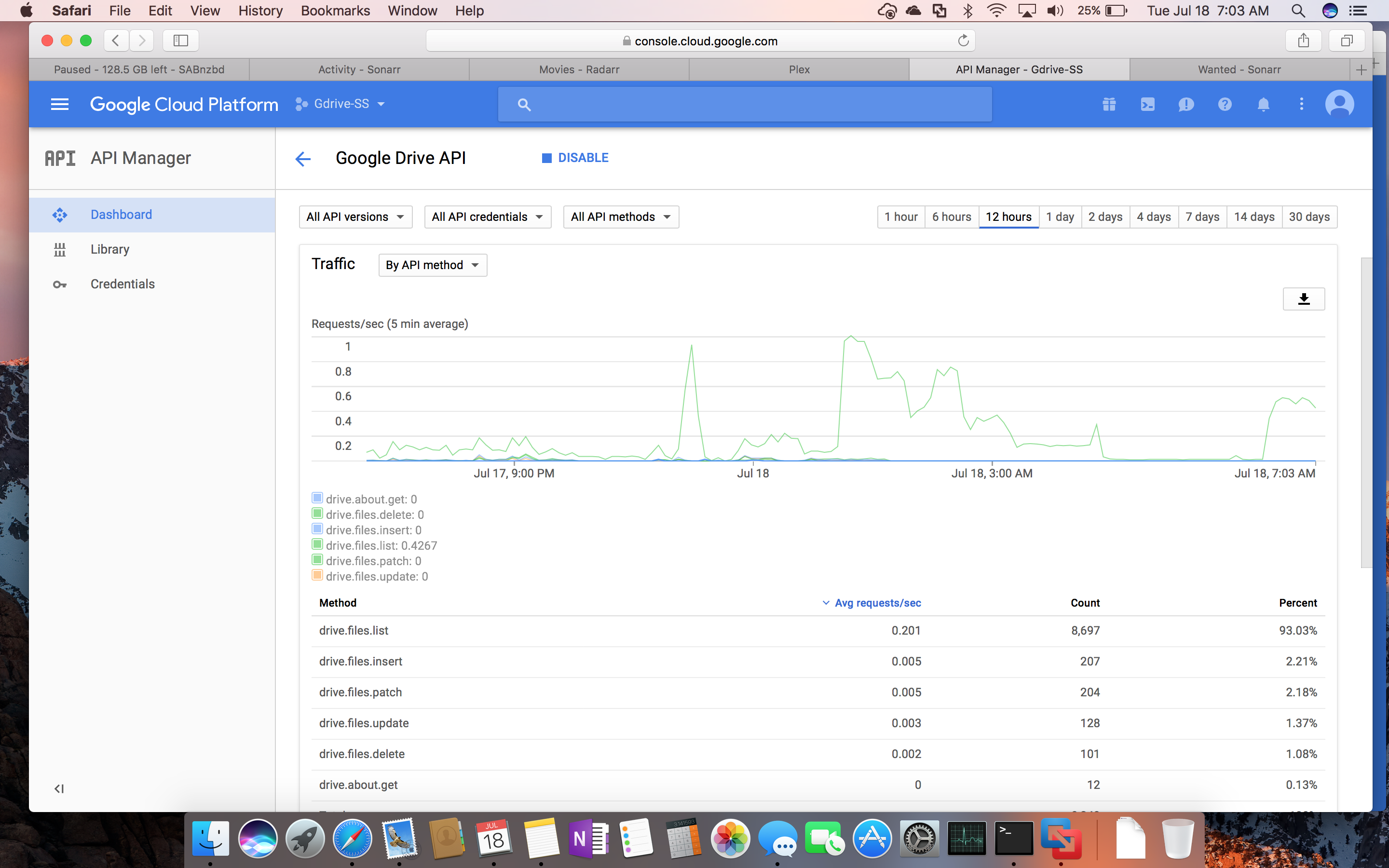
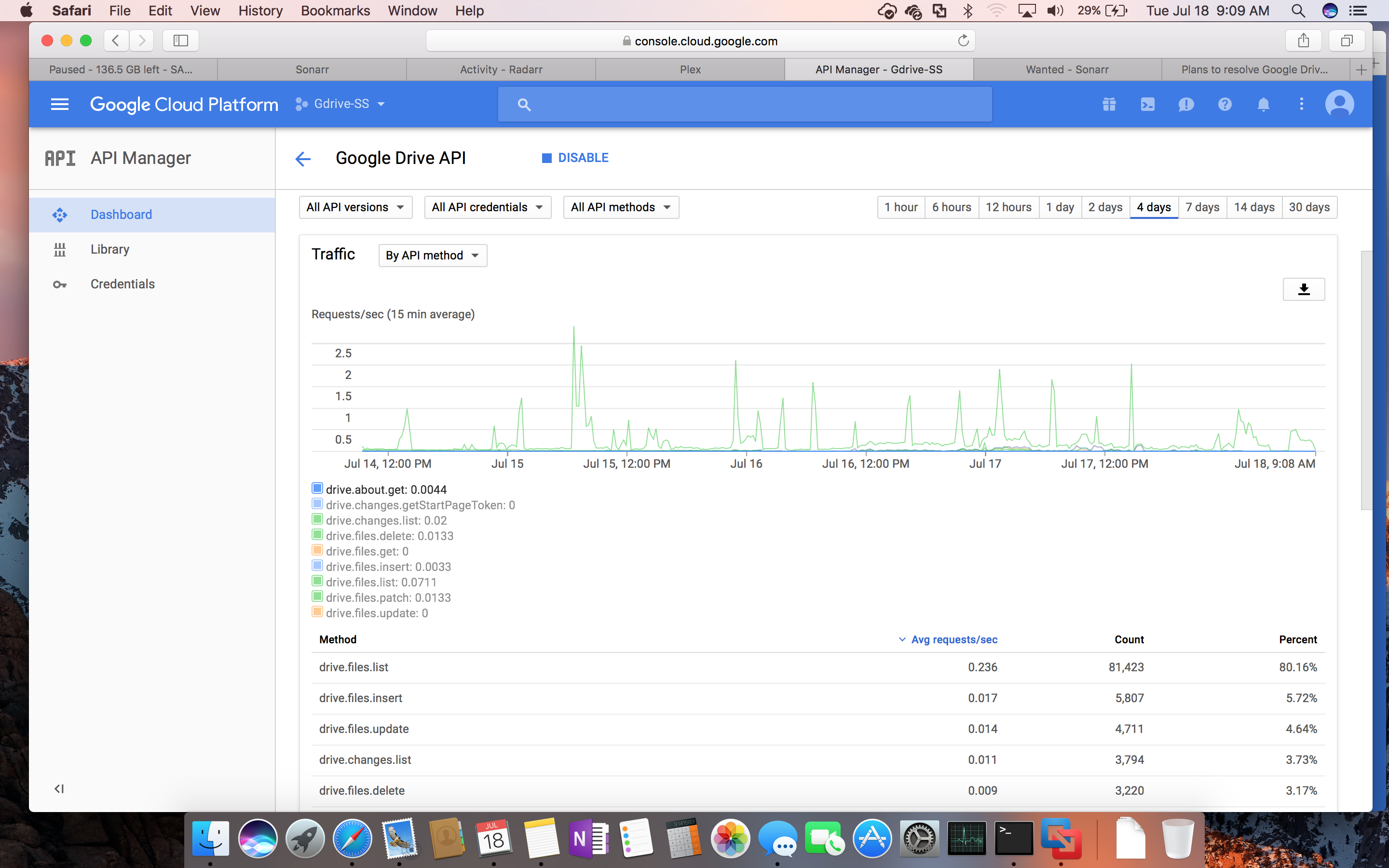
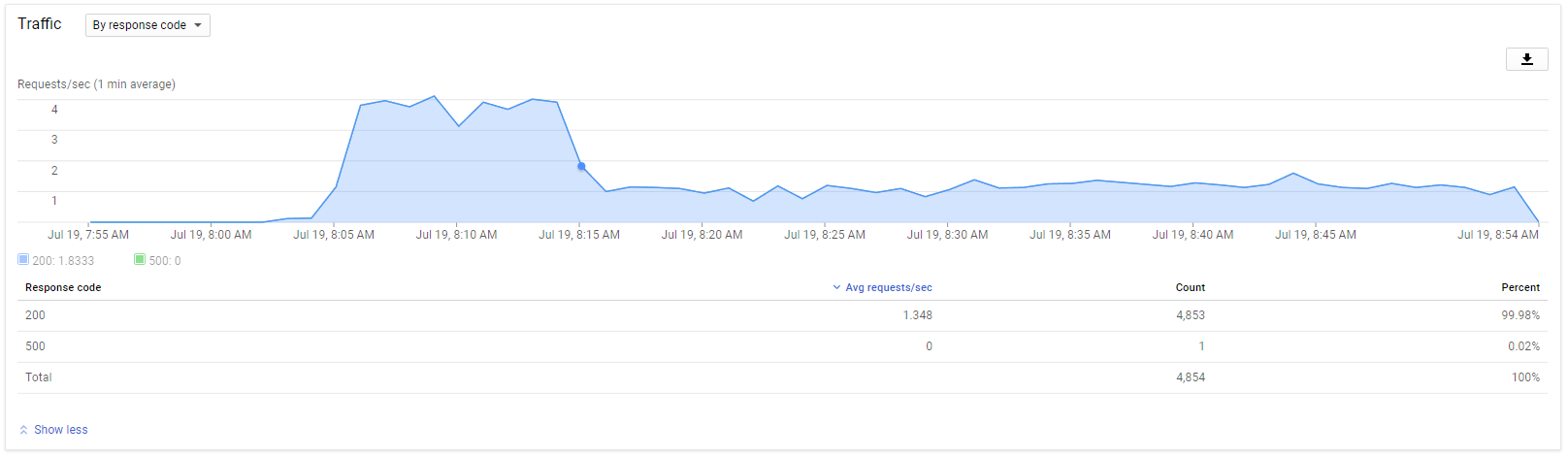
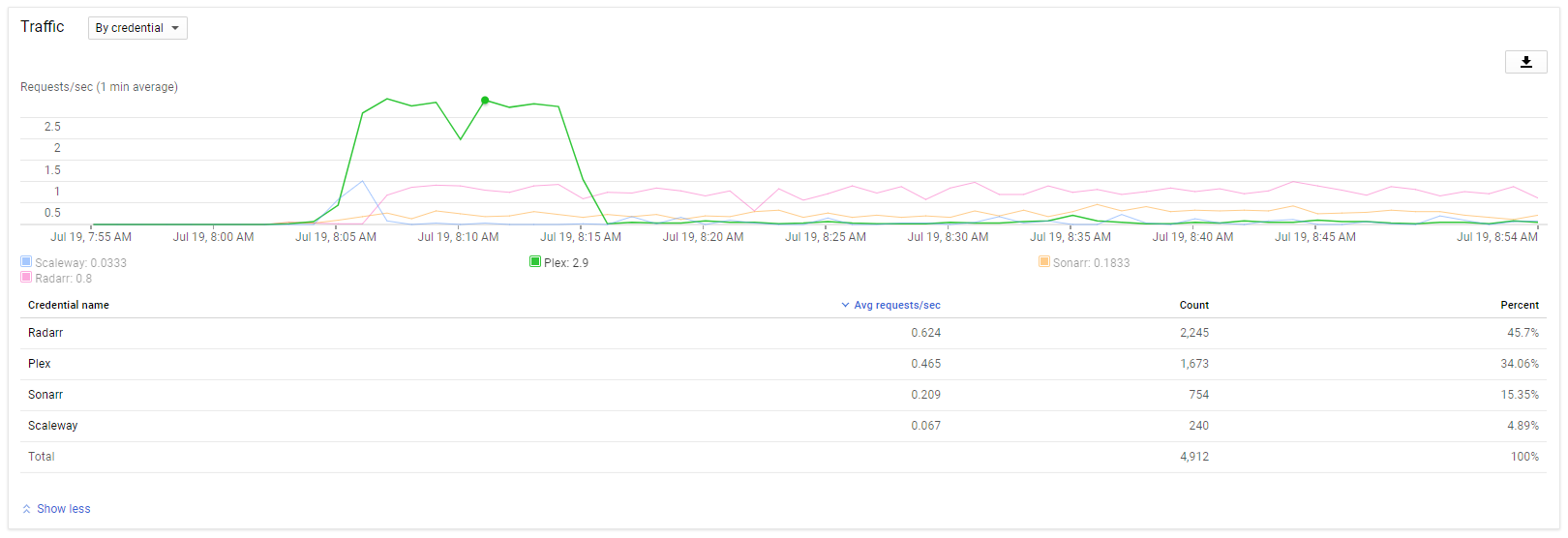
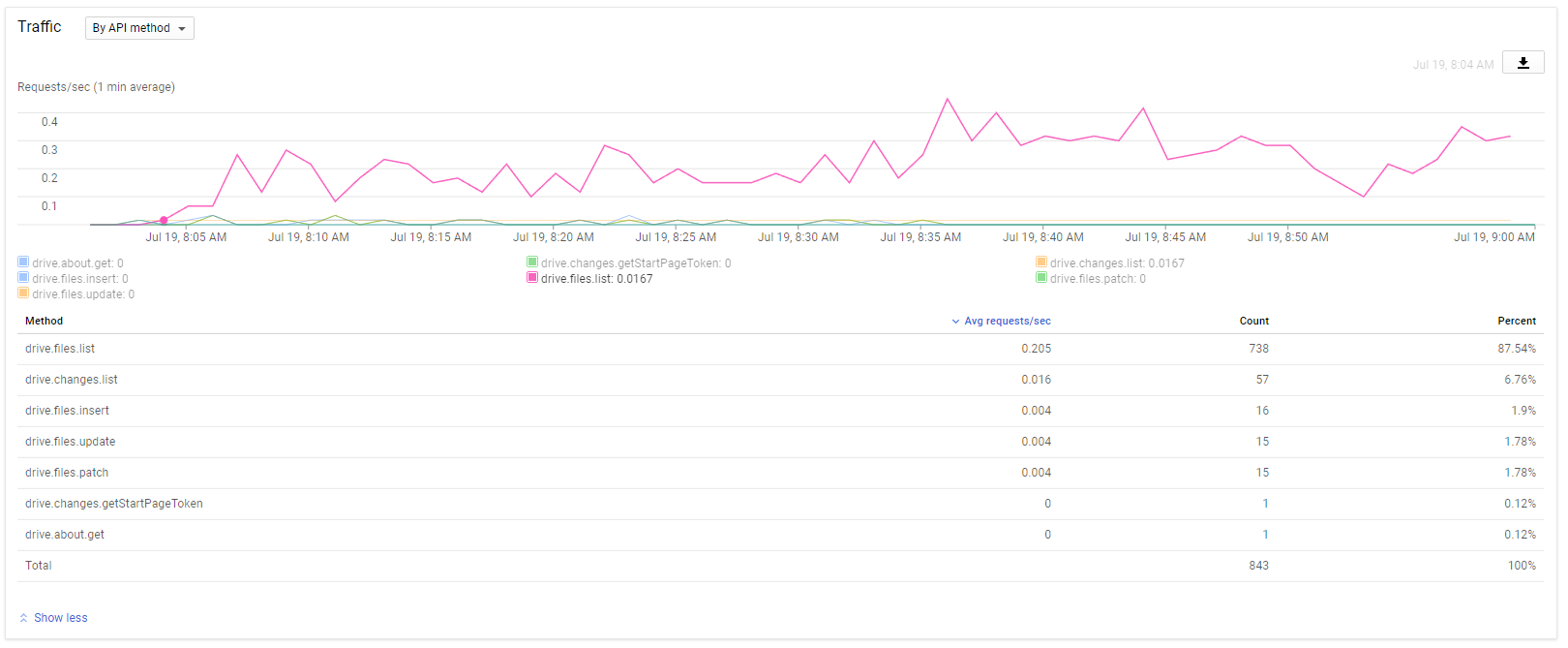
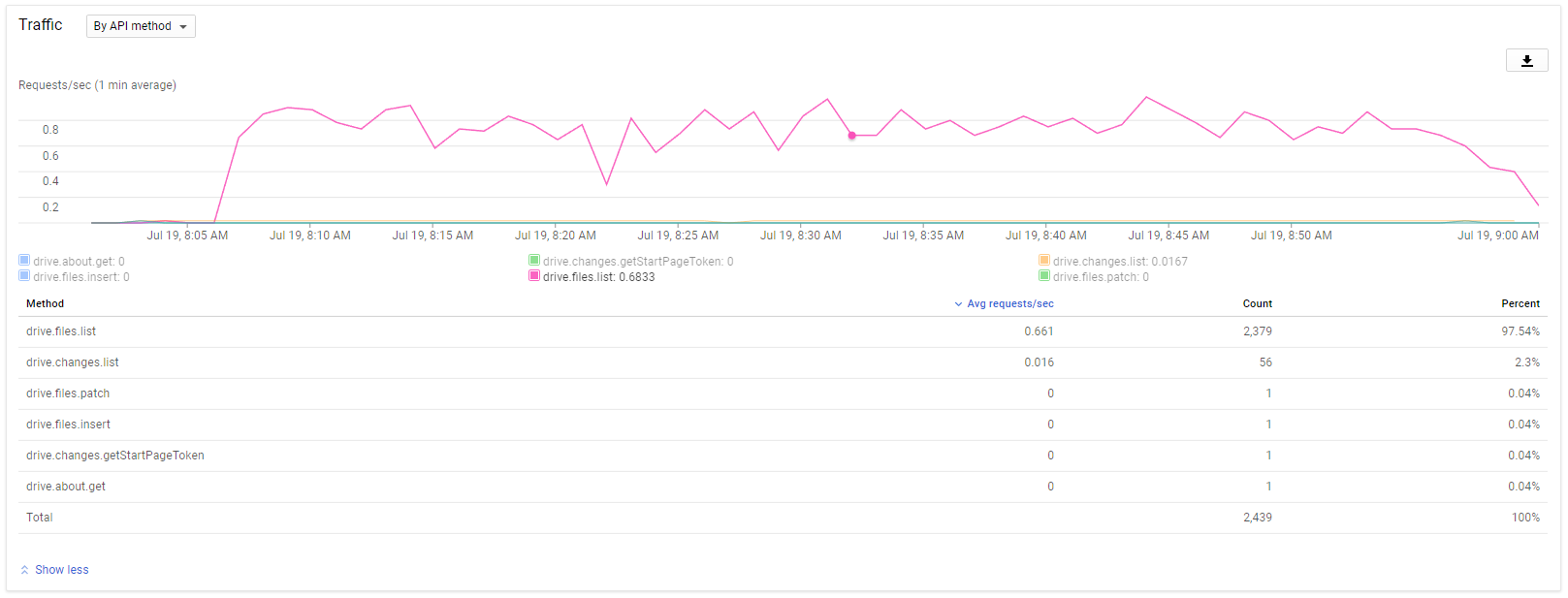
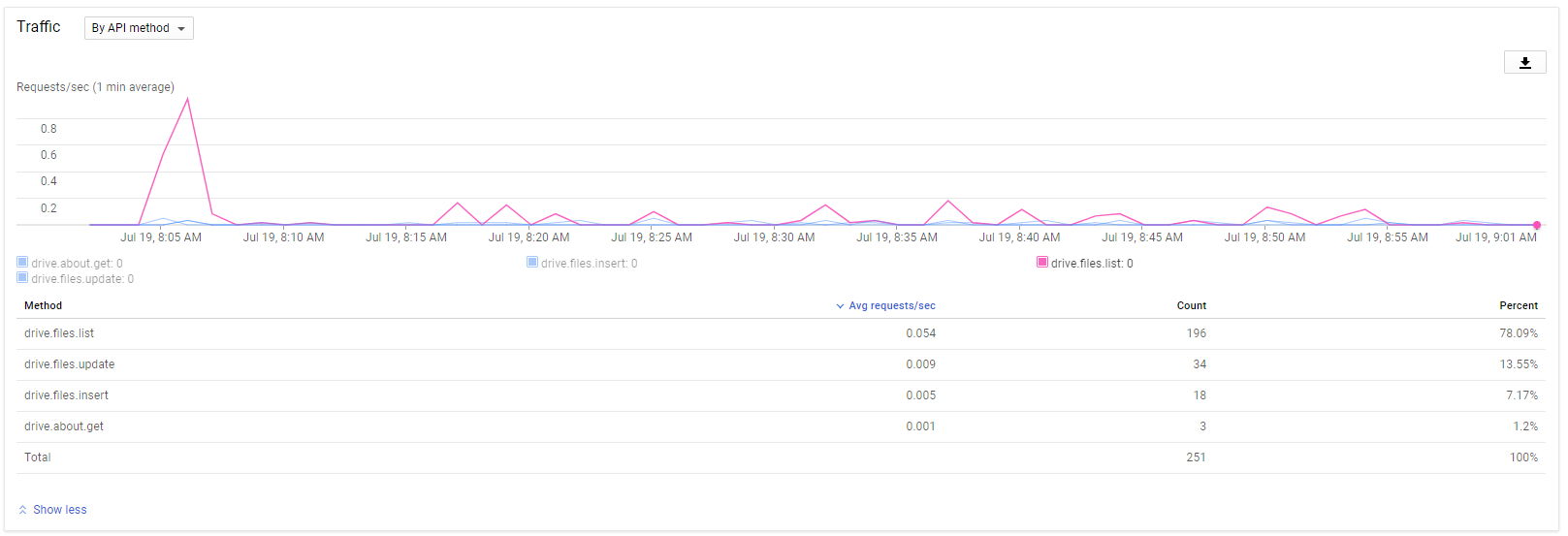
The google API graph shows my requests/sec holding at about 4/sec after the Plex Scanner started for about 15 minutes. Then it drops to below 1.
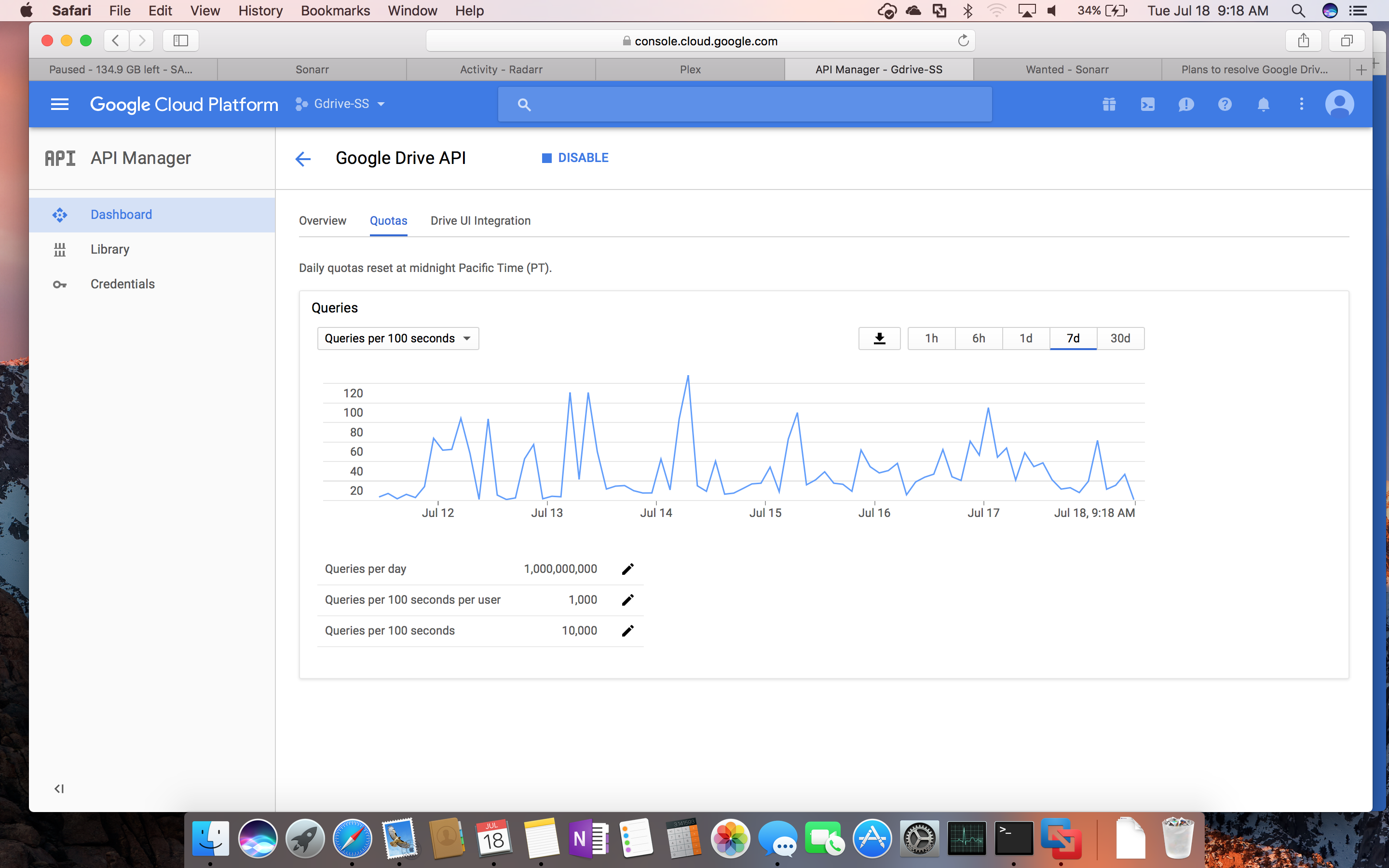
According to my quota, I should have 10req/s. Spiking to 4 should be well below the limit. What am I doing wrong?!?! I must be missing something. I’m getting very frustrated. Any ideas? Could it be the burst? I’m not seeing how I could reach 1000req/100s with the values that I used, even if both VPS servers were trying to maximize their pipe.
Sound to me that this might be the burst. I been running all three plex, sonarr and radarr scans at the same time on tpslimit 10 without a ban. It is a drive ban and not an API one, so watching the API usage only gives you an indication on how hard you are pushing it. It also averages out the graphs so its not easy to see if there has been any big spikes. tpslimit 4&3 should be more than fine, try removing the burst.
I have just tried the tpslimit and got banned. Can someone tell me where i’m going wrong?
Command line i’m using = rclone mount --read-only --allow-other --tpslimit 3 Encrypted:/Plex /mnt/Plex &
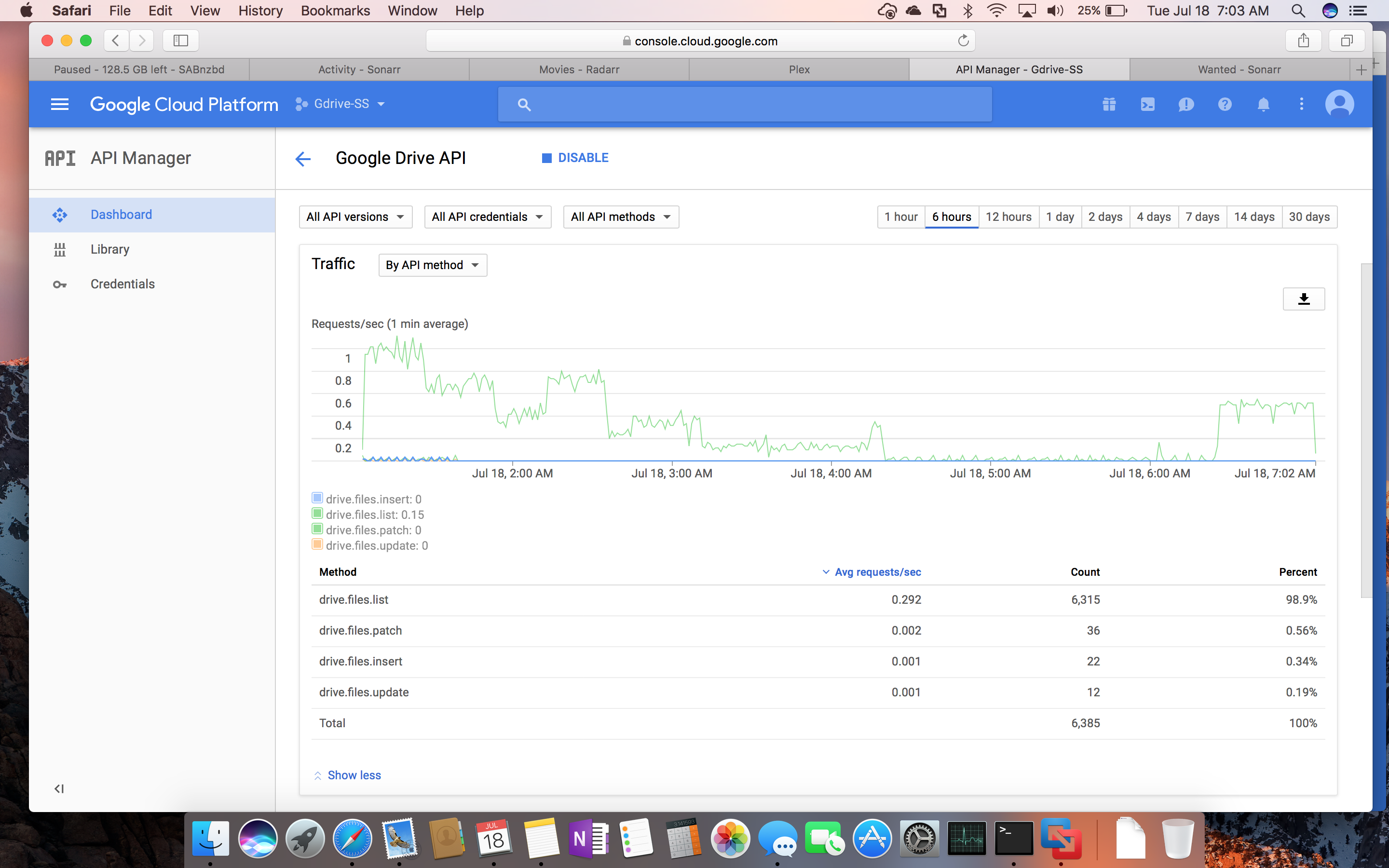
My ban has been lifted again, and I have lowered both servers to tpslimit 1. I’m nervous that we are missing something. A Sonarr scan is running right now, and the Google console is showing 60-90 req/100 sec right now. Of course, according to the console graph, I never should have gotten banned… It has never shown anywhere near 1000 req/100 sec… If I get banned again, I’m going to have to stop beta testing this until others figure it out.
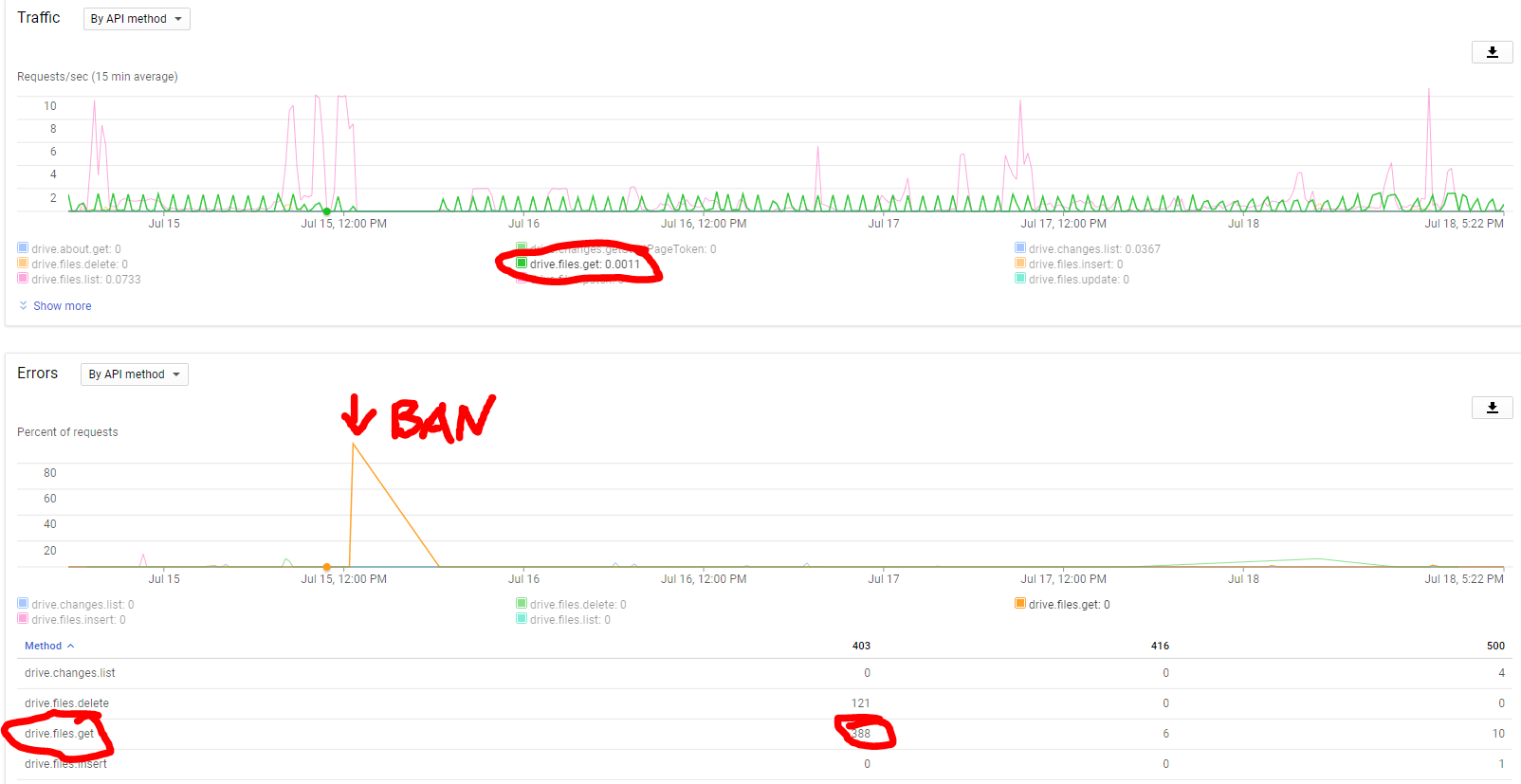
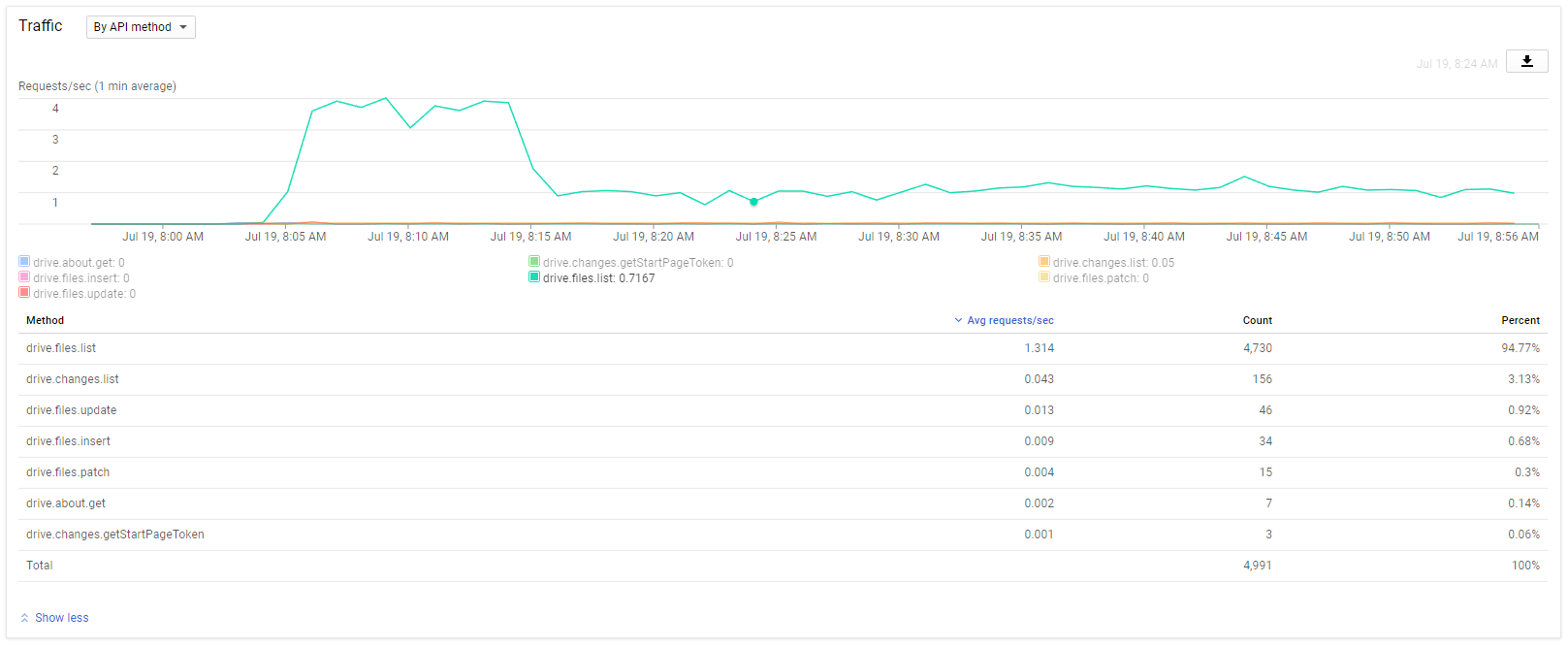
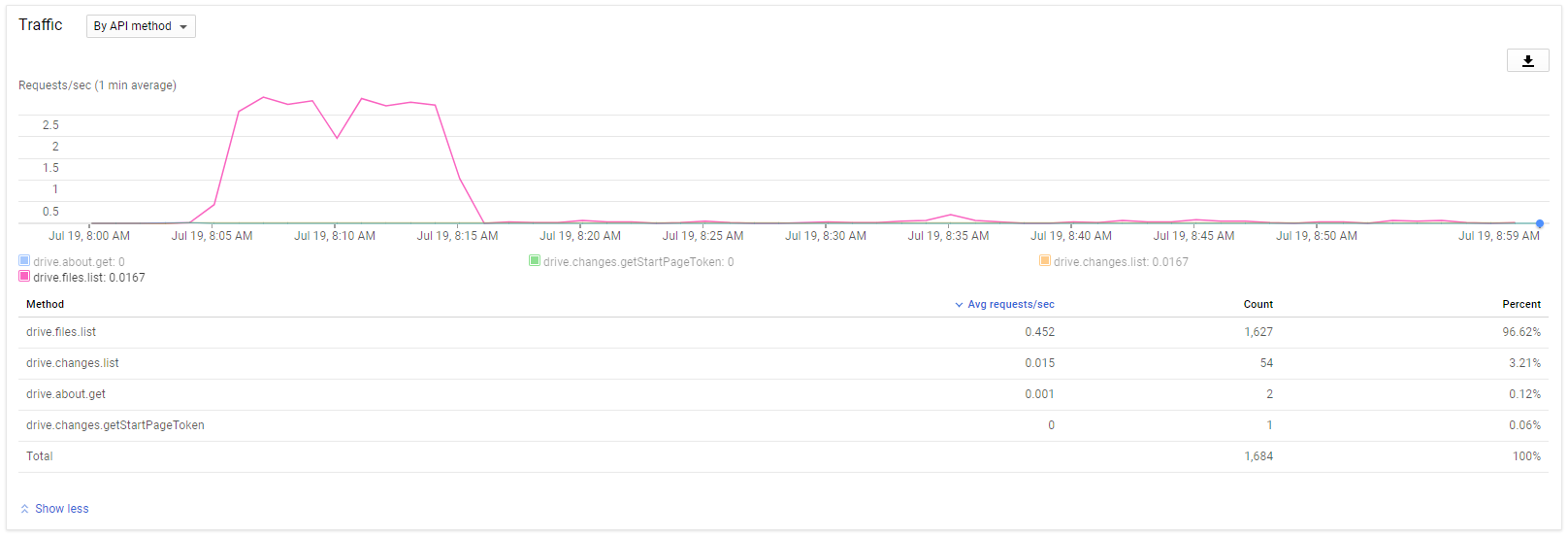
Could you post a screenshot of your API, with traffic “By API method” and the drive.file.get graph highlighted? Maybe we can draw some conclusions. There might be some parameters for the lockout we are not seeing.
I’m done testing for now… 4th ban in 4 days… Maybe I will feel a little more adventurous again soon, but right now I am too frustrated and beaten down by the Google hammer. I assume it was the Plex Scanner again last night. I’ll grab some screenshots of the console graph. I’ve added new media each day, which probably makes the scans do more work. The solution needs to work always though. aj, you must be doing ok because of your higher API limit.
Man, did I want this to work! It worked so well during the brief times of not being banned, and it is so nice having a single tool instead of combining multiple tools with a bunch of cron scripts to work around their various limitations!
Yes. I just double checked my config file and they are both using the same client_id and client_secret which match to the OAuth 2.0 information. I only have 1 OAuth credential created.
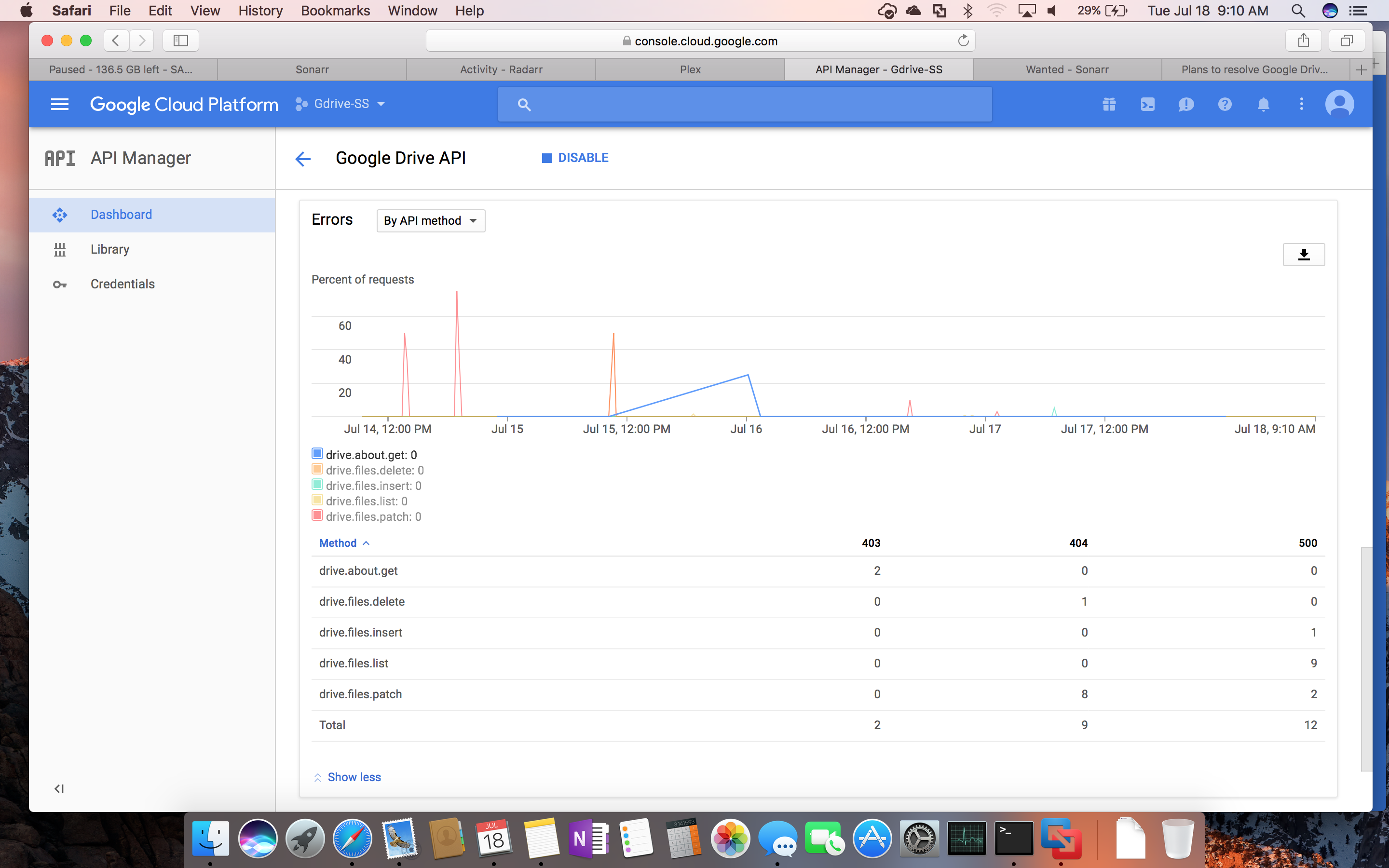
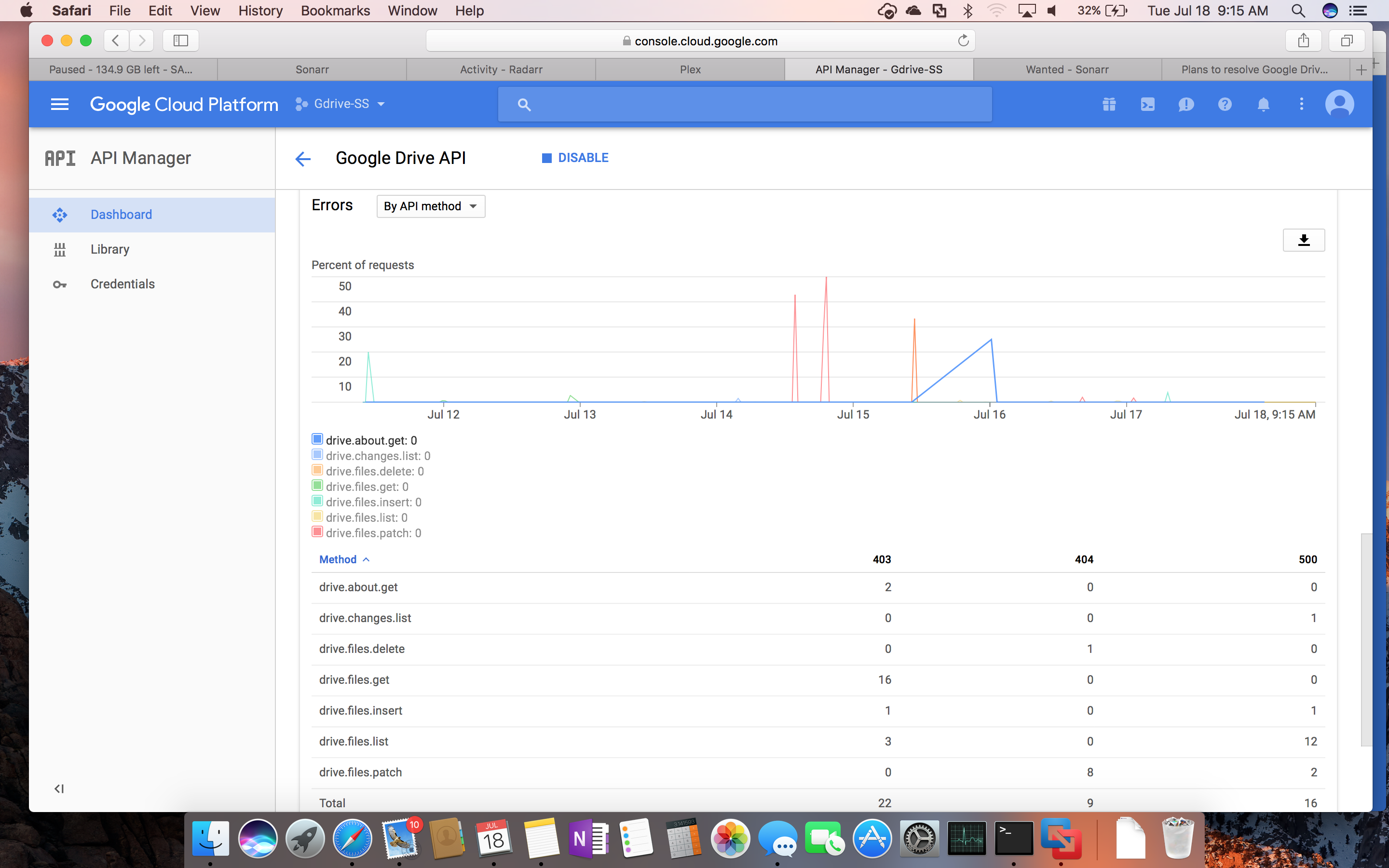
I can’t explain it… Once I get banned, my activity obviously drops off for the day. However, the rclone log file is full of 403 errors this morning. So, something is definitely strange since they don’t seem to show on the graph.
Could the retries be exacerbating the issue? Does the retry code respect the tpslimit parameter?
Sample from log:
2017/07/18 04:42:58 ERROR : TV/Star Trek- The Next Generation/Season 3/Star Trek- The Next Generation - S03E02 - The Ensigns of Command Bluray-1080p.mkv: ReadFileHandle.Read error: low level retry 2/12: bad response: 403: 403 Forbidden
2017/07/18 04:42:59 ERROR : TV/Star Trek- The Next Generation/Season 3/Star Trek- The Next Generation - S03E02 - The Ensigns of Command Bluray-1080p.mkv: ReadFileHandle.Read error: low level retry 3/12: bad response: 403: 403 Forbidden
2017/07/18 04:43:00 ERROR : TV/Star Trek- The Next Generation/Season 3/Star Trek- The Next Generation - S03E02 - The Ensigns of Command Bluray-1080p.mkv: ReadFileHandle.Read error: low level retry 4/12: bad response: 403: 403 Forbidden
2017/07/18 04:43:01 ERROR : TV/Star Trek- The Next Generation/Season 3/Star Trek- The Next Generation - S03E02 - The Ensigns of Command Bluray-1080p.mkv: ReadFileHandle.Read error: low level retry 5/12: bad response: 403: 403 Forbidden
2017/07/18 04:43:02 ERROR : TV/Star Trek- The Next Generation/Season 3/Star Trek- The Next Generation - S03E02 - The Ensigns of Command Bluray-1080p.mkv: ReadFileHandle.Read error: low level retry 6/12: bad response: 403: 403 Forbidden
2017/07/18 04:43:03 ERROR : TV/Star Trek- The Next Generation/Season 3/Star Trek- The Next Generation - S03E02 - The Ensigns of Command Bluray-1080p.mkv: ReadFileHandle.Read error: low level retry 7/12: bad response: 403: 403 Forbidden
2017/07/18 04:43:04 ERROR : TV/Star Trek- The Next Generation/Season 3/Star Trek- The Next Generation - S03E02 - The Ensigns of Command Bluray-1080p.mkv: ReadFileHandle.Read error: low level retry 8/12: bad response: 403: 403 Forbidden
2017/07/18 04:43:05 ERROR : TV/Star Trek- The Next Generation/Season 3/Star Trek- The Next Generation - S03E02 - The Ensigns of Command Bluray-1080p.mkv: ReadFileHandle.Read error: low level retry 9/12: bad response: 403: 403 Forbidden
2017/07/18 04:43:06 ERROR : TV/Star Trek- The Next Generation/Season 3/Star Trek- The Next Generation - S03E02 - The Ensigns of Command Bluray-1080p.mkv: ReadFileHandle.Read error: low level retry 10/12: bad response: 403: 403 Forbidden
2017/07/18 04:43:07 ERROR : TV/Star Trek- The Next Generation/Season 3/Star Trek- The Next Generation - S03E02 - The Ensigns of Command Bluray-1080p.mkv: ReadFileHandle.Read error: low level retry 11/12: bad response: 403: 403 Forbidden
2017/07/18 04:43:08 ERROR : TV/Star Trek- The Next Generation/Season 3/Star Trek- The Next Generation - S03E02 - The Ensigns of Command Bluray-1080p.mkv: ReadFileHandle.Read error: low level retry 12/12: bad response: 403: 403 Forbidden
2017/07/18 04:43:09 ERROR : TV/Star Trek- The Next Generation/Season 3/Star Trek- The Next Generation - S03E02 - The Ensigns of Command Bluray-1080p.mkv: ReadFileHandle.Read error: bad response: 403: 403 Forbidden
2017/07/18 04:43:09 ERROR : TV/Star Trek- The Next Generation/Season 3/Star Trek- The Next Generation - S03E02 - The Ensigns of Command Bluray-1080p.mkv: ReadFileHandle.Read error: low level retry 1/12: stream abandoned
2017/07/18 04:43:10 ERROR : TV/Star Trek- The Next Generation/Season 3/Star Trek- The Next Generation - S03E02 - The Ensigns of Command Bluray-1080p.mkv: ReadFileHandle.Read error: low level retry 2/12: bad response: 403: 403 Forbidden
2017/07/18 04:43:11 ERROR : TV/Star Trek- The Next Generation/Season 3/Star Trek- The Next Generation - S03E02 - The Ensigns of Command Bluray-1080p.mkv: ReadFileHandle.Read error: low level retry 3/12: bad response: 403: 403 Forbidden
2017/07/18 04:43:12 ERROR : TV/Star Trek- The Next Generation/Season 3/Star Trek- The Next Generation - S03E02 - The Ensigns of Command Bluray-1080p.mkv: ReadFileHandle.Read error: low level retry 4/12: bad response: 403: 403 Forbidden
2017/07/18 04:43:13 ERROR : TV/Star Trek- The Next Generation/Season 3/Star Trek- The Next Generation - S03E02 - The Ensigns of Command Bluray-1080p.mkv: ReadFileHandle.Read error: low level retry 5/12: bad response: 403: 403 Forbidden
2017/07/18 04:43:14 ERROR : TV/Star Trek- The Next Generation/Season 3/Star Trek- The Next Generation - S03E02 - The Ensigns of Command Bluray-1080p.mkv: ReadFileHandle.Read error: low level retry 6/12: bad response: 403: 403 Forbidden
2017/07/18 04:43:15 ERROR : TV/Star Trek- The Next Generation/Season 3/Star Trek- The Next Generation - S03E02 - The Ensigns of Command Bluray-1080p.mkv: ReadFileHandle.Read error: low level retry 7/12: bad response: 403: 403 Forbidden
2017/07/18 04:43:16 ERROR : TV/Star Trek- The Next Generation/Season 3/Star Trek- The Next Generation - S03E02 - The Ensigns of Command Bluray-1080p.mkv: ReadFileHandle.Read error: low level retry 8/12: bad response: 403: 403 Forbidden
2017/07/18 04:43:17 ERROR : TV/Star Trek- The Next Generation/Season 3/Star Trek- The Next Generation - S03E02 - The Ensigns of Command Bluray-1080p.mkv: ReadFileHandle.Read error: low level retry 9/12: bad response: 403: 403 Forbidden
2017/07/18 04:43:18 ERROR : TV/Star Trek- The Next Generation/Season 3/Star Trek- The Next Generation - S03E02 - The Ensigns of Command Bluray-1080p.mkv: ReadFileHandle.Read error: low level retry 10/12: bad response: 403: 403 Forbidden
2017/07/18 04:43:19 ERROR : TV/Star Trek- The Next Generation/Season 3/Star Trek- The Next Generation - S03E02 - The Ensigns of Command Bluray-1080p.mkv: ReadFileHandle.Read error: low level retry 11/12: bad response: 403: 403 Forbidden
2017/07/18 04:43:21 ERROR : TV/Star Trek- The Next Generation/Season 3/Star Trek- The Next Generation - S03E02 - The Ensigns of Command Bluray-1080p.mkv: ReadFileHandle.Read error: low level retry 12/12: bad response: 403: 403 Forbidden
2017/07/18 04:43:23 ERROR : TV/Star Trek- The Next Generation/Season 3/Star Trek- The Next Generation - S03E02 - The Ensigns of Command Bluray-1080p.mkv: ReadFileHandle.Read error: bad response: 403: 403 Forbidden
2017/07/18 04:43:23 ERROR : TV/Star Trek- The Next Generation/Season 3/Star Trek- The Next Generation - S03E02 - The Ensigns of Command Bluray-1080p.mkv: ReadFileHandle.Read error: low level retry 1/12: stream abandoned
2017/07/18 04:43:24 ERROR : TV/Star Trek- The Next Generation/Season 3/Star Trek- The Next Generation - S03E02 - The Ensigns of Command Bluray-1080p.mkv: ReadFileHandle.Read error: low level retry 2/12: bad response: 403: 403 Forbidden
2017/07/18 04:43:25 ERROR : TV/Star Trek- The Next Generation/Season 3/Star Trek- The Next Generation - S03E02 - The Ensigns of Command Bluray-1080p.mkv: ReadFileHandle.Read error: low level retry 3/12: bad response: 403: 403 Forbidden
2017/07/18 04:43:26 ERROR : TV/Star Trek- The Next Generation/Season 3/Star Trek- The Next Generation - S03E02 - The Ensigns of Command Bluray-1080p.mkv: ReadFileHandle.Read error: low level retry 4/12: bad response: 403: 403 Forbidden
2017/07/18 04:43:27 ERROR : TV/Star Trek- The Next Generation/Season 3/Star Trek- The Next Generation - S03E02 - The Ensigns of Command Bluray-1080p.mkv: ReadFileHandle.Read error: low level retry 5/12: bad response: 403: 403 Forbidden
2017/07/18 04:43:28 ERROR : TV/Star Trek- The Next Generation/Season 3/Star Trek- The Next Generation - S03E02 - The Ensigns of Command Bluray-1080p.mkv: ReadFileHandle.Read error: low level retry 6/12: bad response: 403: 403 Forbidden
2017/07/18 04:43:29 ERROR : TV/Star Trek- The Next Generation/Season 3/Star Trek- The Next Generation - S03E02 - The Ensigns of Command Bluray-1080p.mkv: ReadFileHandle.Read error: low level retry 7/12: bad response: 403: 403 Forbidden
2017/07/18 04:43:30 ERROR : TV/Star Trek- The Next Generation/Season 3/Star Trek- The Next Generation - S03E02 - The Ensigns of Command Bluray-1080p.mkv: ReadFileHandle.Read error: low level retry 8/12: bad response: 403: 403 Forbidden
2017/07/18 04:43:31 ERROR : TV/Star Trek- The Next Generation/Season 3/Star Trek- The Next Generation - S03E02 - The Ensigns of Command Bluray-1080p.mkv: ReadFileHandle.Read error: low level retry 9/12: bad response: 403: 403 Forbidden
2017/07/18 04:43:32 ERROR : TV/Star Trek- The Next Generation/Season 3/Star Trek- The Next Generation - S03E02 - The Ensigns of Command Bluray-1080p.mkv: ReadFileHandle.Read error: low level retry 10/12: bad response: 403: 403 Forbidden
2017/07/18 04:43:33 ERROR : TV/Star Trek- The Next Generation/Season 3/Star Trek- The Next Generation - S03E02 - The Ensigns of Command Bluray-1080p.mkv: ReadFileHandle.Read error: low level retry 11/12: bad response: 403: 403 Forbidden
2017/07/18 04:43:34 ERROR : TV/Star Trek- The Next Generation/Season 3/Star Trek- The Next Generation - S03E02 - The Ensigns of Command Bluray-1080p.mkv: ReadFileHandle.Read error: low level retry 12/12: bad response: 403: 403 Forbidden
2017/07/18 04:43:35 ERROR : TV/Star Trek- The Next Generation/Season 3/Star Trek- The Next Generation - S03E02 - The Ensigns of Command Bluray-1080p.mkv: ReadFileHandle.Read error: bad response: 403: 403 Forbidden
Create two credetials, vps1 and vps2, that way you can monitor the two more in detail. I would also add two new entries in the config/tokens just to be sure.
I don’t know what more to say, your rclone log shows 24 bad requests while google only have 16.
Yeah… I will try that… And that was only a very small sample of the log. It is LOADED with low-level retries and 403 errors. Thanks for the suggestion.
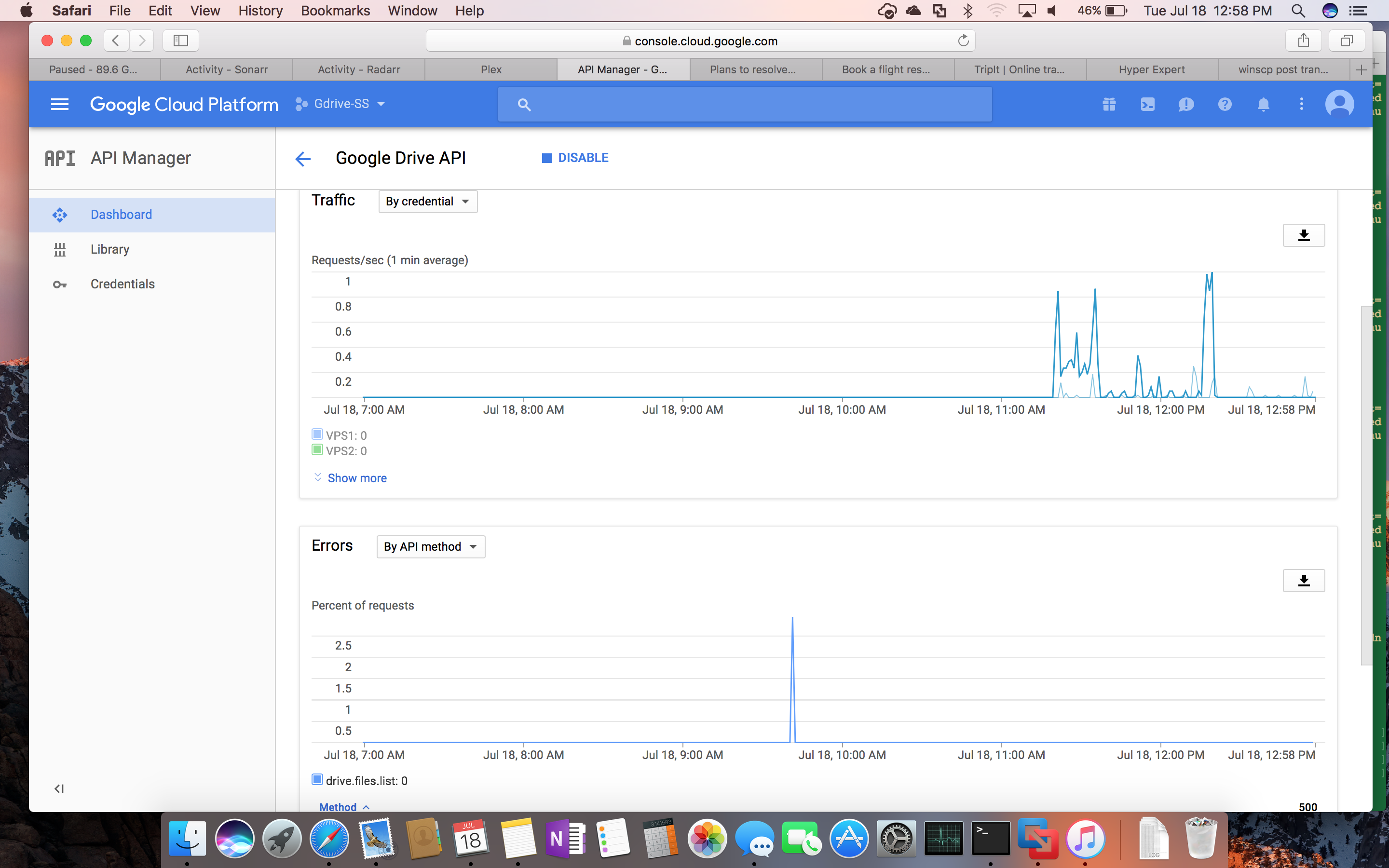
I created 2 new OAuth credentials and deleted the old one (just in case). I am not seeing any errors in the graphs still. I am banned currently… Here is a DEBUG level log from rclone when I ran mkvinfo against a movie file. Interesting that rclone doesn’t return an error at all. mkvinfo thinks it is just an empty file. I know that ncw said that this is related to a different fix, but this does not seem functionally right to me. I think it should be a bug.
So, even though the DEBUG log says “403 Forbidden”, the Google graph is not showing ANY 403 errors. I am 100% certain that I am using the new credentials since I can now filter between the two and the old one is gone. This is very strange…
There is only 1 500 error and that was before I created the new credentials… You can see when they started.
Did you fetch new tokens for these credentials, or just add them to an existing one?
Sound to me and looks like as its still using the old token.
Tokens contain the credentials so if you just add the credentials to the config entry it will still use the old ones if you don’t refresh it.
Delete the config entries completly and create new ones from scratch.
You mean did I get a new verification code for each from Google? If so, then yes. I updated the rclone config for each and reauthenticated with Google for each.
For comparison this is me running the worst case scenario:
I do have a 10000req/100sec/user API, but I dont think it matters for the drive lockout.
The drive is a $10 ebay school one.
Plex:
rclone mount --tpslimit 5 --allow-other --log-level DEBUG PlexG3: /media/Plex/
Scanning, added a new library so it has something new to scan
Sonarr:
rclone mount --tpslimit 2 --bwlimit 25M --log-level DEBUG SonarrG3: /media/Sonarr/
Refresh series plus moving new from local to google
Radarr:
rclone mount --tpslimit 2 --bwlimit 25M --log-level DEBUG RadarrG3: /media/Radarr/
Refresh movies plus moving new from local to google
Scaleway VPS:
while true
do
rclone sync --exclude “~" --log-level INFO --stats 10s --bwlimit 50M --tpslimit 2 GoogleG3:/ GoogleAJ:/PMS/
rclone sync --exclude "~” --log-level INFO --stats 10s --bwlimit 50M --tpslimit 2 --max-size 40G GoogleG3:/ AmazonUK3:/
done
Loop syncing files from Google to backup Amazon + Google #2