After successfully updating the token using `rclone config reconnect oneDrive:`, it is only valid for 1 hour. After 1 hour, executing `rclone lsd oneDrive:` results in an error:
`2025/09/21 20:43:52 CRITICAL: Failed to create file system for destination "oneDrive:": failed to get root: Get "https://graph.microsoft.com/v1.0/drives/xxxxxxxxx/root": couldn't fetch token: invalid_grant: maybe token expired? - try refreshing with "rclone config reconnect oneDrive:"`
D:\>rclone config reconnect oneDrive:
Already have a token - refresh?
y) Yes (default)
n) No
y/n>

Use web browser to automatically authenticate rclone with remote?
 * Say Y if the machine running rclone has a web browser you can use
 * Say N if running rclone on a (remote) machine without web browser access
If not sure try Y. If Y failed, try N.

y) Yes (default)
n) No
y/n> n

Option config_token.
For this to work, you will need rclone available on a machine that has
a web browser available.
For more help and alternate methods see: https://rclone.org/remote_setup/
Execute the following on the machine with the web browser (same rclone
version recommended):
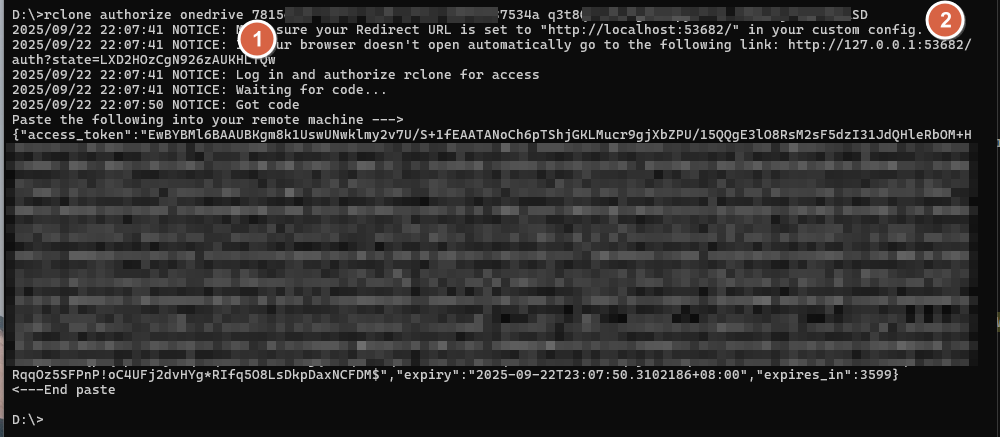
        rclone authorize "onedrive" "eyJkxxxxxwifQ"
Then paste the result.
Enter a value.
config_token> {"access_token":"EwBYxxxxxDM$","expiry":"2025-09-22T23:07:50.3102186+08:00","expires_in":3599}

Option config_type.
Type of connection
Choose a number from below, or type in an existing value of type string.
Press Enter for the default (onedrive).
 1 / OneDrive Personal or Business
   \ (onedrive)
 2 / Root Sharepoint site
   \ (sharepoint)
   / Sharepoint site name or URL
 3 | E.g. mysite or https://contoso.sharepoint.com/sites/mysite
   \ (url)
 4 / Search for a Sharepoint site
   \ (search)
 5 / Type in driveID (advanced)
   \ (driveid)
 6 / Type in SiteID (advanced)
   \ (siteid)
   / Sharepoint server-relative path (advanced)
 7 | E.g. /teams/hr
   \ (path)
config_type> 1

Option config_driveid.
Select drive you want to use
Choose a number from below, or type in your own value of type string.
Press Enter for the default (80xxxxx19).
 1 / OneDrive (personal)
   \ (80xxxxx19)
 2 / Bundles_b89xxxxxad7 (personal)
   \ (80xxxxx19)
 3 / AEEExxxxx500 (personal)
   \ (b!ZExxxxxeNX)
 4 / ODCMetadataArchive (personal)
   \ (b!ZExxxxx7oe)
config_driveid>

Drive OK?

Found drive "root" of type "personal"
URL: https://onedrive.live.com?cid=80xxxxx19&id=014xxxxxRRZ

y) Yes (default)
n) No
y/n>


D:\>
Storage> 38

Option client_id.
OAuth Client Id.
Leave blank normally.
Enter a value. Press Enter to leave empty.
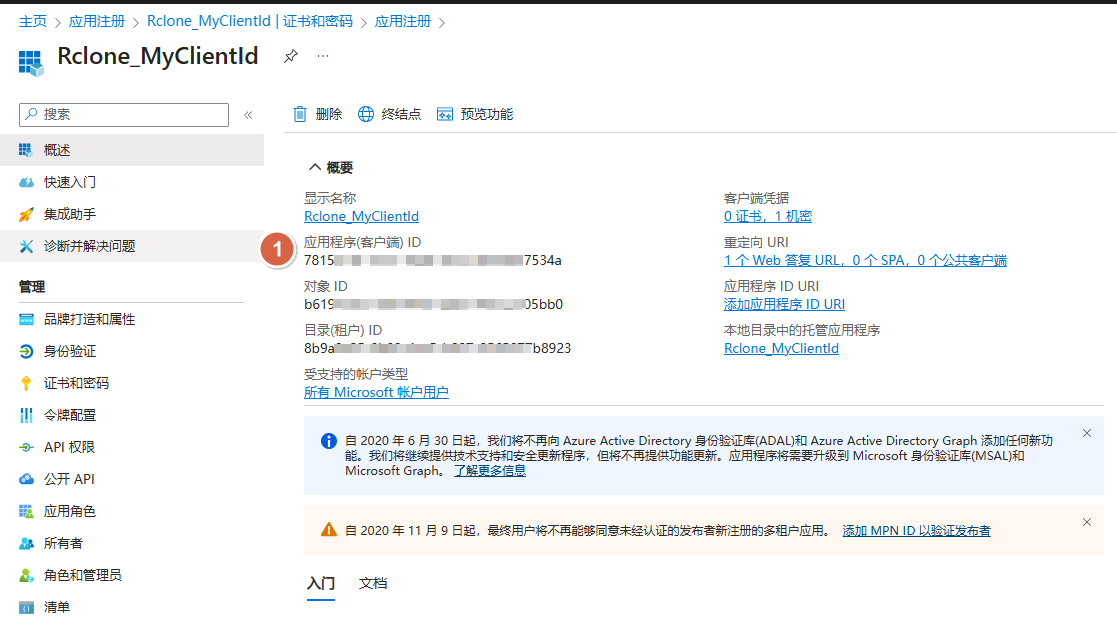
client_id> 781xxxxx34a

Option client_secret.
OAuth Client Secret.
Leave blank normally.
Enter a value. Press Enter to leave empty.
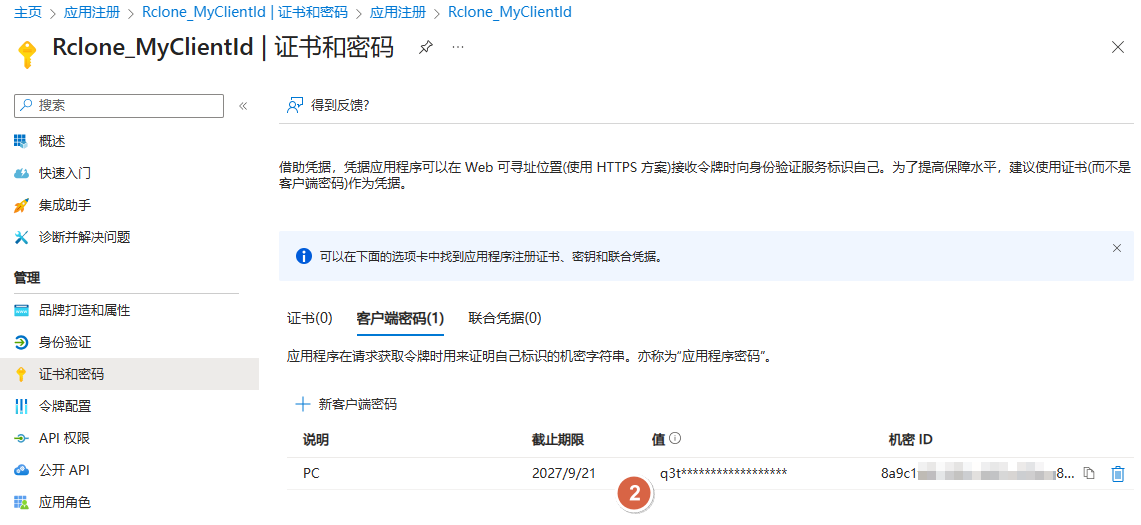
client_secret> q3t8xxxxxSD

Option region.
Choose national cloud region for OneDrive.
Choose a number from below, or type in your own value of type string.
Press Enter for the default (global).
 1 / Microsoft Cloud Global
   \ (global)
 2 / Microsoft Cloud for US Government
   \ (us)
 3 / Microsoft Cloud Germany (deprecated - try global region first).
   \ (de)
 4 / Azure and Office 365 operated by Vnet Group in China
   \ (cn)
region> 1

Option tenant.
ID of the service principal's tenant. Also called its directory ID.
Set this if using
- Client Credential flow
Enter a value. Press Enter to leave empty.
tenant> 8b9xxxxx923

Edit advanced config?
y) Yes
n) No (default)
y/n>

Use web browser to automatically authenticate rclone with remote?
 * Say Y if the machine running rclone has a web browser you can use
 * Say N if running rclone on a (remote) machine without web browser access
If not sure try Y. If Y failed, try N.

y) Yes (default)
n) No
y/n>

2025/09/22 22:42:24 NOTICE: Make sure your Redirect URL is set to "http://localhost:53682/" in your custom config.
2025/09/22 22:42:24 NOTICE: If your browser doesn't open automatically go to the following link: http://127.0.0.1:53682/auth?state=xWJ7l3ISa_KwQgJsuDJujw
2025/09/22 22:42:24 NOTICE: Log in and authorize rclone for access
2025/09/22 22:42:24 NOTICE: Waiting for code...
2025/09/22 22:42:27 NOTICE: Got code
Option config_type.
Type of connection
Choose a number from below, or type in an existing value of type string.
Press Enter for the default (onedrive).
 1 / OneDrive Personal or Business
   \ (onedrive)
 2 / Root Sharepoint site
   \ (sharepoint)
   / Sharepoint site name or URL
 3 | E.g. mysite or https://contoso.sharepoint.com/sites/mysite
   \ (url)
 4 / Search for a Sharepoint site
   \ (search)
 5 / Type in driveID (advanced)
   \ (driveid)
 6 / Type in SiteID (advanced)
   \ (siteid)
   / Sharepoint server-relative path (advanced)
 7 | E.g. /teams/hr
   \ (path)
config_type> 1

Failed to query available drives: HTTP error 400 (400 Bad Request) returned body: "{\"error\":{\"code\":\"BadRequest\",\"message\":\"Tenant does not have a SPO license.\",\"innerError\":{\"date\":\"2025-09-22T14:42:52\",\"request-id\":\"93747cac-5766-42b6-982f-ad68e2b56670\",\"client-request-id\":\"93747cac-5766-42b6-982f-ad68e2b56670\"}}}"