Long hang after crypt copy SMB share (Synology)

STOP and READ USE THIS TEMPLATE NO EXCEPTIONS - By not using this, you waste your time, our time and really hate puppies. Please remove these two lines and that will confirm you have read them.

What is the problem you are having with rclone?

I'm seeing a very long delay after a large file reaches 100% when using the crypt backend writing to a mounted SMB share (mounted by Synology DSM and accessed via the local backend).

Environment:

  • Source: Synology DS923+ (DSM 7.2/7.4)

  • Destination: Synology DS213j (DSM 7.1)

  • 1 GbE network

  • Destination accessed as a DSM-mounted SMB share:


    /volume1/General/rclone_Vault
    
  • Crypt remote points to that mounted path.

The actual file transfer runs at approximately 80–85 MiB/s and reaches 100% in about 8–9 minutes.

However, after reaching 100%, rclone continues running for approximately another 5½ minutes. During this time the reported transfer speed gradually drops to zero.

The debug log then shows:

  • destination MD5 verified (md5 ... OK)
  • destination size verified (size ... OK)
  • Copied (replaced existing)

After these messages the command still does not return to the shell. It continues to run indefinitely until interrupted with Ctrl+C, even though the copy has completed successfully and the destination file is valid.

For comparison:

  • cp to the same mounted SMB share completes normally.
  • rclone copy to the same mounted SMB share (without crypt) also completes normally.
  • rclone using the SMB backend (instead of the mounted share) completes normally but only achieves around 14 MiB/s, so I am using the mounted SMB share for performance.

Is this expected behaviour when using the crypt backend on a mounted SMB filesystem, or could this indicate a bug during the final verification/cleanup stage? The attached debug log shows the transfer completing, MD5 verification succeeding, and Copied being logged, but the process never exits.

I plan to use this as a backup solution to the old 213j NAS as hyperbackup and rsync max out at 10-15MB/s, yet rclone has good throughput.

Run the command 'rclone version' and share the full output of the command.

sudo rclone version
rclone v1.74.3

  • os/version: unknown
  • os/kernel: 4.4.302+ (x86_64)
  • os/type: linux
  • os/arch: amd64
  • go/version: go1.26.4
  • go/linking: static
  • go/tags: none

Which cloud storage system are you using? (eg Google Drive)

The command you were trying to run (eg rclone copy /tmp remote:tmp)

time rclone copy \
    /volume1/General/tests/test39-7GB.mkv \
    ds213_crypt:benchmark \
    --inplace \
    --local-no-preallocate \
    --use-server-modtime \
    --progress

Please run 'rclone config redacted' and share the full output. If you get command not found, please make sure to update rclone.

Paste config [ds213]
type = smb
host = XXX
user = XXX
pass = XXX

[ds213_crypt]
type = crypt
remote = /volume1/General/rclone_Vault/rclone_crypt
password = XXX
password2 = XXX

A log from the command that you were trying to run with the -vv flag

sudo cat  /tmp/rclone-vv.log

2026/07/01 13:15:42 DEBUG : rclone: Version "v1.74.3" starting with parameters ["rclone" "copy" "/volume1/General/tests/test39-7GB.mkv" "ds213_crypt:benchmark" "--inplace" "--local-no-preallocate" "--use-server-modtime" "-vv" "--log-file=/tmp/rclone-vv.log"]
2026/07/01 13:15:42 DEBUG : Creating backend with remote "/volume1/General/tests/test39-7GB.mkv"
2026/07/01 13:15:42 DEBUG : Using config file from "/root/.config/rclone/rclone.conf"
2026/07/01 13:15:42 DEBUG : local: detected overridden config - adding "{lUE4q}" suffix to name
2026/07/01 13:15:42 DEBUG : fs cache: renaming child cache item "/volume1/General/tests/test39-7GB.mkv" to be canonical for parent "local{lUE4q}:/volume1/General/tests"
2026/07/01 13:15:42 DEBUG : Creating backend with remote "ds213_crypt:benchmark"
2026/07/01 13:15:42 DEBUG : Creating backend with remote "/volume1/General/rclone_Vault/rclone_crypt/5neg3m9alfqs934vbmvlqjo5oo"
2026/07/01 13:15:42 DEBUG : local: detected overridden config - adding "{lUE4q}" suffix to name
2026/07/01 13:15:42 DEBUG : fs cache: renaming cache item "/volume1/General/rclone_Vault/rclone_crypt/5neg3m9alfqs934vbmvlqjo5oo" to be canonical "local{lUE4q}:/volume1/General/rclone_Vault/rclone_crypt/5neg3m9alfqs934vbmvlqjo5oo"
2026/07/01 13:15:42 DEBUG : fs cache: switching user supplied name "/volume1/General/rclone_Vault/rclone_crypt/5neg3m9alfqs934vbmvlqjo5oo" for canonical name "local{lUE4q}:/volume1/General/rclone_Vault/rclone_crypt/5neg3m9alfqs934vbmvlqjo5oo"
2026/07/01 13:15:42 DEBUG : test39-7GB.mkv: Need to transfer - File not found at Destination
2026/07/01 13:16:13 DEBUG : rclone: Version "v1.74.3" starting with parameters ["rclone" "copy" "/volume1/General/tests/test39-7GB.mkv" "ds213_crypt:benchmark" "--inplace" "--local-no-preallocate" "--use-server-modtime" "-vv" "--log-file=/tmp/rclone-vv.log"]
2026/07/01 13:16:13 DEBUG : Creating backend with remote "/volume1/General/tests/test39-7GB.mkv"
2026/07/01 13:16:13 DEBUG : Using config file from "/root/.config/rclone/rclone.conf"
2026/07/01 13:16:13 DEBUG : local: detected overridden config - adding "{lUE4q}" suffix to name
2026/07/01 13:16:13 DEBUG : fs cache: renaming child cache item "/volume1/General/tests/test39-7GB.mkv" to be canonical for parent "local{lUE4q}:/volume1/General/tests"
2026/07/01 13:16:13 DEBUG : Creating backend with remote "ds213_crypt:benchmark"
2026/07/01 13:16:13 DEBUG : Creating backend with remote "/volume1/General/rclone_Vault/rclone_crypt/5neg3m9alfqs934vbmvlqjo5oo"
2026/07/01 13:16:13 DEBUG : local: detected overridden config - adding "{lUE4q}" suffix to name
2026/07/01 13:16:13 DEBUG : fs cache: renaming cache item "/volume1/General/rclone_Vault/rclone_crypt/5neg3m9alfqs934vbmvlqjo5oo" to be canonical "local{lUE4q}:/volume1/General/rclone_Vault/rclone_crypt/5neg3m9alfqs934vbmvlqjo5oo"
2026/07/01 13:16:13 DEBUG : fs cache: switching user supplied name "/volume1/General/rclone_Vault/rclone_crypt/5neg3m9alfqs934vbmvlqjo5oo" for canonical name "local{lUE4q}:/volume1/General/rclone_Vault/rclone_crypt/5neg3m9alfqs934vbmvlqjo5oo"
2026/07/01 13:16:13 DEBUG : test39-7GB.mkv: size = 42625587863 (Local file system at /volume1/General/tests)
2026/07/01 13:16:13 DEBUG : test39-7GB.mkv: size = 2178908144 (Encrypted drive 'ds213_crypt:benchmark')
2026/07/01 13:16:13 DEBUG : test39-7GB.mkv: Sizes differ
2026/07/01 13:16:53 DEBUG : rclone: Version "v1.74.3" starting with parameters ["rclone" "copy" "/volume1/General/tests/test39-7GB.mkv" "ds213_crypt:benchmark" "--inplace" "--local-no-preallocate" "--use-server-modtime" "-vv" "--log-file=/tmp/rclone-vv.log"]
2026/07/01 13:16:53 DEBUG : Creating backend with remote "/volume1/General/tests/test39-7GB.mkv"
2026/07/01 13:16:53 DEBUG : Using config file from "/root/.config/rclone/rclone.conf"
2026/07/01 13:16:53 DEBUG : local: detected overridden config - adding "{lUE4q}" suffix to name
2026/07/01 13:16:53 DEBUG : fs cache: renaming child cache item "/volume1/General/tests/test39-7GB.mkv" to be canonical for parent "local{lUE4q}:/volume1/General/tests"
2026/07/01 13:16:53 DEBUG : Creating backend with remote "ds213_crypt:benchmark"
2026/07/01 13:16:53 DEBUG : Creating backend with remote "/volume1/General/rclone_Vault/rclone_crypt/5neg3m9alfqs934vbmvlqjo5oo"
2026/07/01 13:16:53 DEBUG : local: detected overridden config - adding "{lUE4q}" suffix to name
2026/07/01 13:16:53 DEBUG : fs cache: renaming cache item "/volume1/General/rclone_Vault/rclone_crypt/5neg3m9alfqs934vbmvlqjo5oo" to be canonical "local{lUE4q}:/volume1/General/rclone_Vault/rclone_crypt/5neg3m9alfqs934vbmvlqjo5oo"
2026/07/01 13:16:53 DEBUG : fs cache: switching user supplied name "/volume1/General/rclone_Vault/rclone_crypt/5neg3m9alfqs934vbmvlqjo5oo" for canonical name "local{lUE4q}:/volume1/General/rclone_Vault/rclone_crypt/5neg3m9alfqs934vbmvlqjo5oo"
2026/07/01 13:16:53 DEBUG : test39-7GB.mkv: size = 42625587863 (Local file system at /volume1/General/tests)
2026/07/01 13:16:53 DEBUG : test39-7GB.mkv: size = 798851056 (Encrypted drive 'ds213_crypt:benchmark')
2026/07/01 13:16:53 DEBUG : test39-7GB.mkv: Sizes differ
2026/07/01 13:18:58 DEBUG : rclone: Version "v1.74.3" starting with parameters ["rclone" "copy" "/volume1/General/tests/test39-7GB.mkv" "ds213_crypt:benchmark" "--inplace" "--local-no-preallocate" "--use-server-modtime" "-vv" "--log-file=/tmp/rclone-vv.log"]
2026/07/01 13:18:58 DEBUG : Creating backend with remote "/volume1/General/tests/test39-7GB.mkv"
2026/07/01 13:18:58 DEBUG : Using config file from "/root/.config/rclone/rclone.conf"
2026/07/01 13:18:58 DEBUG : local: detected overridden config - adding "{lUE4q}" suffix to name
2026/07/01 13:18:58 DEBUG : fs cache: renaming child cache item "/volume1/General/tests/test39-7GB.mkv" to be canonical for parent "local{lUE4q}:/volume1/General/tests"
2026/07/01 13:18:58 DEBUG : Creating backend with remote "ds213_crypt:benchmark"
2026/07/01 13:18:58 DEBUG : Creating backend with remote "/volume1/General/rclone_Vault/rclone_crypt/5neg3m9alfqs934vbmvlqjo5oo"
2026/07/01 13:18:58 DEBUG : local: detected overridden config - adding "{lUE4q}" suffix to name
2026/07/01 13:18:58 DEBUG : fs cache: renaming cache item "/volume1/General/rclone_Vault/rclone_crypt/5neg3m9alfqs934vbmvlqjo5oo" to be canonical "local{lUE4q}:/volume1/General/rclone_Vault/rclone_crypt/5neg3m9alfqs934vbmvlqjo5oo"
2026/07/01 13:18:58 DEBUG : fs cache: switching user supplied name "/volume1/General/rclone_Vault/rclone_crypt/5neg3m9alfqs934vbmvlqjo5oo" for canonical name "local{lUE4q}:/volume1/General/rclone_Vault/rclone_crypt/5neg3m9alfqs934vbmvlqjo5oo"
2026/07/01 13:18:58 DEBUG : test39-7GB.mkv: size = 42625587863 (Local file system at /volume1/General/tests)
2026/07/01 13:18:58 DEBUG : test39-7GB.mkv: size = 640707792 (Encrypted drive 'ds213_crypt:benchmark')
2026/07/01 13:18:58 DEBUG : test39-7GB.mkv: Sizes differ
2026/07/01 13:19:58 INFO  : 
Transferred:   	    5.165 GiB / 39.698 GiB, 13%, 79.670 MiB/s, ETA 7m23s
Transferred:            0 / 1, 0%
Elapsed time:       1m0.1s
Transferring:
 *                                test39-7GB.mkv: 13% / 39.698 GiB, 79.670 MiB/s, 7m23s

2026/07/01 13:20:58 INFO  : 
Transferred:   	    9.980 GiB / 39.698 GiB, 25%, 81.318 MiB/s, ETA 6m14s
Transferred:            0 / 1, 0%
Elapsed time:       2m0.0s
Transferring:
 *                                test39-7GB.mkv: 25% / 39.698 GiB, 81.317 MiB/s, 6m14s

2026/07/01 13:21:58 INFO  : 
Transferred:   	   14.634 GiB / 39.698 GiB, 37%, 81.168 MiB/s, ETA 5m16s
Transferred:            0 / 1, 0%
Elapsed time:      2m59.9s
Transferring:
 *                                test39-7GB.mkv: 36% / 39.698 GiB, 81.168 MiB/s, 5m16s

2026/07/01 13:22:58 INFO  : 
Transferred:   	   19.332 GiB / 39.698 GiB, 49%, 83.083 MiB/s, ETA 4m11s
Transferred:            0 / 1, 0%
Elapsed time:      3m59.9s
Transferring:
 *                                test39-7GB.mkv: 48% / 39.698 GiB, 83.083 MiB/s, 4m11s

2026/07/01 13:23:58 INFO  : 
Transferred:   	   24.103 GiB / 39.698 GiB, 61%, 81.395 MiB/s, ETA 3m16s
Transferred:            0 / 1, 0%
Elapsed time:       5m0.1s
Transferring:
 *                                test39-7GB.mkv: 60% / 39.698 GiB, 81.395 MiB/s, 3m16s

2026/07/01 13:24:58 INFO  : 
Transferred:   	   29.039 GiB / 39.698 GiB, 73%, 82.793 MiB/s, ETA 2m11s
Transferred:            0 / 1, 0%
Elapsed time:      5m59.9s
Transferring:
 *                                test39-7GB.mkv: 73% / 39.698 GiB, 82.793 MiB/s, 2m11s

2026/07/01 13:25:58 INFO  : 
Transferred:   	   33.916 GiB / 39.698 GiB, 85%, 85.689 MiB/s, ETA 1m9s
Transferred:            0 / 1, 0%
Elapsed time:      6m59.9s
Transferring:
 *                                test39-7GB.mkv: 85% / 39.698 GiB, 85.689 MiB/s, 1m9s

2026/07/01 13:26:58 INFO  : 
Transferred:   	   38.797 GiB / 39.698 GiB, 98%, 83.627 MiB/s, ETA 11s
Transferred:            0 / 1, 0%
Elapsed time:       8m0.0s
Transferring:
 *                                test39-7GB.mkv: 97% / 39.698 GiB, 83.627 MiB/s, 11s

2026/07/01 13:27:58 INFO  : 
Transferred:   	   39.708 GiB / 39.698 GiB, 100%, 3.831 MiB/s, ETA -
Transferred:            0 / 1, 0%
Elapsed time:       9m0.0s
Transferring:
 *                                test39-7GB.mkv:100% / 39.698 GiB, 3.591 MiB/s, -

2026/07/01 13:28:58 INFO  : 
Transferred:   	   39.708 GiB / 39.698 GiB, 100%, 81.629 KiB/s, ETA -
Transferred:            0 / 1, 0%
Elapsed time:      9m59.9s
Transferring:
 *                                test39-7GB.mkv:100% / 39.698 GiB, 76.527 KiB/s, -

2026/07/01 13:29:58 INFO  : 
Transferred:   	   39.708 GiB / 39.698 GiB, 100%, 1.698 KiB/s, ETA -
Transferred:            0 / 1, 0%
Elapsed time:     10m59.9s
Transferring:
 *                                test39-7GB.mkv:100% / 39.698 GiB, 1.698 KiB/s, -

2026/07/01 13:30:58 INFO  : 
Transferred:   	   39.708 GiB / 39.698 GiB, 100%, 36 B/s, ETA -
Transferred:            0 / 1, 0%
Elapsed time:     11m59.9s
Transferring:
 *                                test39-7GB.mkv:100% / 39.698 GiB, 33 B/s, -

2026/07/01 13:31:58 INFO  : 
Transferred:   	   39.708 GiB / 39.698 GiB, 100%, 0 B/s, ETA -
Transferred:            0 / 1, 0%
Elapsed time:     12m59.9s
Transferring:
 *                                test39-7GB.mkv:100% / 39.698 GiB, 0 B/s, -

2026/07/01 13:32:58 INFO  : 
Transferred:   	   39.708 GiB / 39.698 GiB, 100%, 0 B/s, ETA -
Transferred:            0 / 1, 0%
Elapsed time:     13m59.9s
Transferring:
 *                                test39-7GB.mkv:100% / 39.698 GiB, 0 B/s, -

2026/07/01 13:33:33 DEBUG : test39-7GB.mkv: md5 = d250120ec5dfa6b59d646711032974c0 OK
2026/07/01 13:33:33 DEBUG : test39-7GB.mkv: size = 42625587863 OK
2026/07/01 13:33:33 INFO  : test39-7GB.mkv: Copied (replaced existing)
2026/07/01 13:33:33 INFO  : 
Transferred:   	   39.708 GiB / 39.708 GiB, 100%, 0 B/s, ETA 0s
Transferred:            1 / 1, 100%
Elapsed time:     14m34.8s

2026/07/01 13:33:33 DEBUG : 3 go routines active
hi,

fwiw, i never used rclone smb remote. instead use native mounting
https://forum.rclone.org/t/how-to-access-smb-samba-with-rclone/42754


if that is the case, then not sure you need, the remote [ds213]


no way to know yet. i think you need to do some basic quick testing.

  • using rclone smb remote, test with crypt, test without crypt
  • test native mount, test with crypt, test without crypt
  • test sftp

Thanks, I did insert some of the tests above.

  • rclone using the SMB backend (instead of the mounted share) completes normally but only achieves around 14 MiB/s, so I am using the mounted SMB share for performance.

The rclone smb backend was drastically slower 14MB/s vs 80MB/s with the mounted path - no idea why so was abandoned.

When you say native mount can you expand pls?

Was trying to avoid anything that places overhead on the 213j as its so old small overheads add up. But other than this hanging at the end the current setup works well I get 50-80MB/s which is 5x HyperBackup!

Sorry I see you linked native mounting above, checking it out matches my testing. The native DSM SMB mount is much faster here (~80 MiB/s) than the rclone SMB backend (~14 MiB/s), so I’m focusing on the mounted SMB/local backend route.

The remaining issue is that after crypt copy reaches 100%, the log shows md5 OK, size OK and Copied, but the process does not always return to the shell.

Anyway for now it's backing up nicely, and if a solution to the hung completion is found that's a bonus.... seemed a shame to throw away a perfectly useable old NAS - using any built in Synology software was too taxing for it, encrypting on the newer NAS with rclone is much better (sure would love some sort of gui and versioning/snapshot type setup but this is better than nothing).

i took a quick look at the end of the debug log. looks ok to me.

  1. copied test39-7GB.mkv of size 39.698 GiB at a nice approx. 80MiB/s
  2. rclone wants to verify the file transfer, so it calculates the checksum.
    rclone uses one single thread. perhaps that is the source of the perceived hang
  3. rclone exits

can confirm with a quick test using --ignore-checksum


rclone cannot truly provide that but this is what i do, something like

rclone sync src: dst:current --backup-dir=dst:archive/`date +%Y%m%d.%I%M%S`

Thanks I'll try that, I hadn't appreciated that the checksum would require reading back which is another big overhead on the strained nas and a large backup. I'll probably run without checksum if that works, as its a safety backup.

have you tried that?

take the following example:
running backups over the internet to a synbox running tailscale.

  • using smb, to calculate the checksum, rclone has to read/dowload the entire file over the internet. that will be very slow and use a lot of bandwidth
    to calculate the checksum rclone has to read/download the entire file over the slow internet.
    so using smb is not a good choice.

  • for that i use sftp:
    to calculate the checksum, rclone runs a command on the dst.
    rclone does not have to read the entire file. so using sftp is a good choice.
    the debug log would show:

DEBUG : sftp://user@100.107.37.17:22/zork: Running remote command: md5sum /volume1/zork/file.ext
DEBUG : sftp://user@100.107.37.17:22/zork: Remote command result: a4c701431cd41f24b6557622d922918e  /volume1/zork/gparted-live-1.8.1-3-amd64.iso

and the remote would look like

[synbox]
type = sftp
host = 100.107.37.17
port = 22
path_override = @/volume1
user = user01
key_file = c:\data\c\combined\ppl\keys\private
shell_type = unix
md5sum_command = md5sum
sha1sum_command = sha1sum

Taking checksum off seemed to do the trick.

It's not over the internet, its on my home network, just trying to keep as much overhead off the slow destination as possible - if you think its worth testing in the scenario I can try.

for home network, it would not matter so much.


no idea what the is?
imho, skipping the checksum is not safe

good, got what you needed solved.

Hah, well in my head I got it solved because it seems less inclined to 'hang' at the end of the transfer (although the current one seems to be permanently increasing its ETA even though its 99% complete for a far longer period than any % that came before it, so I'll see tomorrow.

Buit at the same time you say skipping is not safe! It's a backup of another NAS so I would of course like to be able to recover data in the event I needed to. But then using checksum slows the process down so much as to be unusable. So not sure where to go here. Only other option is retire the NAS and use a HDD but after buying the drives for the NAS I really want to try and use what ive got rather than buy more.

1m stats

2026/07/02 20:34:55 NOTICE:   984.926 GiB / 1.003 TiB, 96%, 20.579 MiB/s, ETA 34m59s (xfr#54968/104616)
2026/07/02 20:35:55 NOTICE:   986.218 GiB / 1.003 TiB, 96%, 17.166 MiB/s, ETA 40m39s (xfr#55329/104616)
2026/07/02 20:36:55 NOTICE:   987.683 GiB / 1.003 TiB, 96%, 26.084 MiB/s, ETA 25m48s (xfr#55483/104616)
2026/07/02 20:37:55 NOTICE:   989.261 GiB / 1.003 TiB, 96%, 26.892 MiB/s, ETA 24m1s (xfr#55561/104616)
2026/07/02 20:38:55 NOTICE:   990.643 GiB / 1.003 TiB, 96%, 23.152 MiB/s, ETA 26m53s (xfr#55842/104616)
2026/07/02 20:39:55 NOTICE:   992.160 GiB / 1.003 TiB, 97%, 26.098 MiB/s, ETA 22m51s (xfr#55984/104616)
2026/07/02 20:40:55 NOTICE:   993.668 GiB / 1.003 TiB, 97%, 25.565 MiB/s, ETA 22m19s (xfr#56138/104616)
2026/07/02 20:41:55 NOTICE:   994.557 GiB / 1.003 TiB, 97%, 13.612 MiB/s, ETA 40m49s (xfr#56851/104616)
2026/07/02 20:42:55 NOTICE:   996.020 GiB / 1.003 TiB, 97%, 26.728 MiB/s, ETA 19m51s (xfr#57017/104616)
2026/07/02 20:43:55 NOTICE:   997.605 GiB / 1.003 TiB, 97%, 27.173 MiB/s, ETA 18m32s (xfr#57075/104616)
2026/07/02 20:44:55 NOTICE:   999.155 GiB / 1.003 TiB, 97%, 25.946 MiB/s, ETA 18m23s (xfr#57179/104616)
2026/07/02 20:45:55 NOTICE:  1000.348 GiB / 1.003 TiB, 97%, 18.482 MiB/s, ETA 24m43s (xfr#57606/104616)
2026/07/02 20:46:55 NOTICE:  1001.676 GiB / 1.003 TiB, 98%, 24.269 MiB/s, ETA 17m53s (xfr#57835/104616)
2026/07/02 20:47:55 NOTICE:  1003.086 GiB / 1.003 TiB, 98%, 26.077 MiB/s, ETA 15m43s (xfr#58010/104616)
2026/07/02 20:48:55 NOTICE:  1004.632 GiB / 1.003 TiB, 98%, 25.965 MiB/s, ETA 14m47s (xfr#58092/104616)
2026/07/02 20:49:55 NOTICE:  1006.124 GiB / 1.003 TiB, 98%, 24.331 MiB/s, ETA 14m43s (xfr#58284/104616)
2026/07/02 20:50:55 NOTICE:  1006.692 GiB / 1.003 TiB, 98%, 8.788 MiB/s, ETA 39m40s (xfr#59131/104616)
2026/07/02 20:51:55 NOTICE:  1007.263 GiB / 1.003 TiB, 98%, 8.944 MiB/s, ETA 37m53s (xfr#59960/104616)
2026/07/02 20:52:55 NOTICE:  1007.871 GiB / 1.003 TiB, 98%, 10.440 MiB/s, ETA 31m28s (xfr#60785/104616)
2026/07/02 20:53:55 NOTICE:  1008.456 GiB / 1.003 TiB, 98%, 10.060 MiB/s, ETA 31m40s (xfr#61619/104616)
2026/07/02 20:54:55 NOTICE:  1009.066 GiB / 1.003 TiB, 98%, 9.857 MiB/s, ETA 31m16s (xfr#62442/104616)
2026/07/02 20:55:55 NOTICE:  1009.675 GiB / 1.003 TiB, 98%, 9.977 MiB/s, ETA 29m51s (xfr#63279/104616)
2026/07/02 20:56:55 NOTICE:  1010.289 GiB / 1.003 TiB, 98%, 10.271 MiB/s, ETA 27m58s (xfr#64121/104616)
2026/07/02 20:57:55 NOTICE:  1010.881 GiB / 1.003 TiB, 98%, 10.156 MiB/s, ETA 27m18s (xfr#64956/104616)
2026/07/02 20:58:55 NOTICE:  1011.317 GiB / 1.003 TiB, 98%, 6.715 MiB/s, ETA 40m10s (xfr#65900/104616)
2026/07/02 20:59:55 NOTICE:  1011.721 GiB / 1.003 TiB, 99%, 7.119 MiB/s, ETA 36m55s (xfr#66876/104616)
2026/07/02 21:00:55 NOTICE:  1012.135 GiB / 1.003 TiB, 99%, 7.182 MiB/s, ETA 35m37s (xfr#67838/104616)
2026/07/02 21:01:55 NOTICE:  1012.536 GiB / 1.003 TiB, 99%, 6.565 MiB/s, ETA 37m55s (xfr#68815/104616)
2026/07/02 21:02:55 NOTICE:  1012.931 GiB / 1.003 TiB, 99%, 6.524 MiB/s, ETA 37m8s (xfr#69803/104616)
2026/07/02 21:03:55 NOTICE:  1013.319 GiB / 1.003 TiB, 99%, 6.545 MiB/s, ETA 36m (xfr#70810/104616)
2026/07/02 21:04:55 NOTICE:  1013.714 GiB / 1.003 TiB, 99%, 6.858 MiB/s, ETA 33m22s (xfr#71813/104616)
2026/07/02 21:05:55 NOTICE:  1014.112 GiB / 1.003 TiB, 99%, 6.674 MiB/s, ETA 33m16s (xfr#72820/104616)
2026/07/02 21:06:55 NOTICE:  1014.518 GiB / 1.003 TiB, 99%, 6.913 MiB/s, ETA 31m7s (xfr#73808/104616)
2026/07/02 21:07:55 NOTICE:  1014.928 GiB / 1.003 TiB, 99%, 6.952 MiB/s, ETA 29m56s (xfr#74806/104616)
2026/07/02 21:08:55 NOTICE:  1015.327 GiB / 1.003 TiB, 99%, 6.736 MiB/s, ETA 29m54s (xfr#75811/104616)
2026/07/02 21:09:55 NOTICE:  1015.730 GiB / 1.003 TiB, 99%, 6.768 MiB/s, ETA 28m44s (xfr#76804/104616)
2026/07/02 21:10:55 NOTICE:  1016.143 GiB / 1.003 TiB, 99%, 7.026 MiB/s, ETA 26m40s (xfr#77803/104616)
2026/07/02 21:11:55 NOTICE:  1016.561 GiB / 1.003 TiB, 99%, 6.968 MiB/s, ETA 25m52s (xfr#78810/104616)
2026/07/02 21:12:55 NOTICE:  1016.976 GiB / 1.003 TiB, 99%, 7.156 MiB/s, ETA 24m12s (xfr#79818/104616)

not sure your exact usecase but in most cases,
once the intital backup is done, the incremental backups are much, much smaller.
what is the total size of the source?


what does that mean, the rclone is slow to complete the checksum?
or
the entire NAS itself becomes unusable for any other purpose during the rclone command?
can test --bwlimit


at this point, test sftp, as per my example up above.

That slowdown usually happens when rclone hits a massive pile of tiny files, or when the destination NAS is struggling with random write speeds on small pieces of data.

You don't need to throw away the NAS. Leaving checksums enabled is definitely better for a reliable backup, but you can optimize how rclone handles it.

Try adjusting your transfer settings on the next run. Lowering the number of concurrent transfers with --transfers 2 or --transfers 1 often helps slow NAS units process the file queue without choking. Also, increasing --checkers can speed up the initial comparison phase so the sync starts moving faster.

Thanks yes will try a combination of tests for sftp and different flags. It did eventually finish, so at least the first initial 2.5TB approx is copied over in various runs.

Maybe I can run a separate checksum pass on it now it's there?

Here's the options used in this final phase (I experimented with loads of options along the way once I found the mounted network drive in the new NAS being the fastest transfer) just incase anything stands out. Also the logs, which appear to get slower and slower with the transfer maybe that's normal? No idea what exit code 127 is.

MAX_DURATION="24h"
STATS_INTERVALS="1m"
BANDWIDTH_LIMIT="07:00,40M 23:00,80M"

/usr/local/rclone/rclone copy \
    "$SRC" \
    "$DEST" \
    --fast-list \
    --transfers 2 \
    --checkers 4 \
    --check-first \
    --local-no-preallocate \
    --ignore-checksum \
    --filter-from "$FILTER_FILE" \
    --bwlimit "$BANDWIDTH_LIMIT" \
    --max-duration "$MAX_DURATION" \
    --stats "$STATS_INTERVALS" \
    --stats-one-line \
    --stats-file-name-length 50 \
    --log-level NOTICE \
    --stats-log-level NOTICE \
    --log-file "$LOG"
Tail of logs
2026/07/02 20:48:55 NOTICE:  1004.632 GiB / 1.003 TiB, 98%, 25.965 MiB/s, ETA 14m47s (xfr#58092/104616)
2026/07/02 20:49:55 NOTICE:  1006.124 GiB / 1.003 TiB, 98%, 24.331 MiB/s, ETA 14m43s (xfr#58284/104616)
2026/07/02 20:50:55 NOTICE:  1006.692 GiB / 1.003 TiB, 98%, 8.788 MiB/s, ETA 39m40s (xfr#59131/104616)
2026/07/02 20:51:55 NOTICE:  1007.263 GiB / 1.003 TiB, 98%, 8.944 MiB/s, ETA 37m53s (xfr#59960/104616)
2026/07/02 20:52:55 NOTICE:  1007.871 GiB / 1.003 TiB, 98%, 10.440 MiB/s, ETA 31m28s (xfr#60785/104616)
2026/07/02 20:53:55 NOTICE:  1008.456 GiB / 1.003 TiB, 98%, 10.060 MiB/s, ETA 31m40s (xfr#61619/104616)
2026/07/02 20:54:55 NOTICE:  1009.066 GiB / 1.003 TiB, 98%, 9.857 MiB/s, ETA 31m16s (xfr#62442/104616)
2026/07/02 20:55:55 NOTICE:  1009.675 GiB / 1.003 TiB, 98%, 9.977 MiB/s, ETA 29m51s (xfr#63279/104616)
2026/07/02 20:56:55 NOTICE:  1010.289 GiB / 1.003 TiB, 98%, 10.271 MiB/s, ETA 27m58s (xfr#64121/104616)
2026/07/02 20:57:55 NOTICE:  1010.881 GiB / 1.003 TiB, 98%, 10.156 MiB/s, ETA 27m18s (xfr#64956/104616)
2026/07/02 20:58:55 NOTICE:  1011.317 GiB / 1.003 TiB, 98%, 6.715 MiB/s, ETA 40m10s (xfr#65900/104616)
2026/07/02 20:59:55 NOTICE:  1011.721 GiB / 1.003 TiB, 99%, 7.119 MiB/s, ETA 36m55s (xfr#66876/104616)
2026/07/02 21:00:55 NOTICE:  1012.135 GiB / 1.003 TiB, 99%, 7.182 MiB/s, ETA 35m37s (xfr#67838/104616)
2026/07/02 21:01:55 NOTICE:  1012.536 GiB / 1.003 TiB, 99%, 6.565 MiB/s, ETA 37m55s (xfr#68815/104616)
2026/07/02 21:02:55 NOTICE:  1012.931 GiB / 1.003 TiB, 99%, 6.524 MiB/s, ETA 37m8s (xfr#69803/104616)
2026/07/02 21:03:55 NOTICE:  1013.319 GiB / 1.003 TiB, 99%, 6.545 MiB/s, ETA 36m (xfr#70810/104616)
2026/07/02 21:04:55 NOTICE:  1013.714 GiB / 1.003 TiB, 99%, 6.858 MiB/s, ETA 33m22s (xfr#71813/104616)
2026/07/02 21:05:55 NOTICE:  1014.112 GiB / 1.003 TiB, 99%, 6.674 MiB/s, ETA 33m16s (xfr#72820/104616)
2026/07/02 21:06:55 NOTICE:  1014.518 GiB / 1.003 TiB, 99%, 6.913 MiB/s, ETA 31m7s (xfr#73808/104616)
2026/07/02 21:07:55 NOTICE:  1014.928 GiB / 1.003 TiB, 99%, 6.952 MiB/s, ETA 29m56s (xfr#74806/104616)
2026/07/02 21:08:55 NOTICE:  1015.327 GiB / 1.003 TiB, 99%, 6.736 MiB/s, ETA 29m54s (xfr#75811/104616)
2026/07/02 21:09:55 NOTICE:  1015.730 GiB / 1.003 TiB, 99%, 6.768 MiB/s, ETA 28m44s (xfr#76804/104616)
2026/07/02 21:10:55 NOTICE:  1016.143 GiB / 1.003 TiB, 99%, 7.026 MiB/s, ETA 26m40s (xfr#77803/104616)
2026/07/02 21:11:55 NOTICE:  1016.561 GiB / 1.003 TiB, 99%, 6.968 MiB/s, ETA 25m52s (xfr#78810/104616)
2026/07/02 21:12:55 NOTICE:  1016.976 GiB / 1.003 TiB, 99%, 7.156 MiB/s, ETA 24m12s (xfr#79818/104616)
2026/07/02 21:13:55 NOTICE:  1017.406 GiB / 1.003 TiB, 99%, 7.062 MiB/s, ETA 23m29s (xfr#80819/104616)
2026/07/02 21:14:55 NOTICE:  1017.819 GiB / 1.003 TiB, 99%, 6.862 MiB/s, ETA 23m9s (xfr#81812/104616)
2026/07/02 21:15:55 NOTICE:  1018.196 GiB / 1.003 TiB, 99%, 4.758 MiB/s, ETA 32m2s (xfr#82710/104616)
2026/07/02 21:16:55 NOTICE:  1018.523 GiB / 1.003 TiB, 99%, 6.942 MiB/s, ETA 21m9s (xfr#83495/104616)
2026/07/02 21:17:55 NOTICE:  1018.947 GiB / 1.003 TiB, 99%, 7.045 MiB/s, ETA 19m49s (xfr#84492/104616)
2026/07/02 21:18:55 NOTICE:  1019.379 GiB / 1.003 TiB, 99%, 7.017 MiB/s, ETA 18m50s (xfr#85494/104616)
2026/07/02 21:19:55 NOTICE:  1019.800 GiB / 1.003 TiB, 99%, 6.912 MiB/s, ETA 18m5s (xfr#86503/104616)
2026/07/02 21:20:55 NOTICE:  1020.229 GiB / 1.003 TiB, 99%, 7.201 MiB/s, ETA 16m21s (xfr#87519/104616)
2026/07/02 21:21:55 NOTICE:  1020.639 GiB / 1.003 TiB, 99%, 6.485 MiB/s, ETA 17m4s (xfr#88535/104616)
2026/07/02 21:22:55 NOTICE:  1021.058 GiB / 1.003 TiB, 99%, 7.179 MiB/s, ETA 14m26s (xfr#89530/104616)
2026/07/02 21:23:55 NOTICE:  1021.491 GiB / 1.003 TiB, 99%, 7.501 MiB/s, ETA 12m49s (xfr#90532/104616)
2026/07/02 21:24:55 NOTICE:  1021.909 GiB / 1.003 TiB, 99%, 7.258 MiB/s, ETA 12m16s (xfr#91542/104616)
2026/07/02 21:25:55 NOTICE:  1022.303 GiB / 1.003 TiB, 100%, 7.142 MiB/s, ETA 11m32s (xfr#92486/104616)
2026/07/02 21:26:55 NOTICE:  1022.742 GiB / 1.003 TiB, 100%, 7.652 MiB/s, ETA 9m47s (xfr#93505/104616)
2026/07/02 21:27:55 NOTICE:  1023.172 GiB / 1.003 TiB, 100%, 7.466 MiB/s, ETA 9m2s (xfr#94513/104616)
2026/07/02 21:28:55 NOTICE:  1023.605 GiB / 1.003 TiB, 100%, 7.371 MiB/s, ETA 8m9s (xfr#95532/104616)
2026/07/02 21:29:55 NOTICE:     1.000 TiB / 1.003 TiB, 100%, 7.387 MiB/s, ETA 7m9s (xfr#96561/104616)
2026/07/02 21:30:55 NOTICE:     1.000 TiB / 1.003 TiB, 100%, 7.491 MiB/s, ETA 6m2s (xfr#97569/104616)
2026/07/02 21:31:55 NOTICE:     1.001 TiB / 1.003 TiB, 100%, 7.568 MiB/s, ETA 5m1s (xfr#98608/104616)
2026/07/02 21:32:55 NOTICE:     1.001 TiB / 1.003 TiB, 100%, 7.190 MiB/s, ETA 4m16s (xfr#99633/104616)
2026/07/02 21:33:55 NOTICE:     1.002 TiB / 1.003 TiB, 100%, 5.586 MiB/s, ETA 4m25s (xfr#100438/104616)
2026/07/02 21:34:55 NOTICE:     1.002 TiB / 1.003 TiB, 100%, 5.790 MiB/s, ETA 3m16s (xfr#101219/104616)
2026/07/02 21:35:55 NOTICE:     1.002 TiB / 1.003 TiB, 100%, 5.865 MiB/s, ETA 2m19s (xfr#101980/104616)
2026/07/02 21:36:55 NOTICE:     1.003 TiB / 1.003 TiB, 100%, 5.430 MiB/s, ETA 1m31s (xfr#102820/104616)
2026/07/02 21:37:55 NOTICE:     1.003 TiB / 1.003 TiB, 100%, 4.558 MiB/s, ETA 48s (xfr#103644/104616)
2026/07/02 21:38:55 NOTICE:     1.003 TiB / 1.003 TiB, 100%, 4.040 MiB/s, ETA 0s
2026/07/02 21:39:55 NOTICE:     1.003 TiB / 1.003 TiB, 100%, 4.040 MiB/s, ETA 0s
2026/07/02 21:40:41 NOTICE:     1.003 TiB / 1.003 TiB, 100%, 4.040 MiB/s, ETA 0s

Exit code: 127
===== END Thu Jul  2 21:40:41 BST 2026 =====


Thanks just saw this, I think I had something setup along those lines a long time ago, I'll look into it again.

as per rclone docs, local and mounted smb do not support ListR, so does not support --fast-list


need to use a debug log and read it
looks like you are running a script. did you post the complete script or just a snippet?


rclone check
but the issue remains,
using local and mounted smb, rclone will use a lot of network bandwidth
whereas, sftp should use less

After a big issue with a dropped dsm-mounted smb path on the source ds923, I decided to push ahead with some sftp tests. But i've hit a bit of a wall.

Interactive SFTP works from the source DS923 to the target DS213j if I force legacy options:

sftp -oHostKeyAlgorithms=+ssh-rsa -oKexAlgorithms=+diffie-hellman-group-exchange-sha256 -oCiphers=aes128-cbc user@192.168.0.10

But rclone SFTP fails before authentication with:

ssh: handshake failed: ssh: packet too large

Remote config:

[ds213_sftp]
type = sftp
host = 192.168.0.10
user = user
pass = *** ENCRYPTED ***
use_insecure_cipher = true
shell_type = unix
disable_hashcheck = true

Same error with a non-admin user and with an admin user.

Is this a known compatibility issue with older Synology SSH/SFTP servers, or is there another rclone SFTP option I should set?

The same DS213j works correctly with rclone over SMB, and interactive SFTP works using the OpenSSH client. The failure only occurs with rclone’s internal SFTP transport.

Thanks!

maybe, but i doubt it. i posted a working example up above.

i created a private/public key pair and put the public key into the synbox user's authorized_keys file

Ah ok. I figured there was no point continuing with key share until I’d got a basic connection setup but I’ll try it, thanks.

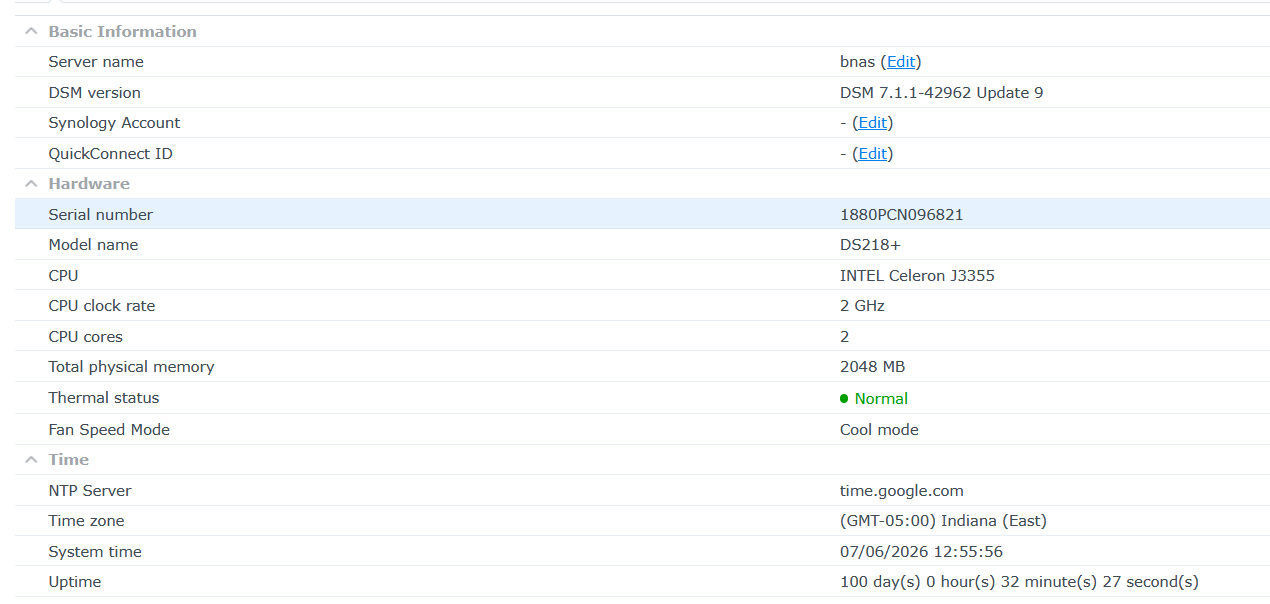
Looking at your screenshot, one difference is that my destination is a DS213j (ARM) rather than a DS218+ (Intel). Interactive SFTP works fine using OpenSSH with legacy ciphers, but rclone’s built-in SFTP backend fails immediately with ssh: handshake failed: ssh: packet too large. I’m wondering if this is specific to the older ARM SSH implementation on the DS213j?

DSM 7.1.1-42962 Update 9
MARVELL Armada 370 88F6707

cat /etc.defaults/VERSION
majorversion="7"
minorversion="1"
major="7"
minor="1"
micro="1"
productversion="7.1.1"
buildphase="GM"
buildnumber="42962"
smallfixnumber="9"
nano="9"
base="42962"
builddate="2025/07/29"
buildtime="14:21:17"

Update:

I managed to get SFTP working, but only by using rclone's external SSH client rather than the built-in Go SSH implementation.

The built-in SFTP backend always fails during the SSH handshake with:

ssh: handshake failed: ssh: packet too large

I tested all of the following with exactly the same result:

  • Password authentication
  • Key authentication (RSA)
  • Admin user (userA)
  • Non-admin user (userB)
  • use_insecure_cipher = true
  • shell_type = unix
  • disable_hashcheck = true

I also confirmed:

  • Interactive SSH works using legacy cipher options.
  • Interactive SFTP works using the same legacy cipher options.
  • Passwordless SSH using an RSA key also works.

The only way I could get rclone talking to the DS213j over SFTP was to configure the remote to use the external OpenSSH client instead of rclone's internal SSH implementation.

My working SFTP remote now contains:

ssh = ssh -i /root/.ssh/ds213_rclone -oHostKeyAlgorithms=+ssh-rsa -oKexAlgorithms=+diffie-hellman-group-exchange-sha256 -oCiphers=aes128-cbc userA@192.168.0.10

along with:

shell_type = unix
path_override = @/volume1
md5sum_command = md5sum
sha1sum_command = sha1sum

With that configuration:

rclone lsf ds213_sftp:/rclone_Vault

returns:

rclone_crypt/

and my crypt remote correctly reports:

Total objects: 167,028
Total size: 2.309 TiB

So the workaround is successful. But I still get these error/warnings:

sudo /usr/local/rclone/rclone lsd ds213_sftp_crypt:

2026/07/06 19:08:01 NOTICE: ds213_sftp: No host key validation is being performed. Set known_hosts_file to enable it. See: https://rclone.org/sftp/#host-key-validation

          -1 2026-07-01 14:18:32        -1 ds923_BUP

My question is:

Why does rclone's internal Go SSH implementation fail with "ssh: handshake failed: ssh: packet too large" against this older Synology DS213j, while the external OpenSSH client works correctly?

try an internet search...

Have spent a good part of my life the past days trying to get rclone setup and internet searching it all, was kind of hoping the developers might just say ‘yes that’s expected here try this, or it’s a bug or whatever’ as I’m already out of my depth digging…..