Before enabling the following configuration, both the rclone client and S3 browser can connect normally.
- Added the
htpasswdparameter to the rclone start command, for example:rclone serve s3 --htpasswd /s3Files/htpasswd.conf --Local:/s3Files --addr 127.0.0.1:8000 - Enabled
auth_basicandauth_basic_user_filein the nginx reverse proxy for the rclone site. - Version information of the
rclone serve s3server.
$ rclone version
rclone v1.71.2
- os/version: ubuntu 24.04 (64 bit)
- os/kernel: 6.14.0-1017-oracle (x86_64)
- os/type: linux
- os/arch: amd64
- go/version: go1.25.3
- go/linking: static
- go/tags: none
$ nginx -v
nginx version: nginx/1.28.0
Test results using curl on the client:
REM curl -u user:passWD -I https://s3.xxx.xx/

D:\>curl -H "Authorization: Basic <The base64 encoding of user:passWD>" -I https://s3.xxx.xx/
HTTP/1.1 400 Bad Request
Server: nginx/1.28.0
Date: Sun, 11 Jan 2026 09:59:25 GMT
Content-Type: text/xml; charset=utf-8
Content-Length: 143
Connection: keep-alive


D:\>curl -I https://s3.xxx.xx/
HTTP/1.1 401 Unauthorized
Server: nginx/1.28.0
Date: Sun, 11 Jan 2026 09:59:37 GMT
Content-Type: text/html
Content-Length: 179
Connection: keep-alive
WWW-Authenticate: Basic realm="S3 File Server Authentication"
Question:
- In the rclone client, when running
rclone configto addrclone s3, there is no step to add parameters like--userand--pass. I also checkedrclone help flags, but there is nothing similar. - Using the
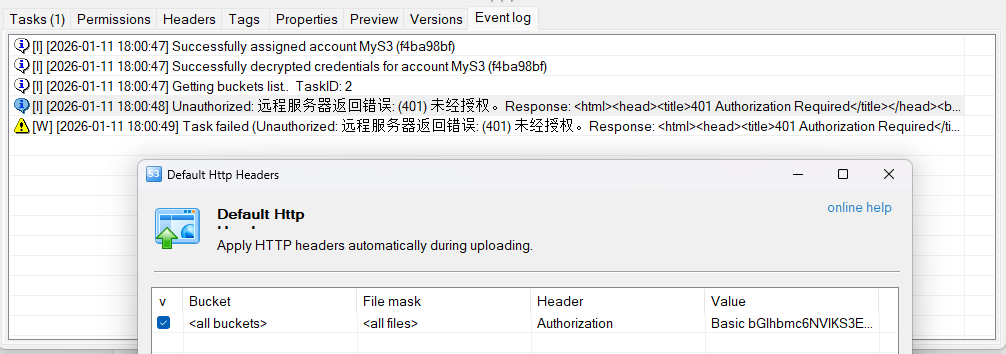
s3 browsertool to add default HTTP header information still results in a failed connection. See the image below.
Help: After enabling rclone serve s3 --htpasswd and nginx auth_basic on the server side, how should the client (rclone, s3 browser) be configured to connect? Or is this combination of server-side configurations incorrect? Or what else could it be?