What is the problem you are having with rclone?
I use rclone copy to back up files from a read-only Google Drive Shared Drive to MEGA.
Many source files lack file extensions (e.g., A Gentle Reminder, relying on Drive's internal MIME type). When copied to MEGA, an external script detects their MIME type and appends the extension (A Gentle Reminder → A Gentle Reminder.pdf).
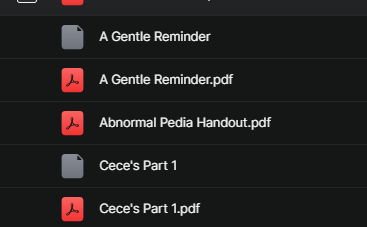
On the next cron run, rclone copy looks for the original filename without extension (A Gentle Reminder). Since only A Gentle Reminder.pdf exists on MEGA, rclone treats the file as missing and re-transfers it (Copied (new)), causing duplicates on MEGA:
A Gentle Reminder
A Gentle Reminder.pdf
Because I have read-only access to Google Drive, I cannot rename the source files.
Questions:
- Is there an rclone flag/feature to append extensions from Google Drive MIME types during transfer?
- Can rclone match extensionless source files against renamed files on the destination to avoid re-transfers?
- What is the recommended way or filter pattern to handle this without duplicate transfers?
Run the command 'rclone version' and share the full output of the command.
rclone v1.75.2
- os/version: Microsoft Windows 11 IoT Enterprise LTSC 2024 24H2 24H2 (64 bit)
- os/kernel: 10.0.26100.9711 (x86_64)
- os/type: windows
- os/arch: amd64
- go/version: go1.26.9
- go/linking: static
- go/tags: cmount
Which cloud storage system are you using?
- Source: Google Drive (Shared Drive, read-only)
- Destination: MEGA
The command you were trying to run
rclone copy "gdrive,root_folder_id=SHARED_FOLDER_ID_XXX:" "mega:backup" \
    --fast-list --transfers 4 --checkers 8 -vv
Please run 'rclone config redacted' and share the full output.
[gdrive]
type = drive
client_id = XXX
client_secret = XXX
scope = drive.readonly
token = XXX
team_drive =

[mega]
type = mega
user = XXX
pass = XXX
session_id = XXX
master_key = XXX
A log from the command that you were trying to run with the -vv flag
2026/10/25 12:20:13 DEBUG : rclone: Version "v1.75.2" starting with parameters ["rclone" "copy" "gdrive,root_folder_id=SHARED_FOLDER_ID_XXX:" "mega:backup" "--fast-list" "-vv"]
2026/10/25 12:20:14 DEBUG : mega root 'backup': Using previously stored session ID and master key to initialize the Mega API
2026/10/25 12:25:03 DEBUG : Checks: 321 / 321, 100%
2026/10/25 12:25:03 DEBUG : Transferred: 0 / 937, 0%
2026/10/25 12:25:14 INFO  : A Gentle Reminder: Copied (new)
2026/10/25 12:25:28 INFO  : Cece's Part 1: Copied (new)
2026/10/25 12:25:29 INFO  : Cece's Part 2: Copied (new)
2026/10/25 12:25:32 INFO  : Communicable Diseases: Copied (new)
2026/10/25 12:26:38 INFO  : (3rd Edition) Medical Surgical by UDAN: Copied (new)
Files already exist on MEGA as A Gentle Reminder.pdf, but rclone re-transfers A Gentle Reminder because of the extension mismatch.
SS taken from mega