[EFAULT] rclone fails everytime

Hello, I’ve been battling with this for a while, I’m still very new to all of this, it was working initially, but started failing out of the blue. Not sure why.. Your help and guidance would be greatly appreciated

I’m using built-in rclone this is the error below

[EFAULT] Errors: 1 (retrying may help) Checks: 35646 / 35646, 100%, Listed 77952 Elapsed time: 5m15.7s 2026/01/18 21:31:58 NOTICE: Failed to sync: art work (11.22)/Refs: error updating metadata: EOF

What is the problem you are having with rclone?

Run the command 'rclone version' and share the full output of the command.

rclone v1.72.1

  • os/version: debian 12.11 (64 bit)
  • os/kernel: 6.12.33-production+truenas (x86_64)
  • os/type: linux
  • os/arch: amd64
  • go/version: go1.25.5
  • go/linking: static
  • go/tags: none

Which cloud storage system are you using? (eg Google Drive)

The command you were trying to run (eg rclone copy /tmp remote:tmp)

I'm Push from my Truenas and sync to Onedrive

Please run 'rclone config redacted' and share the full output. If you get command not found, please make sure to update rclone.

[onedrive]
type = onedrive
token = XXX
drive_id = XXX
drive_type = personal

Hi @Dizzy,

Welcome to the rclone forum!

I am not sure but can you enable DEBUG on your TrueNas rclone cloud sync menu?

EOF means End of file, so the provider didn’t reply with the information rclone was expecting, which could be caused by a number of things.

If you can enable DEBUG then that will tell us what the “errored metadata” is.

Hi Ed, thank you for your response, I can’t find a debug option in the ui, I did try some other things and got these outputs as shown below, in 3 different instances

2026/01/20 23:03:43 ERROR : Attempt 1/3 failed with 1 errors and: ix/art work (11.22)/Graphics/Stores/ Time/adrequestwarrenshalftimeevent: error updating metadata: EOF
2026/01/20 23:08:24 ERROR : Attempt 2/3 failed with 1 errors and: ix/art work (11.22)/Graphics/Stores/Time/adrequestwarrenshalftimeevent: error updating metadata: UnknownError: 500 INTERNAL SERVER ERROR
2026/01/20 23:12:17 ERROR : Attempt 3/3 failed with 1 errors and: ix/art work (11.22)/Graphics/Stores/Time/adrequestwarrenshalftimeevent: error updating metadata: EOF Transferred: 0 B / 0 B, -, 0 B/s, ETA - Errors: 1 (retrying may help) Checks: 30834 / 30834, 100%, Listed 68331 Elapsed time: 12m47.9s
2026/01/20 23:12:17 NOTICE: Failed to sync: ix/art work (11.22)/Graphics/Stores/ Time/adrequestwarrenshalftimeevent: error updating metadata: EOF

\[EFAULT\] Errors: 1 (retrying may help) Checks: 30807 / 30807, 100%, Listed 68262 Elapsed time: 7m46.2s 2026/01/20 23:43:28 NOTICE: Failed to sync: art work (11.22)/Graphics/Stores/Food/fwurgentadrequestsamplingsession: error updating metadata: EOF

I also started to receive “error updating metadata: EOF” with OneDrive this week.

Hi @smeredith is it possible for you to share a log when you’re receiving this error with DEBUG enabled? Or if you can share instructions on how to reproduce the problem that would also work.

@Dizzy the 500 server error also means it could be a problem with OneDrive, at the moment we can’t reproduce the problem so hopefully Steven can enlighten us with what his set up is then we can hopefully get to the bottom of it.

I am doing a bisync between local and OneDrive. I am also getting a 500 from the server. I expect MS will fix it eventually. If they notice.

This looks like the relevant part of the output:

2026/01/22 05:57:40 DEBUG : pacer: low level retry 1/10 (error EOF)
2026/01/22 05:57:40 DEBUG : pacer: Rate limited, increasing sleep to 20ms
2026/01/22 05:57:40 DEBUG : pacer: low level retry 1/10 (error EOF)
2026/01/22 05:57:40 DEBUG : pacer: Rate limited, increasing sleep to 40ms
2026/01/22 05:57:40 DEBUG : pacer: low level retry 2/10 (error EOF)
2026/01/22 05:57:40 DEBUG : pacer: Rate limited, increasing sleep to 80ms
2026/01/22 05:57:40 DEBUG : pacer: low level retry 2/10 (error EOF)
2026/01/22 05:57:40 DEBUG : pacer: Rate limited, increasing sleep to 160ms
2026/01/22 05:57:41 DEBUG : pacer: low level retry 3/10 (error EOF)
2026/01/22 05:57:41 DEBUG : pacer: Rate limited, increasing sleep to 320ms
2026/01/22 05:57:41 DEBUG : pacer: low level retry 3/10 (error EOF)
2026/01/22 05:57:41 DEBUG : pacer: Rate limited, increasing sleep to 640ms
2026/01/22 05:57:42 DEBUG : pacer: low level retry 4/10 (error EOF)
2026/01/22 05:57:42 DEBUG : pacer: Rate limited, increasing sleep to 1.28s
2026/01/22 05:57:42 DEBUG : pacer: low level retry 4/10 (error EOF)
2026/01/22 05:57:42 DEBUG : pacer: Rate limited, increasing sleep to 2s
2026/01/22 05:57:42 DEBUG : pacer: low level retry 5/10 (error EOF)
2026/01/22 05:57:45 DEBUG : pacer: low level retry 5/10 (error EOF)
2026/01/22 05:58:04 DEBUG : pacer: low level retry 6/10 (error UnknownError: 500 INTERNAL SERVER ERROR)
2026/01/22 05:58:04 DEBUG : pacer: low level retry 7/10 (error EOF)
2026/01/22 05:58:07 DEBUG : pacer: low level retry 6/10 (error UnknownError: 500 INTERNAL SERVER ERROR)
2026/01/22 05:58:08 DEBUG : pacer: low level retry 7/10 (error EOF)

@smeredith if you could add --low-level-retries 1 --retries 1 -vv --dump bodies and paste the HTTP transaction which fails so the REQUEST and RESPONSE (you can match them up with the hex numbers) that would be really useful.

I don’t get an HTTP 500 if I pass “--low-level-retries 1”. I do get it if I set it to 2. More later…

2026/01/22 07:38:02 DEBUG : <<<<<<<<<<<<<<<<<<<<<<<<<<<<<<<<<<<<<<<<<<<<<<<<<<<<<<<<<<<<
2026/01/22 07:38:02 DEBUG : pacer: low level retry 1/2 (error EOF)
2026/01/22 07:38:02 DEBUG : pacer: Rate limited, increasing sleep to 20ms
2026/01/22 07:38:02 DEBUG : >>>>>>>>>>>>>>>>>>>>>>>>>>>>>>>>>>>>>>>>>>>>>>>>>>>>>>>>>>>>
2026/01/22 07:38:02 DEBUG : HTTP REQUEST (req 0xc00053b900)
2026/01/22 07:38:02 DEBUG : PATCH /v1.0/drives/0491CCDF831E17F8/items/491CCDF831E17F8!385930:/01: HTTP/1.1^M
Host: graph.microsoft.com^M
User-Agent: rclone/v1.72.1^M
Content-Length: 111^M
Authorization: XXXX
Content-Type: application/json^M
Accept-Encoding: gzip^M

{"fileSystemInfo":{"createdDateTime":"2018-07-01T00:38:20Z","lastModifiedDateTime":"2026-01-19T16:00:00.666Z"}}
2026/01/22 07:38:02 DEBUG : >>>>>>>>>>>>>>>>>>>>>>>>>>>>>>>>>>>>>>>>>>>>>>>>>>>>>>>>>>>>
2026/01/22 07:38:24 DEBUG : <<<<<<<<<<<<<<<<<<<<<<<<<<<<<<<<<<<<<<<<<<<<<<<<<<<<<<<<<<<<
2026/01/22 07:38:24 DEBUG : HTTP RESPONSE (req 0xc00053b900) 2026/01/22 07:38:24 DEBUG : HTTP/2.0 500 Internal Server Error^M
Cache-Control: private^M
Client-Request-Id: 1383032e-c418-42aa-8e31-7cd76474d26f^M
Content-Type: application/json^M
Date: Thu, 22 Jan 2026 15:38:24 GMT^M
Request-Id: 1383032e-c418-42aa-8e31-7cd76474d26f^M
Strict-Transport-Security: max-age=31536000^M
Vary: Accept-Encoding^M
X-Ms-Ags-Diagnostic: {"ServerInfo":{"DataCenter":"West US 2","Slice":"E","Ring":"4","ScaleUnit":"000","RoleInstance":"CO1PEPF00000EE2"}}^M

1 Like

A "500 Internal Server Error" looks very much like a Microsoft bug.

If rclone is sending the wrong parameters it should be a 400 error of some kind.

This used to work and I checked the docs - they haven't changed - so I think we have to wait for Microsoft to fix the problem.

I have had success in the past reporting Onedrive issues here: GitHub · Where software is built - though we'd need a reasonably reliable way of reproducing the problem.
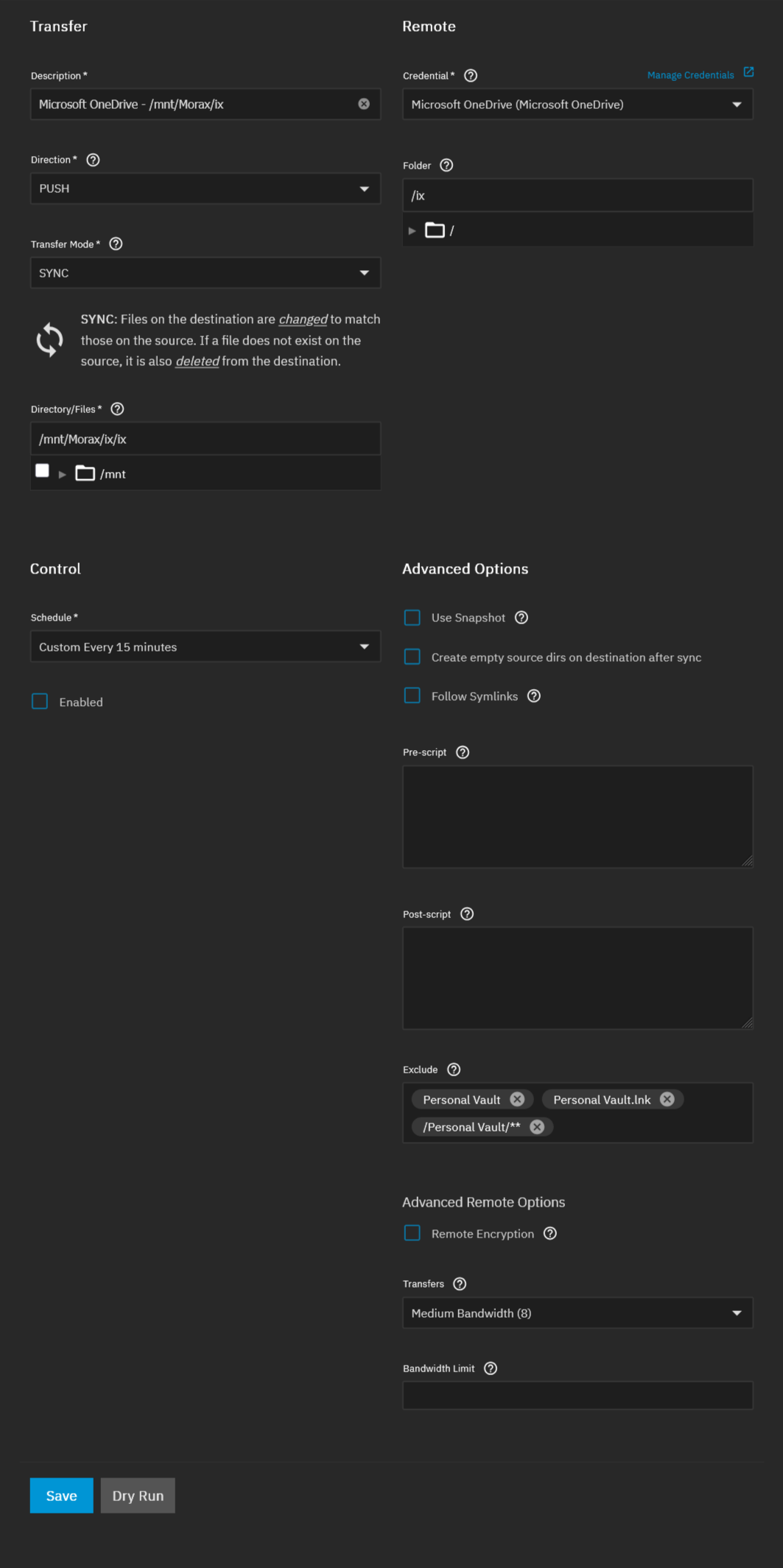
Same issue here. I have two accounts I backup too. One is fine the other not.

Definitely a MS issue. It happened last year briefly.

Ver 1.73.0

see Possible problems with OneDrive API - move doesn't work

OneDrive personal accounts issue : : moveto and update-dir-modtime not work

DEBUG error : error EOF or error UnknownError: 500 INTERNAL SERVER ERROR

rclone set --no-update-dir-modtime

rclone not set --backup-dir "xxxx"

As of 2/26/2026, this is working again.

1 Like

fixed OneDrive personal accounts issue : : moveto and update-dir-modtime worked

Yep… same for me. MS got their act together again. :grinning_face_with_smiling_eyes: