Does anyone know a good local dedupe tool that can take 400,000 files mounted with rclone mount and dedupe them PURELY by size and name?

Does anyone know a good local dedupe tool that can take 400,000 files mounted with rclone mount and dedupe them PURELY by size and name?

Dupeguru APPEARS to be able to do this but when I tried it hit 16gb of ram at 97% done 22,000 duplicates found. Then 28gb of ram at 98% done, then I clicked cancel and it was using 31gb of ram and I force closed the task without ever seeing a duplicate file listed.

Was all that ram for GUI reasons? Or was it hashing my files despite me trying my best to ask it not to hash my files?

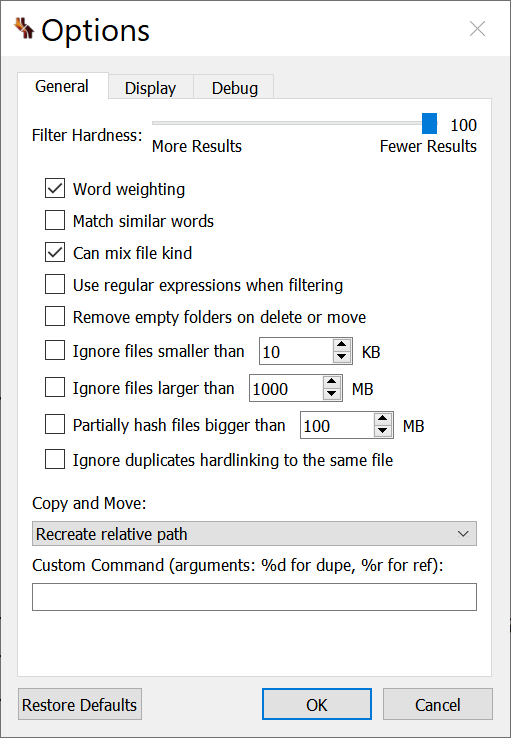
I ran in filename mode with these settings. The whole partially hash setting is what is leaving me worried it was foolishly trying to hash all my files but the documentation on dupeguru is light at explaining this.

I’ve never used dupeguru before though and have no loyalty to it. Rclone’s deduping tool would be fine, except it matches based on full path not merely filename, and my files are stored in foolishly arranged filepaths (that’s the mistake I made that requires me to do all this.)

TLDR: I just want to compare 400,000 filenames and see my duplicates. I want to use name and size. I do not want to use fullpath (rules out rclone) I do not want to make hashes (rules out hashmyfiles) Can someone please make me a recommendation?
Ran dupeguru again for 2hours straight. Quickly hit 22000 dupes and 98% complete using 28gb of ram then quit on me.

Ran czkawka_gui_gtk412 aka czkawka for about 5minutes and it found all the duplicates! That’s good. It is using 250megabytes of ram ALSO GOOD. I have no idea how to delete the files I want deleted though.

I mounted all the badly sorted files as L: and the files sorted properly as M: So I want to delete all duplicates in L: buuuuuuut czkawka is not telling me anything about the file path of the duplicates!

OH wait no I figured it out I can do custom select. Path. Set path to L:

Dang that does not work I had to instead set the path to something weird \server\remotename folderonremotename\* … actually I forget, I think I had to also use / instead of \ it makes sense since these tools are mainly for linux but also work on windows so it doesn’t support using drive letters everywhere…. Even though I added the files to scan via drive letter.

There we go! It worked.

I wanted to be sure the file paths were right though so I compared to krokiet which is another gui for czkawka and it does have a file path column so I can recommend to anyone AGAINST dupeguru and FOR czkawka and it’s variants! Whew. Glad to have that 4TB back! I knew I made a mistake but hunting down 20,000 mistakes out of 90,000 files compared to a base of 300,000 files would’ve been impossible to do manually!

Neither krokiet or czkawka_gui_gtk used more than 300megabytes of ram. And that make sense. I set them to NOT make hashes. Why? I knew the hashes would get out of hand. dupeguru must’ve been making hashes by default or something?

EDIT: To clarify krokiet shows the file paths in an easy to read manner and lets you click the GUI to open the file path in file explorer. But krokiet does not have a handy select custom button to customize and select 18000 files all at once. So I guess czkawka_gui_gtk for 20,000 duplicates and krokiet when you suspect merely 100s you can skim through and do a select all of.

Deleting the files still leaves the folders a mess, but I can delete empty folders rather easily I suppose…. At least the empty folders don’t eat 4TB.

Wow emptying googledrive’s trash is SLOOOOOOWWWWWW I wonder if waiting 30 days would actually work? That’s one flaw with using mount instead of rclone’s own dedupe procedures, it looks like deleting files on my mount places them in google trash. Which frankly is the correct thing to do, I don’t trust windows explorer nearly as much as rclone not to accidentally delete the wrong thing.

To clarify further for anyone reading, especially future me. czkawka_gui_gtk is essentially hanging or frozen BUT I am able to easily see it working using

.\rclone -v size --drive-trashed-only "cleancrypt:wherethefolderIamtalkingaboutis”

It’s deleted 4000-5000 out of 18000 files so far in 30-60 minutes. It’s quite slow, but I bet that rclone mount –network-mode is mostly to blame not the duplicate hunting tool itself? Either way I can be patient. Although more speed would be better. rclone is so much faster than any other tool I use. Alas.

EDIT: Another hour later and roughly 16000 files are deleted by czkawka but of course this is merely putting them in google drive trash, where I will still have to attack them again. But the end is near and that 4TB of mistaken wasted space is about to come back, hooray.