What is the problem you are having with rclone?
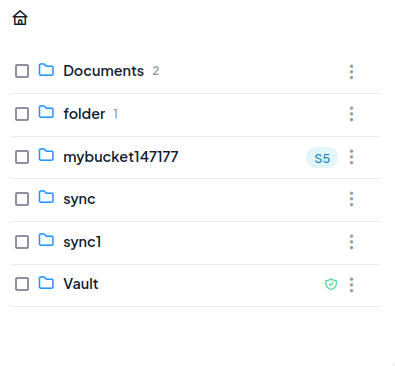
Commands lsd and ls FileLu does not show subdirectories. But I can see them on FileLu web-interface.
I tried to create subfolders via rclone and via web-interface. Error exists in both cases.
Run the command 'rclone version' and share the full output of the command.
rclone v1.74.3
- os/version: ubuntu 24.04 (64 bit)
- os/kernel: 6.17.0-1011-oracle (aarch64)
- os/type: linux
- os/arch: arm64 (ARMv8 compatible)
- go/version: go1.26.4
- go/linking: static
- go/tags: none
Which cloud storage system are you using? (eg Google Drive)
FileLu
The command you were trying to run (eg rclone copy /tmp remote:tmp)
rclone mkdir filelu:folder -vv --log-file=./bug.log
rclone mkdir filelu:folder/subfolder -vv --log-file=./bug.log
rclone touch filelu:folder/test.txt -vv --log-file=./bug.log
rclone ls filelu:folder -vv --log-file=./bug.log
        0 test.txt
rclone lsd filelu:folder -vv --log-file=./bug.log
<empty output>
The rclone config contents with secrets removed.
[filelu]
type = filelu
key = <hidden>
description = filelu
A log from the command with the -vv flag
2026/06/14 17:32:02 DEBUG : rclone: Version "v1.74.3" starting with parameters ["rclone" "mkdir" "filelu:folder" "-vv" "--log-file=./bug.log"]
2026/06/14 17:32:02 DEBUG : Creating backend with remote "filelu:folder"
2026/06/14 17:32:02 DEBUG : Using config file from "/home/ubuntu/.config/rclone/rclone.conf"
2026/06/14 17:32:02 INFO  : FileLu root 'folder': Making directory
2026/06/14 17:32:02 INFO  : FileLu root 'folder': Successfully created folder "folder" with ID 4262678
2026/06/14 17:32:02 DEBUG : 5 go routines active
2026/06/14 17:32:26 DEBUG : rclone: Version "v1.74.3" starting with parameters ["rclone" "mkdir" "filelu:folder/subfolder" "-vv" "--log-file=./bug.log"]
2026/06/14 17:32:26 DEBUG : Creating backend with remote "filelu:folder/subfolder"
2026/06/14 17:32:26 DEBUG : Using config file from "/home/ubuntu/.config/rclone/rclone.conf"
2026/06/14 17:32:27 INFO  : FileLu root 'folder/subfolder': Making directory
2026/06/14 17:32:27 INFO  : FileLu root 'folder/subfolder': Successfully created folder "folder/subfolder" with ID 4262714
2026/06/14 17:32:27 DEBUG : 5 go routines active
2026/06/14 17:32:38 DEBUG : rclone: Version "v1.74.3" starting with parameters ["rclone" "touch" "filelu:folder/test.txt" "-vv" "--log-file=./bug.log"]
2026/06/14 17:32:38 DEBUG : Creating backend with remote "filelu:folder/"
2026/06/14 17:32:38 DEBUG : Using config file from "/home/ubuntu/.config/rclone/rclone.conf"
2026/06/14 17:32:38 DEBUG : fs cache: renaming cache item "filelu:folder/" to be canonical "filelu:folder"
2026/06/14 17:32:38 DEBUG : Touch time 2026-06-14 17:32:38.815234604 +0000 UTC m=+0.033447682
2026/06/14 17:32:39 DEBUG : FileLu root 'folder': Touching (creating) "test.txt"
2026/06/14 17:32:41 DEBUG : 7 go routines active
2026/06/14 17:33:01 DEBUG : rclone: Version "v1.74.3" starting with parameters ["rclone" "ls" "filelu:folder" "-vv" "--log-file=./bug.log"]
2026/06/14 17:33:01 DEBUG : Creating backend with remote "filelu:folder"
2026/06/14 17:33:01 DEBUG : Using config file from "/home/ubuntu/.config/rclone/rclone.conf"
2026/06/14 17:33:01 DEBUG : 5 go routines active
2026/06/14 17:33:10 DEBUG : rclone: Version "v1.74.3" starting with parameters ["rclone" "lsd" "filelu:folder" "-vv" "--log-file=./bug.log"]
2026/06/14 17:33:10 DEBUG : Creating backend with remote "filelu:folder"
2026/06/14 17:33:10 DEBUG : Using config file from "/home/ubuntu/.config/rclone/rclone.conf"
2026/06/14 17:33:11 DEBUG : 5 go routines active