I have tried copying data from Gdrive to my personal Gdrive, but there is something that makes me wonder about the difference between Listed and Transferred (see attached image below).
Please could you explain how to resolve this issue? Rclone is very helpful in this process.
Run the command 'rclone version' and share the full output of the command.
rclone v1.71.0
os/version: Microsoft Windows 10 Home Single Language 22H2 22H2 (64 bit)
os/kernel: 10.0.19045.6216 (x86_64)
os/type: windows
os/arch: amd64
go/version: go1.25.0
go/linking: static
go/tags: cmount
Which cloud storage system are you using? (eg Google Drive)
Google Drive
The command you were trying to run (eg rclone copy /tmp remote:tmp)
Thank you for the explanation. I have tried checking with rclone check and manual check compaire one-on-one.
Next, could you provide me with feedback on the commands I attached earlier? Are there any flags that need to be added or modifications to the commands for better optimization, such as error detection with log assistance? Because I will be trying this directly on a large data source up to 100GB++. However, it will take several days. Is it possible to perform a cutoff and then resume the commands afterward?
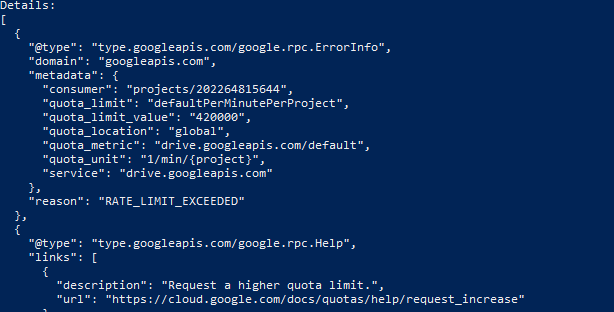
I have another problem. When the network is unstable or when my laptop automatically shuts down, an error like the one in the attached image occurs. How do I fix this? Do I need to confirm the command and start from the beginning?
You do not have to confirm anything. It is not interactive mode. Let it run, eventually start again.
“retrying may help“ means that rclone considers it intermittent issue. It will retry itself (3 times as I remember) but only few times. For example when your network is down.
After some time, this often happens? Stop and restart with the same command, but this still happens. What should I do? This causes the data being copied to be interrupted and takes time.
Okay, I have created a GD client ID and have a quota of 12,000. Then I continued the process with the command added --bwlimit8.5M.
I ran the command again and the queries ran. How does the command I ran work? Does it start from the beginning -> ignore files that have already been copied -> then copy new files? Will this process consume quotas, even though it is only reviewing data that has already been copied? Or how does it work?