SAFE Network - after years of development, is getting closer to release . .
(Same reply as in another thread)
Hi, long time lurker of the recent Workspace/Dropbox/Box saga. After Workspace drama we started migrating to Box. So far so good, we have a big database (not going into details) and the cloud solution has always fit our needs. We are still looking to get a deal with Workspace (since we are a small startup we are trying to not waste resources), because we have some users in our org, but still the amount of space that the new policy reserves us is not right for us (even with future increases). Hence we also explored other solutions. Since Dropbox was the first choice for many we decided to wait and eventually chose Box. We started uploading files via rclone (the Box team told us to use Shuttle, but 20TB was not near enought for us. Also FTPS was a good solution, since it does not apply limits to uploads, but we experienced some disconnections and eventually had to restart many uploads with broken files) since the sync option looked right for us. We reached about 90% of our migration and Box applied the new upload policy of 1TB/mo per user. As I said we have some users, but still they count the previous uploaded files in the new limits hence none is able to upload anything via Box apps nor via FTPS neither via rclone. We keep getting the errors that everyone is experiencing. So we reached out to Box support, ticket was escalated to multiple levels and once again they told the aforementioned tips for migration. In the end they eventually wrote us this:
—-
Hi [redacted],
Thank you for responding.
I understand that you have questions regarding an email you received from Box about your account usage. I would be happy to assist here! Box has determined that your account has violated our Fair Use Policy under Section 3 “Product Limits”:
-
Download Bandwidth for Shared Links: Files downloaded from an open access shared link (applies to the owner of the file).
- 10GB per user per month for Individual plans
- 2TB per user per month for Box Business plans
-
Download/upload Ingress/Egress Bandwidth: Files uploaded and downloaded (applies to the user who uploads and/or downloads the file).1TB per user per month for both Box Business and Individual plans
In response to this violation we have placed a ratelimit upon your account that will be removed 30 days from its implementation. The implementation began the same day as the day you received the email. You have 3 options to resolve this rate limit:
- You can reach out to [cancel@box.com] with the subject line of Fair Use Policy at Box and request a refund. You will receive a refund for the time remaining on your contract at Box and be provided with 30 days to download your content from Box before the account is deactivated.
- You can stay within the bandwidth limit for 30 days upon which it will be lifted.
- You can reach out to [sales@box.com] with the subject line of “Fair Use Policy at Box where they will guide you to purchase a plan that will comply with Box’s Fair Use Policy.
Thanks,
[redacted]
—-
As you can see it seems they do not want to listen to any request of lifting limits in order to finish the migration, even considering that the 1TB limit for all our users should be fine (more or less) for us in the future. At the moment we do not really know what to do and we cannot find any other solutions that could allow us to not waste precious resources for our business.
Hopefully this could be of help for some of you that are waiting for news on this front. Excuse my english and have a nice one.
1 Like
Well, I'm not exactly sure what they're referring to when they talk about "bandwidth," but it's really not clear. There's no way to check precisely where we stand. Here's what my account shows:
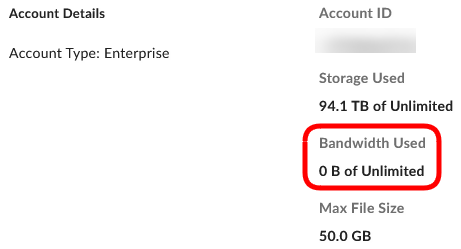
I haven't received a response from them yet, but I imagine it will be somewhat similar.
It seems they refer to file storage as bandwith, since we too have 0B of Unlimited in our organization, same as you, but we too have many TB of database in Storage Used. Unfortunately their support is not in the position to give clear answers based on what is happening so far.
1 Like
I have here Storage used 986 gb of unlimited, BW 0 B of unlimited and I cannot upload as because of the 429 error msg rclone pumped all the files over and over again which caused 3x the data transfer as it was needed
1 Like
I'm not sure if I understood correctly, but if you only need 20 TB, would one or two Hetzner storage boxes be an option for your business? But really I would just buy a NAS and a couple of HDDs.
I have never said that we need 20TB.
Then I misunderstood, sorry.
No problem at all. The issue here is that we are almost at full migration of our database, let’s say 90% and we are not allowed to upload anything for another month. That’s is really annoying for our business now.
With me now the same. No more upload possible. No matter which way. But I have neither received an email nor any other notification. I also have an Enterprise Account.
1 Like
I'm in the same position
No email and also getting 429 errors
1 Like
It looks like Box has started to block new uploads with these 429 errors...
Where do you find this? The Account details that say the Bandwidth Used?
Click on your user initials icon in the top right corner of a Dropbox window in your browser and select "Account Settings". Then scroll down on that webpage.
1 Like
Is there anyone familiar with the internals of rclone who knows whether the --progress flag is outputting somewhat accurate stats about the data transferred?
As @left1000, and others, have noted it certainly seems like Box's way of handling bandwith exceeded is inefficient. Just today tried to upload upload 15.5GB of files, left it alone for a while and when I came back rclone claimed to have used 120GB of bandwidth and yet no files were moved.
> rclone move -v --progress --tpslimit 6  --include="project_ax7908*"  --include="pax7908*  .   chnkcrypt1:projmedia/ax7908/
2023/09/02 09:13:05 INFO  : Starting transaction limiter: max 6 transactions/s with burst 1
2023-09-02 09:36:59 ERROR : pax7908_20230815_session02.mp4: Failed to copy: multipart upload failed to finalize: Error "rate_limit_exceeded" (429): Request rate limit exceeded, please try again later
... [for brevity deleted a bunch of lines...]

Transferred:   	  120.675 GiB / 128.311 GiB, 94%, 12.025 MiB/s, ETA 10m50s
Errors:                 2 (retrying may help)
Checks:                 6 / 8, 75%
Transferred:            0 / 2, 0%
Elapsed time:   1h55m16.6s
For those familiar with the internals of rclone's network communication protocols, do the rclone -P transfer stats accurately reflect what went down the wire to Box? Or is it just an indication of number of times it attempted to transfer data but nothing was actually sent down the wire. If, it's going down the wire, that seems incredibly inefficient. If so, how does that contrast with what Google and Dropbox doing in a similar situation? Are their implementations more efficient? Just curious.
Since nobody is able to upload anything to box, even customers who didnt receive any emails regarding fair use policy, it looks like they competely run out of space.
Customer service asks to record a video of the issue. I asked them if there still are any limits on my account, which should be gone since yesterday, but i dont get any info on that.
1 Like
Nobody need this. Sia and Storj are already on the market and make exactly the same thing. And they have stable software not this early shit.
We got this email today:
Dear Box admin,
Thanks for continuing to use Box. We have detected a significant increase in content uploaded to your XXXXXXX account that exceeds the bandwidth limitations set out in our Fair Usage Policy. This month, the total upload bandwidth exceeded the acceptable usage limit of 1TB per user per month by 72.22TB.
As a result, to prevent abuse and ensure the integrity of the Box Service for everyone, we have implemented preventive measures to limit upload bandwidth. This limit will remain in effect until October 2nd.
We ask that you take the necessary steps to reduce your bandwidth usage to less than 1TB per month per user. For more information on what drives bandwidth usage, see this article. You can also contact Sales to discuss options, including purchasing additional licenses, which will allow your account to use more bandwidth.
After this period ends, Box reserves the right to pursue further remedial action if you continue to use Box in a manner that violates our Terms of Service and/or our Fair Use Policy. Such action may include, but is not limited to, reducing the bandwidth available to your account and potentially suspending your use of the Box Service.
If you no longer wish to remain on the platform, we will expedite your cancellation and refund the remaining period of your account.
Thank you for your understanding and for being a valued Box customer.
Yours sincerely ,
Box Team
Is the box.com limit per actual box user, so you actually get 3TB with a minimum of three users? The fair use policy reads like its 1TB per user so for those who where luckily enough to already move a large chunk of there storage you could purchase additional users for a month or a number of months to finish your migration. It's not very economical but might still be an option.
As far as I know the information in the email is just false. Using a new user, having a new calendar month, having a new billing month, none of these seem to resolve the limitation on an account. And the limitation applies to as far as I know people who didn't get the email.
In essence we have to wait indefinitely for an update.
EDIT: Of course atm I'm paying google 100$ a month for nearly worthless read only storage of 135TB and paying box.com 60$ a month for the same sort of nearly useless read only storage in an amount of 90TB. So, neither service is "worthless" in many way's they're both fine prices/deals... the problem is... neither is functional and neither solves my problems or needs 
Edit2: To clarify I'd gladly pay 160$ a month for 210TB of fully functional storage. Which. If google and box were both just... working instead of not working, is what I'd be at right now.