Tried this, too, but no luck 
I’m having exactly the same issue, with rclone 1.72.0 in Arch Linux. I’ve been trying the solutions above, none worked so far. I’ll keep trying new possible solutions, or another rclone version from AUR, something different, but I guess it’s Apple blocking the access.
same 400 error with user-agent supplied here on Linux Mint 22.2 with rclone 1.72.1
Great shame as I’d tried snap install of icloud-for-linux only to find it is just a web browser so useless for my use case of syncing my iCloud drive to local folder.
Confirming what other users posted above. The user agent string workaround worked a little while back, but doesn’t work any more. I tried random user agent strings, tried using the exact same user agent string my browser uses to log in to iCloud online without luck.
Workaround
I made a proof of concept authentication script, which uses Puppeteer to pull the needed cookies:
If you want to do it manually, without the script, below are the steps:
- Open your web browser
- Log in to icloud.com, follow MFA prompts until you get to the dashboard screen that shows your profile, recent files, etc.
- Make sure to select "remember device" otherwise your token will only last around 30 minutes.
- Open developer tools and have a look at the request to www.icloud.com (or pretty much any other request to the same domain).
- Copy the Cookie header (
X-APPLE-WEBAUTH-USER="v=1:s=0:d=......) - In the
Cookieheader you just copied, there is a trust token.X-APPLE-WEBAUTH-HSA-TRUST="..."Copy the part between the double quotes. - Run the command
rclone config update [remote] cookies=FULL_COOKIES_HEADER_GOES_HERE trust_token=TRUST_TOKEN_GOES_HERE - Run
rclone config reconnect remote: - Test by running
rclone config ls remote:
Note:
I tried using the environment variable RCLONE_ICLOUDDRIVE_TRUST_TOKEN and flag --iclouddrive-trust-token but neither worked. Please let me know if there’s a way to use this instead 
1 Like
Thank you!
To better understand the basics of the process I would like to try the manual steps provided. Could you guide me through the use of developer tools? I have managed to open those on my Edge browser and got a tree view under ‘sources’ tab including multiple icloud.com & related branches but can’t seem to locate cookies there…
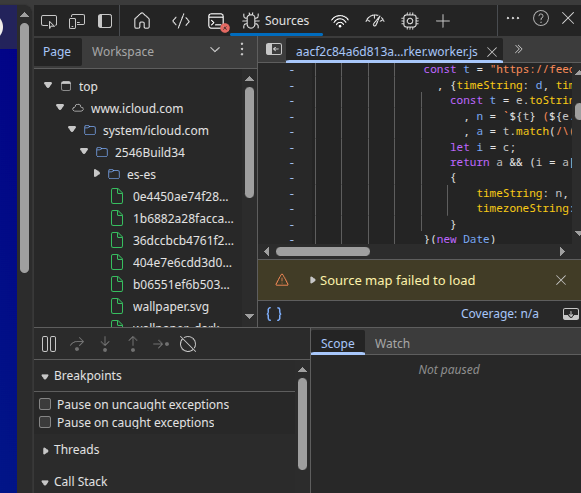
Use the Network tab. Looks like a WiFi icon to the right of "Sources" in your screenshot.
Click on one of the requests to view its details on the right hand side. Make sure you look at the "Request Headers" section not the "Response Headers" section to find the right header. There you should see a table of each of the headers. Here you can copy the contents of the "Cookie" header.
1 Like
Thanks again! Unfortunately I got HTTP error 400 again but I’m pretty sure I made some mistakes while following your directions (maybe this is not the best example for me to explore the world of cookies & browser dev tools for the first time!)
I logged into my iCloud account, (‘remember this device’ marked) and got my dashboard displayed. Then opened the dev tools on Edge and, as per my interpretation of your guidelines, I finally composed & run a command like this:
$ rclone config update <my remote’s name here> cookies=X-APPLE-WEBAUTH-USER="v=1:s=1:d=XXXXXXXXXX" trust_token=90b35e9d…(TOTAL: 261 chrs here)…mCc2mgLSRVX
2025/12/29 10:40:15 NOTICE: Fatal error: HTTP error 400 (400 Bad Request) returned body: "{\"success\":false,\"error\":\"Invalid Session Token\"}"
Does this look reasonably good or should it be a substantially different command?
Same here for a first init
sad sad 
Thanks again! Unfortunately I got HTTP error 400 again but I’m pretty sure I made some mistakes while following your directions (maybe this is not the best example for me to explore the world of cookies & browser dev tools for the first time!)
I logged into my iCloud account, (‘remember this device’ marked) and got my dashboard displayed. Then opened the dev tools on Edge and, as per my interpretation of your guidelines, I finally composed & run a command like this:
$ rclone config update <my remote’s name here> cookies=X-APPLE-WEBAUTH-USER="v=1:s=1:d=XXXXXXXXXX" trust_token=90b35e9d…(TOTAL: 261 chrs here)…mCc2mgLSRVX
2025/12/29 10:40:15 NOTICE: Fatal error: HTTP error 400 (400 Bad Request) returned body: "{\"success\":false,\"error\":\"Invalid Session Token\"}"
Does this look reasonably good or should it be a substantially different command?
@EvansMatthew97 please disregard my last question. Your script works like a charm and I finally got my iCloud remote reconnected to rclone.
Due to my specific setup, I needed to follow a few additional (preliminary) steps, though, which I am listing here in case anyone else encounters the same situations:
- Installed npm from my distro’s repository and run the npm install - npm run start commands on the unzipped directory but I got the following:
> rclone-icloud-authenticator@0.0.1 start
node index.ts
node:internal/errors:496
ErrorCaptureStackTrace(err);
^TypeError [ERR_UNKNOWN_FILE_EXTENSION]: Unknown file extension ".ts" for /home/javierp/Descargas/rclone-
icloud-authenticator-main/index.ts
at new NodeError (node:internal/errors:405:5)
at Object.getFileProtocolModuleFormat [as file:] (node:internal/modules/esm/get_format:136:11)
at defaultGetFormat (node:internal/modules/esm/get_format:182:36)
at defaultLoad (node:internal/modules/esm/load:101:20)
at ModuleLoader.load (node:internal/modules/esm/loader:416:13)
at ModuleLoader.moduleProvider (node:internal/modules/esm/loader:287:22)
at new ModuleJob (node:internal/modules/esm/module_job:63:26)
at #createModuleJob (node:internal/modules/esm/loader:311:17)
at ModuleLoader.getJobFromResolveResult (node:internal/modules/esm/loader:264:34)
at ModuleLoader.getModuleJob (node:internal/modules/esm/loader:250:17) {
code: 'ERR_UNKNOWN_FILE_EXTENSION'
}
So I uninstalled your package, removed npm and installed Node.js (as suggested in https://kinsta.com/blog/what-is-npm/) using the bash sequence displayed on https://nodejs.org/en/download/ :
curl -o- https://raw.githubusercontent.com/nvm-sh/nvm/v0.40.3/install.sh | bash
\. "$HOME/.nvm/nvm.sh"
nvm install 24
node -v # Should print "v24.12.0"
npm -v # Should print "11.6.2".
- As Node.js includes the npm packet manager, I just ran the install & run commands again on your package from the unzipped directory and got the following:
> rclone-icloud-authenticator@0.0.1 start
node index.ts
file:///home/javierp/Descargas/rclone-icloud-authenticator-main/node_modules/@puppeteer/browsers/lib/esm
/launch.js:329
reject(new Error([
^Error: Failed to launch the browser process: Code: null
stderr:
[95699:95699:0104/005637.688128:FATAL:content/browser/zygote_host/zygote_host_impl_linux.cc:128] No usable sandbox! If you are running on Ubuntu 23.10+ or another Linux distro that has disabled unprivileged user namespaces with AppArmor, see https://chromium.googlesource.com/chromium/src/+/main/docs/security/apparmor-userns-restrictions.md Otherwise see https://chromium.googlesource.com/chromium/src/+/main/docs/linux/suid_sandbox_development.md for more information on developing with the (older) SUID sandbox. If you want to live dangerously and need an immediate workaround, you can try using --no-sandbox.TROUBLESHOOTING: Troubleshooting | Puppeteer
at ChildProcess.onClose (file:///home/…/rclone-icloud-authenticator-main/node_modules/@puppeteer/browsers/lib/esm/launch.js:329:24)
at ChildProcess.emit (node:events:520:35)
at ChildProcess.\_handle.onexit (node:internal/child_process:294:12)
Node.js v24.12.0
- So I figured out that my Ubuntu version did have the problem with user namespaces & Chrome sandboxes so I followed the clues and did
export CHROME_DEVEL_SANDBOX=/opt/google/chrome/chrome-sandbox
as recommended at https://pptr.dev/troubleshooting as the safest option (#3) to solve this problem.
Finally I ran your script again (which went flawlessly this time), copied the resulting rclone update command, replaced ‘remote’ with my remote’s name, issued the reconnect command and got my connection to iCloud running again.
Thank you again for such a good, useful job!
Sorry been on holiday. Not sure why the cookies you set didn't work. Could have been an issue with whitespace, or maybe you just happened to choose a request which didn't have all the necessary cookies.
For the NodeJS setup, I'm sorry that was such a pain. Usually it's fairly easy. I've updated the README to note it requires Node 24 or later.
1 Like
I get the same error 400 on a fresh config for icloud drive using Windows. I enter the appleid and password, never get asked for a 2fa code, get an error 400 the same as listed above.
Have you considered using iCloud for Windows instead of rclone? It worked fine for me before I switched to Linux.
I will give that method a shot, my use case is trying to use rclone to download over 8tb of icloud data directly to a nas device simply using the windows pc as the intermediary. I can instal a large hard drive on the windows pc instead, then Rsync from windows to the nas.I just really liked the idea of a one-step backup solution.
Sorry for the late reply (this site is not sending me notifications, niw). You just need to direct your iCloud client to your local NAS storage, providing it sits on a Windows’ drive letter eg F: or G: etc) and configure iCloud to save a local copy of every file & folder. I guess you’ll also want to exclude Photos and other iCloud service repositories.
Well I assume you have already done the above by the time being…
Monthly expiration, ran your script again… iCloud remote working 
For Windows user
- download rclone
- download nuget https://www.nuget.org/ (put it in c:\nuget\nuget.exe)
- download selenium “
nuget install Selenium.WebDriver -Version 4.40.0” - download Geckodriver Releases · mozilla/geckodriver · GitHub
Put every single prerequisite in windows PATH
PowerShell
Install-Module -Name Selenium -Force -Scope CurrentUser
Then get-icloud-cookies.ps1
Import-Module Selenium

$driver = Start-SeFirefox

$authURL = "https://www.icloud.com/"
$driver.Navigate().GoToUrl($authURL)

Write-Host "Firefox is opened go to log in iCloud."

Write-Host "After 2FA hit enter"
$null = Read-Host "Hit Enter"

Write-Host "Cookie retrieved"
$cookies = $driver.Manage().Cookies.AllCookies

$token = ""
$user = ""
$trust_token = ""
$pcsCookies = ""

foreach ($cookie in $cookies) {
if ($cookie.Name -eq "X-APPLE-WEBAUTH-TOKEN") {
$token = $cookie.Value
}
if ($cookie.Name -eq "X-APPLE-WEBAUTH-USER") {
$user = $cookie.Value
}
if ($cookie.Name -eq "X-APPLE-WEBAUTH-HSA-TRUST") {
$trust_token = $cookie.Value
}
if ($cookie.Name -like "X-APPLE-WEBAUTH-PCS*") {
$pcsCookies += "$($cookie.Name)=$($cookie.Value);"
}
}

if ($token -and $user -and $trust_token) {
Write-Host "Cookie & Token retrieved"
} else {
Write-Host "Fail to grab verify connection"
$driver.Quit()
exit
}

$cookieFile = "C:\rclone_icloud_cookies.txt"
Write-Host "Cokiie and Token written in $cookieFile"

$cookieData = "cookies = X-APPLE-WEBAUTH-TOKEN=$token; X-APPLE-WEBAUTH-USER=$user; $pcsCookies`n"
$cookieData += "trust_token = $trust_token"

Set-Content -Path $cookieFile -Value $cookieData

Write-Host "Succes $cookieFile."

$driver.Quit()

Write-Host "You can copy paste into rclone conf"
Then in rclone.conf
[icloud]
type = iclouddrive
apple_id = your_login
password = tokenised pass
content of the file generated by the script
And voila
Just joined the forum to thank you so much for this guide. worked great as of Feb 23, 2026.
does this have to reconnect after 30 days?
Yes, @Falomain confirmed above that it's a monthly expiration. Best way is to see for yourself, Apple could change how the cookie works.
sorry
yes
apparently there is going to be a new way to login