How do I use --drive-export-formats=desktop with --include to get just the Google format files? Example: With --drive-export-formats=url I can use --include *.url. This by nature excludes all the other superfluous documents.
--drive-export-formats=desktop
--include
--drive-export-formats=url
--include *.url
EDIT: --include *.desktop >facepalm<
--include *.desktop
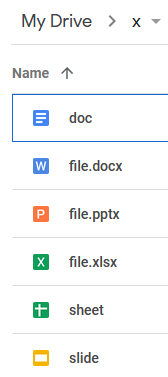
here is my test folder and command and output
rclone.exe ls gdrive-a1b2:x --exclude={*.pptx,*.xlsx,*.docx} --drive-export-formats=ods,odt,odp
       -1 slide.odp
       -1 doc.odt
       -1 sheet.ods
rclone.exe lsf gdrive-a1b2:x --exclude={*.xlsx,*.pptx,*.docx} --drive-export-formats=ods,odt,odp 1> list.txt
this will give you a text file like this. now, you know
doc.odt
sheet.ods
slide.odp